# AutoGrab Developer Hub

Welcome to the developer hub, this is your reference to integrate with all aspects of the system. We've got guides and reference materials to support and accelerate your development.

You can explore our endpoints by searching or asking questions through the AI-powered doc system. See what product fits your user case by clicking a top-level grouping below.&#x20;

<button type="button" class="button primary" data-action="ask" data-icon="gitbook-assistant">Ask a question about finding auto data or integration</button>

<table data-view="cards" data-full-width="true"><thead><tr><th></th><th></th><th></th><th data-hidden data-card-target data-type="content-ref"></th></tr></thead><tbody><tr><td><img src="https://4010475651-files.gitbook.io/~/files/v0/b/gitbook-x-prod.appspot.com/o/spaces%2FFaCA1JqFKRrqIB0EfZlZ%2Fuploads%2FaSYhcRZcqA2HoB9iGpoB%2Fsearchanddata.png?alt=media&amp;token=ed740825-7139-45b6-a036-b52155ff92aa" alt=""></td><td></td><td><p></p><p><strong>Vehicle Search</strong> </p><p>Find vehicles in our comprehensive, regional databases using plain text search, aggregate field lookup &#x26; state vehicle registration.</p></td><td><a href="/vehicle-search/vehicle-searching">Vehicle Search</a></td></tr><tr><td><img src="https://4010475651-files.gitbook.io/~/files/v0/b/gitbook-x-prod.appspot.com/o/spaces%2FFaCA1JqFKRrqIB0EfZlZ%2Fuploads%2FUUaW6FEk16xCygbrr34y%2Fvalssds.svg?alt=media&amp;token=d8376551-b0cd-4de8-b99b-25bed7bd0f8a" alt=""></td><td><p></p><p></p><p><strong>Vehicle Valuation</strong></p></td><td>Value new &#x26; used vehicles from our database, and calculate trade-in price &#x26; future value using our highly accurate pricing model.</td><td><a href="/valuation/valuation">Valuation</a></td></tr><tr><td><img src="https://4010475651-files.gitbook.io/~/files/v0/b/gitbook-x-prod.appspot.com/o/spaces%2FFaCA1JqFKRrqIB0EfZlZ%2Fuploads%2FxiMNyYtQIo5UnSvIrrhG%2Fvehicledata.svg?alt=media&amp;token=745fd315-5e83-47cf-bf96-6e90b8adccfb" alt=""></td><td><p></p><p></p><p><strong>Vehicle Data</strong></p></td><td>Find descriptive data on vehicles to enrich your user experiences or power your backend workflows.</td><td><a href="/vehicle-data/vehicle-data">Vehicle Data</a></td></tr><tr><td><img src="https://4010475651-files.gitbook.io/~/files/v0/b/gitbook-x-prod.appspot.com/o/spaces%2FFaCA1JqFKRrqIB0EfZlZ%2Fuploads%2FMjs5vNqFYsZE7ekqjcIU%2FPAVdoc.png?alt=media&amp;token=18d42549-0bd4-4a55-a22d-0f8d9c43a5e3" alt=""></td><td><strong>Insurance</strong></td><td>Access our suite of Insurance centric products. </td><td><a href="/insurance/insurance">Insurance</a></td></tr><tr><td><img src="https://4010475651-files.gitbook.io/~/files/v0/b/gitbook-x-prod.appspot.com/o/spaces%2FFaCA1JqFKRrqIB0EfZlZ%2Fuploads%2F4sw3VISYUZkPqo2xPadt%2Fsourcingdwsd.svg?alt=media&amp;token=f9bb7f24-eb17-482a-946f-3a0247264ffd" alt=""></td><td></td><td><p><strong>Sourcing</strong></p><p>Access lead and listing data from a variety of vehicle car marketplaces.</p></td><td><a href="/sourcing/sourcing">Sourcing</a></td></tr><tr><td><p><img src="https://4010475651-files.gitbook.io/~/files/v0/b/gitbook-x-prod.appspot.com/o/spaces%2FFaCA1JqFKRrqIB0EfZlZ%2Fuploads%2Fzm8f4V1zjAa8uFIrqI3O%2Fcusrecs.svg?alt=media&amp;token=fb9317e8-78b1-4b43-87cf-9dbd3f76a5ec" alt=""></p><p></p><p></p><p><strong>Customer Recapture</strong></p><p>Track your past customers and get notified when they list vehicles for sale online.</p></td><td></td><td></td><td><a href="/customer-recapture/recapture">Recapture</a></td></tr><tr><td><img src="https://4010475651-files.gitbook.io/~/files/v0/b/gitbook-x-prod.appspot.com/o/spaces%2FFaCA1JqFKRrqIB0EfZlZ%2Fuploads%2FArTESwgyG9nxSZUyAZxh%2FGroup%201000003920.png?alt=media&amp;token=6099856f-e380-4627-a6f0-afee79c39d7d" alt=""></td><td><p></p><p></p><p><strong>Embeddable Products</strong></p></td><td>Explore products like Valuation Widget, Deal Gauge and more.</td><td><a href="/embeddable-products/embeddables">Embeddables</a></td></tr><tr><td><img src="https://4010475651-files.gitbook.io/~/files/v0/b/gitbook-x-prod.appspot.com/o/spaces%2FFaCA1JqFKRrqIB0EfZlZ%2Fuploads%2FnAyAbI4YGEUPhiu2C4Eh%2FGroup%2041.svg?alt=media&amp;token=5116bd4c-00c4-4d22-b48c-de4930514a25" alt=""></td><td></td><td><p><strong>Reports</strong></p><p>Generate PDF reports to show valuations or vehicle details in your own workflows.</p></td><td><a href="/reports/reports">REPORTS</a></td></tr><tr><td><p><img src="https://4010475651-files.gitbook.io/~/files/v0/b/gitbook-x-prod.appspot.com/o/spaces%2FFaCA1JqFKRrqIB0EfZlZ%2Fuploads%2FJYH3hoBamIjmArvflu0y%2Fpipelineicon.png?alt=media&amp;token=5fb6de0f-60c0-4978-b48a-674898e73252" alt=""></p><p></p><p><strong>Pipeline</strong></p><p>Send data into AutoGrab Pipeline to display your data alongside market intelligence. </p></td><td></td><td></td><td><a href="/pipeline/post-external-enquiry">Pipeline</a></td></tr></tbody></table>


# Integration Overview

Key things to know before you start.

## Overview <a href="#overview" id="overview"></a>

Our API uses the OpenAPI 2.0 specification, making it easy for our partners to integrate. We want to ensure the best possible experience when integrating with our stack.

### Environments <a href="#environments" id="environments"></a>

| Environment   | URL                               |
| ------------- | --------------------------------- |
| Production V2 | `https://api.autograb.com.au/v2/` |

### Regions <a href="#regions" id="regions"></a>

Certain API endpoints require that a region be passed as part of the request URL. Where necessary it is expected that region=au be included where region is required.

For example: `https://api.autograb.com.au/v2/vehicle/239c8928fnc934fc?region=au`

#### Supported Regions <a href="#supported-regions" id="supported-regions"></a>

| Country        | Region Code |
| -------------- | ----------- |
| Australia      | `au`        |
| New Zealand    | `nz`        |
| Malaysia       | `my`        |
| United Kingdom | `uk`        |

### API Keys <a href="#api-keys" id="api-keys"></a>

Your account manager will provision API keys for your account. If you require a key to be revoked or rotated please get in touch with your account manager.

### Quota Limits <a href="#quota-limits" id="quota-limits"></a>

APIs have soft quota limits that are enforced based on your contract agreement. To discuss these limits please get in touch with your account manager.

#### Rate Limiting <a href="#rate-limiting" id="rate-limiting"></a>

We strictly monitor the number of requests per second — if you exceed your allocation the API will respond with `HTTP 429 Too Many Requests`. We will also return additional headers to help you better understand when rate limits will be applied.

The limits are applied per API product and are decided based on your contract agreement. Rate limits do not relate to quotas.

| Header                       | Example      | Description                                                         |
| ---------------------------- | ------------ | ------------------------------------------------------------------- |
| `Rate-Limit-Remaining`       | `60`         | Number of remaining requests until the limit is reset.              |
| `Rate-Limit-Total`           | `60`         | Number of total requests that can be made until the limit is reset. |
| `Rate-Limit-Reset`           | `1609459200` | The timestamp of when the limit will reset.                         |
| `Monthly-Base-Request-Quota` | `100`        | Number of requests included in your contract.                       |
| `Monthly-Max-Request-Quota`  | `100000`     | Maximum number of requests allowed in your contract.                |
| `Monthly-Request-Total`      | `100`        | Monthly requests performed for this request type.                   |


# API Test Cases

Test your requests in a safe zero-cost way through our test case set.

You can use our test cases to confirm your implementation on our production endpoints. All requests using these values are not billable.&#x20;

## Test Cases

Refer below to set of test cases. They are all linked and refer back to the same vehicle IDs

<table><thead><tr><th width="146">Type</th><th width="111">Region</th><th width="218">Value</th><th>Outcome</th></tr></thead><tbody><tr><td>Registration Plate </td><td>Australia</td><td><code>REG4SUCCESS</code></td><td>Returns a successful lookup response with a high-quality vehicle match for an ICE vehicle</td></tr><tr><td>Registration Plate</td><td>Australia</td><td><code>REG4SUCCESSEV</code></td><td>Returns a successful lookup response with a high-quality match for an EV</td></tr><tr><td>Registration Plate </td><td>Australia</td><td><code>REG4WARNING</code></td><td>Returns a successful lookup response with a low-match quality warning</td></tr><tr><td>Registration Plate </td><td>Australia</td><td><code>REG4NOMATCH</code></td><td>Returns the VIN and vehicle description but no matching vehicle</td></tr><tr><td>Registration Plate </td><td>Australia</td><td><code>REG4VINONLY</code></td><td>Only returns the VIN and no other vehicle details</td></tr><tr><td>VIN</td><td>Australia</td><td>00000000000000000</td><td>Returns a valid VIN match in Australia for an ICE vehicle</td></tr><tr><td>VIN</td><td>Australia</td><td>00000000000000010</td><td>Returns a valid VIN match in Australia for an EV</td></tr><tr><td>Vehicle ID</td><td>Australia</td><td>1111111111111111</td><td>Can be used for /Predict or /Sourcing to return outcomes.</td></tr></tbody></table>

## Supported Endpoints

Test cases are supported across a range of API endpoints listed below. If the endpoint you are testing with is not listed get in touch to request test data.&#x20;

* `/valuations/predict`
* `/valuations/vins`
* `/valuations/registrations`
* `/valuations/residual`
* `/valuations/predict/conditions`
* `/sourcing/market_overlay`&#x20;
* `/sourcing/market_overlay/statistics`

## Implementation Guide

An example implementation could run a test as part of an integration test or development process. For example, you could test a valuation flow by first using a registration plate to get the ID (which is also test data) and send that to a /predict to get a valuation and a market overlay.&#x20;


# Asset Classes

{% hint style="info" %}
New asset classes are rolling out in phases with support expanding across Australian product lines. Ask us about how this rollout works in your specific use case.&#x20;
{% endhint %}

AutoGrab supports a growing range of asset classes. Each additional asset class fit seamlessly into our existing set of API endpoints. You can request or constrain your searches to the following asset classes.&#x20;

* `conventional`: Passenger and Light Commercial vehicles.&#x20;
* `powersports`: Motorbikes, ATVs and UTVs
* `camping`: Caravans, Campervans, Motorhomes, Camper Trailers, etc.&#x20;
* `heavy_trucks`: Prime Movers and other heavy commercial vehicles.&#x20;

You will need a license per asset class in order to constrain or access its specific catalogue.&#x20;

For example for [Facet Searches](/vehicle-search/facet-search) using `category=powersports` limits this search for "makes" to only those categorised as powersports.&#x20;

{% code overflow="wrap" %}

```json
curl --location 'https://api.autograb.com.au/v2/vehicles/facets?facet=make&region=au&category=powersports' \
--header 'ApiKey: YOURKEY'
```

{% endcode %}

For [Registration](/vehicle-search/registration-plate-search) or [VIN](/vehicle-search/vin-search) Search you can also force the system to match whatever input you give it to a specific catalogue. In the scenario below the input is a tesla but the catagory is powersports. The response shows a reduced confidence match.&#x20;

{% code overflow="wrap" %}

```json
curl --location 'https://api.autograb.com.au/v2/vehicles/registrations/CCU542?state=VIC&region=au&category=powersports' \
--header 'ApiKey: YOURKEY'
```

{% endcode %}

In the responses body you also will see a "category" line showing you the asset type of the specific vehicle. The example below is from a free text search

{% code overflow="wrap" %}

```json
            "id": "0112728441671777",
            "legacy_id": "0112728441671777",
            "category": "conventional",
            "badge": "320i SE",
            "make": "BMW",
            "model": "3 Series",
            "series": "F30",
            "title": "2016 BMW 3 Series 320i SE F30 Auto"
            // trimmed 
```

{% endcode %}


# FAQ

These are frequently asked questions about AutoGrab and our products.

<details>

<summary>What is a VIN?</summary>

The car's vehicle identification number (VIN) is the identifying code for a specific automobile. The VIN serves as the car's fingerprint, as no two vehicles in operation have the same VIN. A VIN is composed of 17 characters (digits and capital letters) that act as a unique identifier for the vehicle. A VIN displays the car's unique features, specifications and manufacturer. The VIN can be used to track recalls, registrations, warranty claims, thefts and insurance coverage.

</details>

<details>

<summary>What is an AutoGrab ID?</summary>

An AutoGrab ID (AGID) is our market-leading identifier for vehicles in the AutoGrab catalogue. It serves as the canonical source of metadata for any vehicle across the platform.

For example, the registration plate CCU542 resolves to AGID 3583316061320587 — representing all 2022 Tesla Model Y MY22 1sp Auto SUV RWD 220kW 350Nm Electric 5DR 5-seat models currently on the market. While a VIN maps to exactly one AGID, every other vehicle sharing the same make, model, and specification will map to that same ID.

Note that colour is not a factor in AGID assignment — two otherwise identical vehicles of different colours will share the same AGID.

</details>

<details>

<summary>How do AutoGrab Valuations Work?</summary>

AutoGrab’s Valuation captures the asking prices from the past week for a specific vehicle’s year, make, model, and variant at a given mileage, sourced from private sellers and dealers within a selected state. It excludes government charges but includes GST, assuming the vehicles are in good condition and fitted with standard OEM accessories.

Leveraging advanced machine learning and updated weekly, our pricing integrates active listings and recently delisted data from public marketplaces. AutoGrab emphasises the most recent data to deliver comprehensive valuations that reflect current market trends.

Each estimate includes a confidence score, which indicates AutoGrab’s certainty in the valuation. Two key factors determine this score:

* The number of vehicles listed in the past 365 days for the specific vehicle type
* A detailed accuracy analysis of the pricing algorithm for that vehicle type

The confidence score ranges from 0 to 1, with 1 representing the highest confidence level more detail on how the confidence score is determined is available here: [AutoGrab Confidence Score](/valuation/valuation/autograb-confidence-score)

</details>

<details>

<summary>Where can I get customer support?</summary>

You can get assistance by&#x20;

* submitting a support ticket at [www.autograbhelp.zendesk.com](https://devhub.autograb.com/autograb/www.autograbhelp.zendesk.com)
* calling or emailing your account representative
* calling us with non-urgent matters on 1800 531 718

</details>

<details>

<summary>How do I know the current status of each endpoint?</summary>

Go to <https://status.autograb.com.au/> to view the current system state.

</details>


# API Key

We support API key-based authentication, recommended if you build applications to integrate with our platform.

{% hint style="info" %}
Do you need a key? Contact your sales rep or contact to request one to start developing.
{% endhint %}

Requests to our APIs must include an ApiKey header for authentication.

Include your API key in the request headers as shown in the example below.

```bash
curl --location 'https://api.autograb.com.au/v2/valuations/registrations/CCU542?region=au' \
--header 'Content-Type: application/json' \
--header 'ApiKey: YOURKEYHERE' \
--data '{
    "state": "VIC",
    "region": "au"
}'
```

### Other Authentication Methods <a href="#authenticating-requests" id="authenticating-requests"></a>

We also support [OAuth](/authentication/oauth-authentication), and you can read more about this authentication mechanism here.


# OAuth Authentication

OAuth will only work for agreed AutoGrab api\_v2 REST endpoints where an ApiKey has already been provisioned.

OAuth integration consists of 2 basic components:

1. Token management (ensure your system always has a valid OAuth token available)
2. REST api call signing using a valid token

### Token management

Before implementing token management, make sure you have a valid `client_id` and `client_secret` as provided by AutoGrab. (They will be provided by your sales rep.) These are the credentials you will use to get valid tokens from the AutoGrab `auth-broker`.

#### auth-broker POST call to receive a valid OAuth token

```jsx
POST !!!!!!!!/request-token

Post body
{ grant_type: client_credentials }
Headers 
Content-Type: application/x-www-form-urlencoded
Authorization
Basic Auth of form client_id:client_secret Base64 encoded

Sample success response body
{
    "access_token": "[obfuscated-token-string]",
    "expires_in": 3599,
    "scope": "",
    "token_type": "bearer"
}
```

A valid token can be stored locally for use in subsequent api calls. It is recommended to calculate a safe expiry timestamp based on the expires\_in property of the response body, and use this to pre-emptively refresh your token when it nears expiry.

### REST api call signing

With a valid AutoGrab OAuth token to hand, each REST api call that you make can be authorised by encoding the as-provided token string into your Authorization header using Bearer prefix.

#### Troubleshooting

* *I don’t get a 200 response on my request-token calls* Double-check your client\_id and client\_secret with AutoGrab. Double-check your Basic Auth encoding. Double check your content-type header and post body structure.


# Vehicle Searching

Vehicle discovery is the starting place for almost all functions on the AutoGrab API.

The Vehicle Search API set allows you to find matching vehicles within our database.&#x20;

<table data-view="cards"><thead><tr><th></th><th></th><th></th><th data-hidden data-card-target data-type="content-ref"></th><th data-hidden data-card-cover data-type="files"></th></tr></thead><tbody><tr><td><p><img src="https://4010475651-files.gitbook.io/~/files/v0/b/gitbook-x-prod.appspot.com/o/spaces%2FFaCA1JqFKRrqIB0EfZlZ%2Fuploads%2F05foVj0VlwWTAninPJng%2Ftexts.png?alt=media&amp;token=4b5be6cd-5284-40d9-98ce-dabb75e9f2ad" alt="" data-size="original"></p><h3><strong>Text Search</strong></h3><p>Use this search mechanism if you have a vehicle description or title as a text string and want to resolve to a vehicle ID.</p></td><td></td><td></td><td><a href="/vehicle-search/plain-text-search">Plain-text Search</a></td><td></td></tr><tr><td><p><img src="https://4010475651-files.gitbook.io/~/files/v0/b/gitbook-x-prod.appspot.com/o/spaces%2FFaCA1JqFKRrqIB0EfZlZ%2Fuploads%2F1pnfsuFm8OzWd68n2SOl%2Fvin.png?alt=media&amp;token=9524480c-70e4-49db-a193-c09eb29ae035" alt="" data-size="original"></p><h3><strong>VIN Search</strong></h3><p>Use this search mechanism if you have a VIN and want summary data to resolve to a vehicle ID.</p></td><td></td><td></td><td><a href="/vehicle-search/vin-search">VIN Search</a></td><td></td></tr><tr><td><p><img src="https://4010475651-files.gitbook.io/~/files/v0/b/gitbook-x-prod.appspot.com/o/spaces%2FFaCA1JqFKRrqIB0EfZlZ%2Fuploads%2FCT5BlHfgmdPfdDMR52bL%2Fplate.png?alt=media&amp;token=ccd23404-858e-4655-93de-344cfbc85adc" alt="" data-size="original"></p><h3><strong>Registration Plate Search</strong></h3><p>Use this search mechanism if you have a registration plate and want summary data to resolve to a vehicle ID.</p></td><td></td><td></td><td><a href="/vehicle-search/registration-plate-search">Registration Plate Search</a></td><td></td></tr><tr><td><p><img src="https://4010475651-files.gitbook.io/~/files/v0/b/gitbook-x-prod.appspot.com/o/spaces%2FFaCA1JqFKRrqIB0EfZlZ%2Fuploads%2FZ8D4NhpkuLnIkK2bG87N%2Ffacets.png?alt=media&amp;token=69266ef5-d666-4653-a6cf-50ba3e6ef043" alt="" data-size="original"></p><h3>Facet Search</h3><p>Use this search mechanism if you would like your users to interact with drop downs to resolve to a vehicle ID.</p></td><td></td><td></td><td><a href="/vehicle-search/facet-search">Facet Search</a></td><td></td></tr><tr><td><p><img src="https://4010475651-files.gitbook.io/~/files/v0/b/gitbook-x-prod.appspot.com/o/spaces%2FFaCA1JqFKRrqIB0EfZlZ%2Fuploads%2FfNNRg7r1V5RLDwSCXEaT%2Fupicon.png?alt=media&amp;token=999cd7f7-0347-4b38-b066-50966d712045" alt=""></p><h3>Upstream VIN &#x26; Registration Search</h3><p>Use this search mechanism if you would like to understand registration information without being given a vehicle ID.</p></td><td></td><td></td><td><a href="/vehicle-search/upstream-vehicle-search">Upstream Vehicle Search</a></td><td></td></tr><tr><td><p><img src="https://4010475651-files.gitbook.io/~/files/v0/b/gitbook-x-prod.appspot.com/o/spaces%2FFaCA1JqFKRrqIB0EfZlZ%2Fuploads%2FqcUdHSIKQIck2WEzMWjX%2Fidsearch.png?alt=media&amp;token=5a165921-6104-4468-818e-ecbd4dcf949b" alt=""></p><h3>Vehicle ID Search</h3><p>Use this to get summary data on a vehicle if you already have its ID.</p></td><td></td><td></td><td><a href="/vehicle-search/vehicle-id-search">Vehicle ID Search</a></td><td></td></tr><tr><td><img src="https://4010475651-files.gitbook.io/~/files/v0/b/gitbook-x-prod.appspot.com/o/spaces%2FFaCA1JqFKRrqIB0EfZlZ%2Fuploads%2F4VyCU7M5J5etnVTDVVpW%2Fmid.png?alt=media&amp;token=e96d558c-4186-4437-baa1-9267b9b67c4b" alt=""></td><td><h3>Marketplace ID</h3><p>A special use case search function for marketplace partners. </p></td><td></td><td><a href="/vehicle-search/marketplace-id-lookup">Marketplace ID Lookup</a></td><td></td></tr><tr><td><img src="https://4010475651-files.gitbook.io/~/files/v0/b/gitbook-x-prod.appspot.com/o/spaces%2FFaCA1JqFKRrqIB0EfZlZ%2Fuploads%2F2U7miJyRLMWpCS9meqQ4%2Fv2r.png?alt=media&amp;token=45a7d5a0-a3a5-441a-8c66-d893b42e40b6" alt=""></td><td><h3>VIN to Registration</h3><p>Convert between VIN and Registration / State.</p></td><td></td><td><a href="/vehicle-search/vin-and-registration-conversion">VIN &amp; Registration Conversion</a></td><td></td></tr><tr><td><p><img src="https://4010475651-files.gitbook.io/~/files/v0/b/gitbook-x-prod.appspot.com/o/spaces%2FFaCA1JqFKRrqIB0EfZlZ%2Fuploads%2Fn7Y5OaxmkLH9UNjZVL46%2Ffeauture.png?alt=media&amp;token=b18e40f7-acd0-4642-850e-78facffa97cb" alt="" data-size="original"></p><h3>Features</h3><p>Enrich your searches with additional market and vehicle information. </p></td><td></td><td></td><td><a href="/vehicle-search/vehicle-search-features">Vehicle Search Features</a></td><td></td></tr></tbody></table>


# Plain-text Search

Get results with a text string search

The Vehicle Search API allows you to search for matching vehicles by plain-text input. The API will return an array of vehicles and the confidence score in a match for that given vehicle.

The request requires a region, search string & API key. The default page length is 10, however, you can adjust this based on your requirements.

{% openapi src="/files/TapIOjKDYdyzufcTwuea" path="/v2/vehicles/" method="get" %}
[insurance\_updated.yaml](https://4010475651-files.gitbook.io/~/files/v0/b/gitbook-x-prod.appspot.com/o/spaces%2FFaCA1JqFKRrqIB0EfZlZ%2Fuploads%2FuDtxATuz0g12x4lhufjn%2Finsurance_updated.yaml?alt=media\&token=2565c3ea-325e-4bf3-b8e4-31792a5c9e79)
{% endopenapi %}

#### Example <a href="#example" id="example"></a>

{% code overflow="wrap" %}

```json
/v2/vehicles?region=au&search=2026 Toyota RAV4
```

{% endcode %}

**Example Payload**

```json
{
    "success": true,
    "vehicles": [
        {
            "id": "0172512978191803",
            "legacy_id": "0172512978191803",
            "badge": "GX",
            "make": "Toyota",
            "model": "RAV4",
            "series": null,
            "title": "2026 Toyota RAV4 GX Hybrid-Petrol Auto",
            "year": 2026,
            "body_config_type": null,
            "body_type": "SUV",
            "drive_type": "Front Wheel Drive",
            "engine_type": "Hybrid",
            "fuel_type": "Hybrid-Petrol",
            "transmission_type": "Automatic",
            "wheelbase_type": null,
            "roof_type": null,
            "capacity_cc": 2487,
            "power_kw": 143,
            "torque_nm": null,
            "range": null,
            "weight_kg": null,
            "battery_kwh": null,
            "num_cylinders": 4,
            "num_doors": 5,
            "num_gears": 5,
            "num_seats": 5,
            "model_year": "MY26",
            "release_month": 11,
            "release_year": 2025
        },
        {
            "id": "0196271430696017",
            "legacy_id": "0196271430696017",
            "badge": "GXL",
            "make": "Toyota",
            "model": "RAV4",
            "series": null,
            "title": "2026 Toyota RAV4 GXL Hybrid-Petrol Auto",
            "year": 2026,
            "body_config_type": null,
            "body_type": "SUV",
            "drive_type": "Front Wheel Drive",
            "engine_type": "Hybrid",
            "fuel_type": "Hybrid-Petrol",
            "transmission_type": "Automatic",
            "wheelbase_type": null,
            "roof_type": null,
            "capacity_cc": 2487,
            "power_kw": 143,
            "torque_nm": null,
            "range": null,
            "weight_kg": null,
            "battery_kwh": null,
            "num_cylinders": 4,
            "num_doors": 5,
            "num_gears": 5,
            "num_seats": 5,
            "model_year": "MY26",
            "release_month": 11,
            "release_year": 2025
        }
    ],
    "total": 2,
    "confidence": "standard"
}
```


# Registration Plate Search

Find vehicle information from a registration plate.

### Overview

The Vehicle Registration API allows you to search for a vehicle by supplying its number plate. The request requires a region, the state (dependent on region), the number plate, and the API key. It will return either a matching vehicle or a null.

If a matching vehicle cannot be identified in all cases, we will return the `upstream_vehicle` field, allowing you to identify how the relevant road transport authority describes the car. Depending on your use case, you may wish to allow front-end users to manually classify the vehicle using the guide to fill out a Facet-style[ search](/vehicle-search/facet-search).

{% openapi src="/files/TapIOjKDYdyzufcTwuea" path="/v2/vehicles/registrations/{plate\_number}" method="get" %}
[insurance\_updated.yaml](https://4010475651-files.gitbook.io/~/files/v0/b/gitbook-x-prod.appspot.com/o/spaces%2FFaCA1JqFKRrqIB0EfZlZ%2Fuploads%2FuDtxATuz0g12x4lhufjn%2Finsurance_updated.yaml?alt=media\&token=2565c3ea-325e-4bf3-b8e4-31792a5c9e79)
{% endopenapi %}

### Example Response

The response below is a standard quality response for a vehicle search based on plate and state.

```json
curl --location 'https://api.autograb.com.au/v2/vehicles/registrations/ccu542?region=au&state=vic'
--header 'ApiKey: YOURKEY'
```

```json
{
    "success": true,
    "vehicle": {
        "id": "3583316061320587",
        "region": "au",
        "title": "2022 Tesla Model Y Electric Auto",
        "year": "2022",
        "make": "Tesla",
        "model": "Model Y",
        "badge": null,
        "series": null,
        "model_year": "MY22",
        "release_month": 6,
        "release_year": 2022,
        "body_type": "SUV",
        "body_config": null,
        "transmission": "Automatic",
        "transmission_type": "Automatic",
        "wheelbase": null,
        "wheelbase_type": null,
        "fuel": "Electric",
        "fuel_type": "Electric",
        "engine": "Electric",
        "engine_type": "Electric",
        "drive": "RWD",
        "drive_type": "Rear Wheel Drive",
        "num_doors": 5,
        "num_seats": 5,
        "num_gears": 1,
        "num_cylinders": null,
        "capacity_cc": null,
        "power_kw": 220,
        "torque_nm": 350,
        "range": null,
        "battery_kwh": 60,
        "roof_type": null,
        "options": []
    },
    "upstream_vehicle": "2022 TESLA MODEL Y AUTO RWD ELECTRIC SUV 220kw 1sp 5dr 5seat",
    "vin": "LRWYHCFS6NC428809",
    "colour": "GREY",
    "confidence": "standard",
    "additional_vehicles": [],
    "plate_module": {
        "plate": "ccu542",
        "plate_state": "VIC"
    }
}
```

### The State Parameter

This is a required parameter for the region. You must send the state in its short format; you can use the extended format for front-end purposes if necessary.

<table><thead><tr><th width="148">State (Short</th><th>State (Long)</th></tr></thead><tbody><tr><td><code>NSW</code></td><td>New South Wales</td></tr><tr><td><code>NT</code></td><td>Northern Territory</td></tr><tr><td><code>QLD</code></td><td>Queensland</td></tr><tr><td><code>SA</code></td><td>South Australia</td></tr><tr><td><code>TAS</code></td><td>Tasmania</td></tr><tr><td><code>VIC</code></td><td>Victoria</td></tr><tr><td><code>WA</code></td><td>Western Australia</td></tr><tr><td><code>ACT</code></td><td>Australian Capital Territory</td></tr></tbody></table>

## Supported Plate Types

The registration lookup system requires a vehicle to be registered with NEVDIS in Australia. This means all standard and custom plates operate across supported asset types. Australian Club permit vehicles are not yet supported.&#x20;

## Features

You can request more data than the standard payload by leveraging a range of features described below. You can request one or many features at once in a comma separated list.&#x20;

{% code overflow="wrap" %}

```json
curl --location 'https://api.autograb.com.au/v2/vehicles/vins/JTDKW3D380D521439?features=writeoff_info%2Cregistration_status%2Cextended_data&region=au' \
--header 'ApiKey: YOURKEY'
```

{% endcode %}

Refer to the [Vehicle Search Feature](/vehicle-search/vehicle-search-features) page for a full list of supported features like registration status, stolen status and much more. <a href="/vehicle-search/vehicle-search-features" class="button primary">Explore Registration Search Features</a>


# VIN & Registration Conversion

Reverse lookup a registration and state from VIN Number

You can use this service to convert a VIN to Registration or the same in reverse. This can be useful when you require only that datapoint and no other descriptive information about the vehicle. If you need more data like year, make or model you should use the standard[ registration search](/vehicle-search/registration-plate-search) endpoint.

## Get vehicle registration details by VIN

> Get vehicle registration details by VIN

```json
{"openapi":"3.1.1","info":{"title":"AutoGrab API","version":"2.0.0"},"servers":[{"url":"https://api.autograb.com.au"}],"security":[{"ApiKeyAuth":[]}],"components":{"securitySchemes":{"ApiKeyAuth":{"type":"apiKey","in":"header","name":"ApiKey"}}},"paths":{"/v2/vehicles/vins/{vin}/registration":{"get":{"summary":"Get vehicle registration details by VIN","description":"Get vehicle registration details by VIN","parameters":[{"name":"vin","type":"string","required":true,"description":"The VIN number to lookup","in":"path"},{"name":"region","type":"string","enum":["au","nz","uk","my"],"description":"The region to perform this request in","in":"query"},{"name":"reference_id","type":"string","required":false,"description":"An optional reference id which will be stored against usage records if supplied","in":"query"}],"responses":{"200":{"description":"Success","schema":{"type":"object","properties":{"success":{"type":"boolean"},"plate":{"type":"string"},"plate_state":{"type":"string"},"vin":{"type":"string"}},"required":["success","plate","plate_state","vin"]}},"400":{"description":"Bad Request","schema":{"$ref":"#/definitions/ErrorSchema"}},"401":{"description":"Unauthorized","schema":{"$ref":"#/definitions/ErrorSchema"}},"404":{"description":"Not Found","schema":{"$ref":"#/definitions/ErrorSchema"}}},"tags":["Vehicles"]}}}}
```

### Example Usage

#### Convert a VIN to a plate

You can convert a VIN to its current related registration plate and state using the request below.&#x20;

{% code overflow="wrap" %}

```json
curl --location 'https://api.autograb.com.au/v2/vehicles/vins/LRWYHCFS6NC428809/registration?region=au' \
--header 'ApiKey: YOURKEY'
```

{% endcode %}

{% code overflow="wrap" %}

```json
{
    "success": true,
    "plate": "CCU542",
    "plate_state": "VIC",
    "vin": "LRW3F7FA1MC176142"
}
```

{% endcode %}

#### Convert a plate and state to a VIN

You can convert a plate and state to its current related VIN using the request below.&#x20;

{% code title="" overflow="wrap" %}

```json
curl --location 'https://api.autograb.com.au/v2/vehicles/registrations/CCU542/vin?region=au&state=VIC' \
--header 'ApiKey: YOURKEY'
```

{% endcode %}

```json
{
    "success": true,
    "plate": "CCU542",
    "plate_state": "VIC",
    "vin": "LRWYHCFS6NC428809"
}
```


# VIN Search

Get vehicle details from a VIN.

The Vehicle VIN API allows you to search for vehicles by VIN. The request requires only a region, VIN, and API key. It will either return a matching vehicle with possible option packs or a null.

{% openapi src="/files/TapIOjKDYdyzufcTwuea" path="/v2/vehicles/vins/{vin}" method="get" %}
[insurance\_updated.yaml](https://4010475651-files.gitbook.io/~/files/v0/b/gitbook-x-prod.appspot.com/o/spaces%2FFaCA1JqFKRrqIB0EfZlZ%2Fuploads%2FuDtxATuz0g12x4lhufjn%2Finsurance_updated.yaml?alt=media\&token=2565c3ea-325e-4bf3-b8e4-31792a5c9e79)
{% endopenapi %}

### **Example Usage**

To request vehicle information with a VIN supply the VIN in your request.&#x20;

```
curl --location 'https://api.autograb.com.au/v2/vehicles/vins/LRW3F7FA1MC176142?region=au' \
--header 'ApiKey: YOURKEY'
```

```json
{
    "success": true,
    "vehicle": {
        "id": "4568590518845440",
        "region": "au",
        "title": "2021 Tesla Model 3 Electric Auto",
        "year": "2021",
        "make": "Tesla",
        "model": "Model 3",
        "badge": null,
        "series": null,
        "model_year": "MY21",
        "release_month": 11,
        "release_year": 2021,
        "body_type": "Sedan",
        "body_config": null,
        "transmission": "Automatic",
        "transmission_type": "Automatic",
        "wheelbase": null,
        "wheelbase_type": null,
        "fuel": "Electric",
        "fuel_type": "Electric",
        "engine": "Electric",
        "engine_type": "Electric",
        "drive": "RWD",
        "drive_type": "Rear Wheel Drive",
        "num_doors": 4,
        "num_seats": 5,
        "num_gears": 1,
        "num_cylinders": null,
        "capacity_cc": null,
        "power_kw": null,
        "torque_nm": null,
        "range": null,
        "battery_kwh": null,
        "roof_type": null,
        "options": []
    },
    "upstream_vehicle": "2021 TESLA MODEL3 SEDAN",
    "confidence": "standard",
    "additional_vehicles": []
}
```

## Features

You can request more data than the standard payload by leveraging a range of features described below. You can request one or many features at once in a comma separated list.&#x20;

{% code overflow="wrap" %}

```json
curl --location 'https://api.autograb.com.au/v2/vehicles/vins/JTDKW3D380D521439?features=writeoff_info%2Cregistration_status%2Cextended_data&region=au' \
--header 'ApiKey: YOURKEY'
```

{% endcode %}

Refer to the [Vehicle Search Feature](/vehicle-search/vehicle-search-features) page for a full list of supported features.&#x20;


# Registration Status

Find a vehicle's registration status.

To retrieve the registration status & write-off information for a given vehicle, you can call the `status` endpoint.

Call the `/v2/vehicles/{number_plate}/status` endpoint with `region=au`. You must send the state in its short format, you can use the long format for front-end purposes if you require. Refer to the Australian state table under the Registration Search heading in this guide for a list.

{% openapi src="/files/TapIOjKDYdyzufcTwuea" path="/v2/vehicles/registrations/{plate\_number}/status" method="get" %}
[insurance\_updated.yaml](https://4010475651-files.gitbook.io/~/files/v0/b/gitbook-x-prod.appspot.com/o/spaces%2FFaCA1JqFKRrqIB0EfZlZ%2Fuploads%2FuDtxATuz0g12x4lhufjn%2Finsurance_updated.yaml?alt=media\&token=2565c3ea-325e-4bf3-b8e4-31792a5c9e79)
{% endopenapi %}

### Example Usage

To understand the current registration status of a vehicle request with the plate and state.

```
curl --location 'https://api.autograb.com.au/v2/vehicles/registrations/CCU542/status?state=vic&region=au' \
--header 'ApiKey: YOURKEY'
```

```json
{
    "success": true,
    "plate_number": "CCU542",
    "state": "VIC",
    "vin": "LRWYHCFS6NC428809",
    "registration_status": "REGISTERED",
    "registration_expiry": "2026-09-07",
    "manufacture_year": 2022,
    "compliance_plate": "2022-08",
    "incidents": []
}
```


# Facet Search

Use smart drop downs to find a vehicle.

### Search for Vehicles by facets <a href="#search-for-vehicles-by-facets" id="search-for-vehicles-by-facets"></a>

The Vehicle Facets API allows you to narrow down the matching vehicle based on the vehicle's parameters. The facets available are: `year`, `make`, `model`, `badge`, `series`, `transmission`, `body`, `body_style`, `fuel`, `engine` and `wheelbase`.

If you would like to return aggregations of factes, use a comma-separated list in the `facets` field: eg. `facets=badge,series,transmission`.

{% openapi src="/files/TapIOjKDYdyzufcTwuea" path="/v2/vehicles/facets/" method="get" %}
[insurance\_updated.yaml](https://4010475651-files.gitbook.io/~/files/v0/b/gitbook-x-prod.appspot.com/o/spaces%2FFaCA1JqFKRrqIB0EfZlZ%2Fuploads%2FuDtxATuz0g12x4lhufjn%2Finsurance_updated.yaml?alt=media\&token=2565c3ea-325e-4bf3-b8e4-31792a5c9e79)
{% endopenapi %}

{% openapi src="/files/TapIOjKDYdyzufcTwuea" path="/v2/vehicles/facets/search" method="get" %}
[insurance\_updated.yaml](https://4010475651-files.gitbook.io/~/files/v0/b/gitbook-x-prod.appspot.com/o/spaces%2FFaCA1JqFKRrqIB0EfZlZ%2Fuploads%2FuDtxATuz0g12x4lhufjn%2Finsurance_updated.yaml?alt=media\&token=2565c3ea-325e-4bf3-b8e4-31792a5c9e79)
{% endopenapi %}

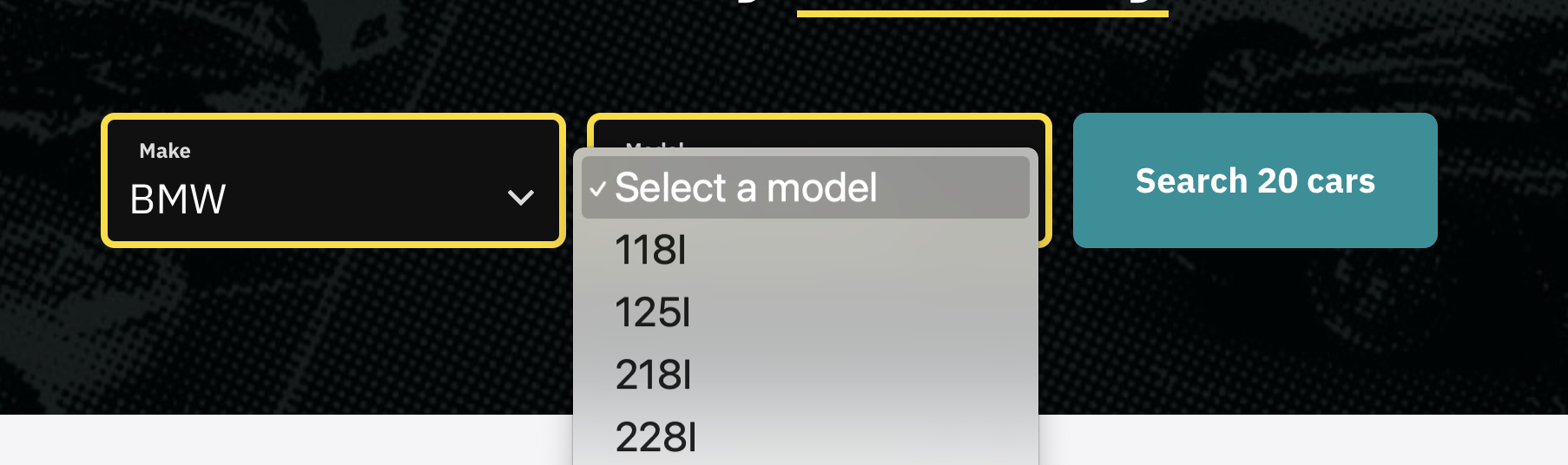
## Facets User Interface Example <a href="#search-for-vehicles-by-facets" id="search-for-vehicles-by-facets"></a>

This function is useful when supplying data to drop-downs for display on a form. A good example of using Facets API is [Westside Auto](https://www.westsideauto.com.au/).

<figure><img src="https://4010475651-files.gitbook.io/~/files/v0/b/gitbook-x-prod.appspot.com/o/spaces%2FFaCA1JqFKRrqIB0EfZlZ%2Fuploads%2FScjEmgHEWZLwtw37PKHm%2Fimage.png?alt=media&amp;token=132da921-0a41-41c0-8cd6-4645fccdc207" alt=""><figcaption></figcaption></figure>

For a preview of how facets in implemented inside the AutoGrab web app see the video below.

{% embed url="<https://www.loom.com/share/a19c3e50f95f4ed286583956c2e22693>" %}

## Facet Integration Worked Example

Let's work backwards from the end result which is one or a few results for your user to pick from driven by previous drop-down. There are a few ways to make facets work for you, we'll go through the most common integration method.

### **Form your GET request for Makes**

```
/v2/vehicles/facets?region=au&facet=make
```

```json
{
    "success": true,
    "make": [
        {
            "value": "Abarth",
            "count": 47
        },
        {
            "value": "Acura",
            "count": 1
        },
        {
            "value": "Alfa Romeo",
            "count": 713
        },
        {
            "value": "AM General",
            "count": 2
        },
        {
            "value": "Aston Martin",
            "count": 169
// trimmed - this would show all makes in the AU region
```

Ask your user to choose a make from the list then call all available models based on that selection. Let's say your user chose *Toyota*.

### **Form your request for a list of Models**

```
/v2/vehicles/facets?region=au&make=Toyota&facet=model
```

```json
{
    "success": true,
    "model": [
        {
            "value": "4Runner",
            "count": 41
        },
        {
            "value": "86",
            "count": 72
        },
        {
            "value": "Allex",
            "count": 26
  // trimmed - this would show all models in the AU region
```

Ask your user to choose a Model from the list then call all available models based on that selection. Let's say your user chose *Corolla*.

### **Form your request for a list of Badges**

```
v2/vehicles/facets?model=Corolla&region=au&make=Toyota&facet=badge
```

```json
{
    "success": true,
    "badge": [
        {
            "value": "SE Ltd",
            "count": 6
        },
        {
            "value": "SE LTD",
            "count": 2
        },
        {
            "value": "Sprint",
            "count": 3
        },
        {
            "value": "Sprinter",
            "count": 5
        },
        {
            "value": "Sprinter SR",
            "count": 1
        },
        {
            "value": "SR",
            "count": 4
        },
 // trimmed - this would show all badges in the AU region
```

**Select A Badge A Load Vehicles From A Search**

Ask your user to choose a badge from the list. Let's say your user chose Sprint. You can see the count is 3, meaning there are only 2 badges. You could send that directly to them or repeat the process with the year (`&facet=year`) to refine it further.

Let's say you'd like to present the three options to the user.

{% code overflow="wrap" %}

```json
curl --location 'https://api.autograb.com.au/v2/vehicles/facets/search?region=au&make=Toyota&model=Corolla&badge=Sprinter' \
--header 'ApiKey: YOURKEY'
```

{% endcode %}

```json
{
    "success": true,
    "vehicles": [
        {
            "id": "4765277606641664",
            "region": "au",
            "title": "1969 Toyota Corolla Sprinter Manual",
            "year": "1969",
            "make": "Toyota",
            "model": "Corolla",
            "badge": "Sprinter",
            "series": "KE15",
            "model_year": "MY69",
            "release_month": 1,
            "release_year": 1969,
            "body_type": "Coupe",
            "body_config": null,
            "transmission": "Manual",
            "transmission_type": "Manual",
            "wheelbase": null,
            "wheelbase_type": null,
            "fuel": "Petrol",
            "fuel_type": "Petrol",
            "engine": "Piston",
            "engine_type": "Piston",
            "drive": "RWD",
            "drive_type": "Rear Wheel Drive",
            "num_doors": 2,
            "num_seats": 4,
            "num_gears": 4,
            "num_cylinders": 4,
            "capacity_cc": null,
            "power_kw": null,
            "torque_nm": null,
            "range": null,
            "battery_kwh": null,
            "roof_type": null,
            "options": []
        },
        {
            "id": "5353417878798336",
            "region": "au",
            "title": "1970 Toyota Corolla Sprinter Manual",
            "year": "1970",
            "make": "Toyota",
            "model": "Corolla",
            "badge": "Sprinter",
            "series": "KE17",
            "model_year": "MY70",
            "release_month": 1,
            "release_year": 1970,
            "body_type": "Coupe",
            "body_config": null,
            "transmission": "Manual",
            "transmission_type": "Manual",
            "wheelbase": null,
            "wheelbase_type": null,
            "fuel": "Petrol",
            "fuel_type": "Petrol",
            "engine": "Piston",
            "engine_type": "Piston",
            "drive": "RWD",
            "drive_type": "Rear Wheel Drive",
            "num_doors": 2,
            "num_seats": 4,
            "num_gears": 4,
            "num_cylinders": 4,
            "capacity_cc": null,
            "power_kw": null,
            "torque_nm": null,
            "range": null,
            "battery_kwh": null,
            "roof_type": null,
            "options": []
        },
        {
            "id": "6735602443616256",
            "region": "au",
            "title": "1968 Toyota Corolla Sprinter Manual",
            "year": "1968",
            "make": "Toyota",
            "model": "Corolla",
            "badge": "Sprinter",
            "series": "KE15",
            "model_year": "MY68",
            "release_month": 6,
            "release_year": 1968,
            "body_type": "Coupe",
            "body_config": null,
            "transmission": "Manual",
            "transmission_type": "Manual",
            "wheelbase": null,
            "wheelbase_type": null,
            "fuel": "Petrol",
            "fuel_type": "Petrol",
            "engine": "Piston",
            "engine_type": "Piston",
            "drive": "RWD",
            "drive_type": "Rear Wheel Drive",
            "num_doors": 2,
            "num_seats": 4,
            "num_gears": 4,
            "num_cylinders": 4,
            "capacity_cc": null,
            "power_kw": null,
            "torque_nm": null,
            "range": null,
            "battery_kwh": null,
            "roof_type": null,
            "options": []
        }
    ],
    "is_paginated": false,
    "count": 3
}
```

If you do not pay attention to the counts under each facet, there may be too many vehicles to search for. You will know you have triggered this limitation if you see the error below.

```json
{
    "error": true,
    "message": "Too many vehicles, you must return at least make, model, badge, series, year"
}
```


# Vehicle ID Search

Get summary data on a vehicle by searching for its ID

If you know a vehicles ID already and would like summary data you can leverage a basic vehicle search.

{% openapi src="/files/TapIOjKDYdyzufcTwuea" path="/v2/vehicles/{vehicle\_id}" method="get" %}
[insurance\_updated.yaml](https://4010475651-files.gitbook.io/~/files/v0/b/gitbook-x-prod.appspot.com/o/spaces%2FFaCA1JqFKRrqIB0EfZlZ%2Fuploads%2FuDtxATuz0g12x4lhufjn%2Finsurance_updated.yaml?alt=media\&token=2565c3ea-325e-4bf3-b8e4-31792a5c9e79)
{% endopenapi %}

### **Example Response**

If you have the AutoGrab ID, for example 6742461841932288, you can request its standard vehicle object by using the request below.&#x20;

{% code overflow="wrap" %}

```json
curl --location 'https://api.autograb.com.au/v2/vehicles/6742461841932288?region=au' \
--header 'ApiKey: YOURKEY'
```

{% endcode %}

```json
{
    "vehicle": {
        "id": "6742461841932288",
        "region": "au",
        "title": "2015 Nissan Navara RX NP300 Diesel Auto Dual Cab",
        "year": "2015",
        "make": "Nissan",
        "model": "Navara",
        "badge": "RX",
        "series": "NP300",
        "model_year": "MY15",
        "release_month": 4,
        "release_year": 2015,
        "body_type": "Utility",
        "body_config": "Dual Cab",
        "transmission": "Sports Automatic",
        "transmission_type": "Automatic",
        "wheelbase": null,
        "wheelbase_type": null,
        "fuel": "Diesel",
        "fuel_type": "Diesel",
        "engine": "Piston",
        "engine_type": "Piston",
        "drive": "AWD",
        "drive_type": "Four Wheel Drive",
        "num_doors": 4,
        "num_seats": 5,
        "num_gears": 7,
        "num_cylinders": 4,
        "capacity_cc": 2298,
        "power_kw": 120,
        "torque_nm": 403,
        "range": 1311,
        "battery_kwh": null,
        "roof_type": null,
        "options": []
    },
    "success": true
}
```


# Upstream Vehicle Search

Access registration authority information to get unmatched vehicle data from a plate or VIN.

The Upstream API allows you to search for registration authority information by registration plate or VIN. You will receive back what the vehicle is registered as with varying structured data that the authority holds.

You can request information on anything with a registration plate, which means motorbikes, caravans, trucks and so on.&#x20;

Importantly you will not receive a vehicle ID with these responses as we only maintain a catalogue for passenger vehicles. We are unable to match other vehicles like motorbikes or heavy trucks and are therefore unable to provide additional functions like valuation.

The request requires only a region, vin or registration plate and state plus an API key.&#x20;

{% hint style="warning" %}
You will not receive a vehicle ID with your response.
{% endhint %}

{% openapi src="/files/TapIOjKDYdyzufcTwuea" path="/v2/vehicles/vins/{vin}/upstream" method="get" %}
[insurance\_updated.yaml](https://4010475651-files.gitbook.io/~/files/v0/b/gitbook-x-prod.appspot.com/o/spaces%2FFaCA1JqFKRrqIB0EfZlZ%2Fuploads%2FuDtxATuz0g12x4lhufjn%2Finsurance_updated.yaml?alt=media\&token=2565c3ea-325e-4bf3-b8e4-31792a5c9e79)
{% endopenapi %}

### **Example Usage**

If you would like to know what the registration authority records a vehicle as irrespective of AutoGrab matching.&#x20;

Search via plate and state

{% code overflow="wrap" %}

```json
curl --location 'https://api.autograb.com.au/v2/vehicles/registrations/CCU542/upstream?state=VIC&region=au' \
--header 'ApiKey: YOURKEY'
```

{% endcode %}

Alternatively search by VIN

{% code overflow="wrap" %}

```json
curl --location 'https://api.autograb.com.au/v2/vehicles/vins/LRWYHCFS6NC428809/upstream?region=au' \
--header 'ApiKey: YOURKEY'
```

{% endcode %}

```json
{
    "success": true,
    "payload": {
        "vin": "LRWYHCFS6NC428809",
        "year": "2022",
        "make": "Tesla",
        "model": "Model Y",
        "fuel_type": "Electric",
        "body_style": "Wagon",
        "transmission": "Direct drive",
        "capacity_cc": "0",
        "colour": "Grey",
        "title": "2022 Tesla Model Y 4 Wagon 1sp auto Electric 2022"
    }
}
```


# Marketplace ID Lookup

A special use case endpoint for our marketplace customers to find their own leads on AutoGrab systems.

### Overview

In a scenario where you want to understand the vehicle ID or data on listed vehicles, you can use the marketplace search system.

Prerequisites to access.

1. To be approved to access this special use case endpoint, contact your account manager.
2. Be aware of your listing ID and use that for the `marketplace_id` parameter.&#x20;
3. Be aware of your marketplace identifier, it is your public domain name, e.g `drive.com.au`

{% openapi src="/files/TapIOjKDYdyzufcTwuea" path="/v2/vehicles/marketplace/" method="get" %}
[insurance\_updated.yaml](https://4010475651-files.gitbook.io/~/files/v0/b/gitbook-x-prod.appspot.com/o/spaces%2FFaCA1JqFKRrqIB0EfZlZ%2Fuploads%2FuDtxATuz0g12x4lhufjn%2Finsurance_updated.yaml?alt=media\&token=2565c3ea-325e-4bf3-b8e4-31792a5c9e79)
{% endopenapi %}

### Limitations

You are only able to search for a vehicle once it is present on our service. If you receive the error below this means we are not yet aware of the listing due to its recency.&#x20;

```json
{
  "error": true,
  "message": "Vehicle via marketplace drive.com.au/969515013 not found in database"
}
```

In this scenario, we recommend falling back to a test lookup using the title in its most descriptive format. E.g 2024 Nissan X-TRAIL Ti Wagon Ti 2.5L SUV 4WD. [Refer to the text searching guide here.](/vehicle-search/plain-text-search)


# Vehicle Search Features

Add on additional data into your VIN or Registration plate searches.

When making a [VIN](/vehicle-search/vin-search) or [Registration Plate](/vehicle-search/registration-plate-search) search you can request more data than the standard payload by leveraging a range of features described below. You can request on or many of the features at once as a comma separated list.&#x20;

{% code overflow="wrap" %}

```json
curl --location 'https://api.autograb.com.au/v2/vehicles/vins/JTDKW3D380D521439?features=writeoff_info%2Cregistration_status%2Cextended_data&region=au' \
--header 'ApiKey: YOURKEY'
```

{% endcode %}

{% hint style="info" %}
Ensure your commercial agreement has these features enabled if you require them.
{% endhint %}

### **Extended Data**

This feature will return an extended payload of vehicle data from the registration authority. Use `features=extended_data` to receive this payload.

```json
   "extended_data": {
        "body_type_description": "CAR/SEDAN",
        "color_description": "WHITE",
        "engine_number": "DKJ039523",
        "make_code": "VOLKS",
        "make_description": "",
        "model_code": "",
        "model_description": "POLO",
        "vehicle_type_description": "CAR / SMALL PASSENGER VEHICLE"
```

### **Upstream Data**

This feature will return structured descriptive data from the registration authority. Use `features=additional_upstream_data` to receive this payload.

```json
    "additional_upstream_data": {
        "vin": "WVWZZZAWZKU065305",
        "year": "2019",
        "make": "Volkswagen",
        "model": "Polo",
        "badge": "AW",
        "series": "85TSI Comfortline",
        "fuel_type": "95 RON PULP",
        "body_style": "Hatch",
        "transmission": "7 auto",
        "capacity_cc": "1000",
        "colour": "White",
        "title": "2019 Volkswagen AW Polo 85TSI Comfortline 4 Hatch 7sp auto 1.0L 1000cc 3cyl T/Petrol 2018"
```

### **Vehicle Age**

This feature will return structured data on the age of a vehicle from the registration authority. Use `features=vehicle_age` to receive this payload.

```json
    "vehicle_age": {
        "compliance_plate": "2019-04",
        "year_of_manufacture": 2019
```

### **Writeoff Information**

This feature will return information about the write-off status of a vehicle. Use `features=writeoff_info`

```json
  "writeoff_info": {
        "incident_list": [
            {
                "code": "Repairable Write-off",
                "damage_codes": "I04AI17DI21C",
                "jurisdiction": "VIC",
                "recorded_date": "2024-04-28",
                "type_code": "Collision"
            }
        ]
```

### **Stolen Status**

This feature will return information about the statutory stolen status of the vehicle. Use `features=stolen_info`

```json
      "stolen_info": {
        "incident_list": [
            {
                "incident_type": "Plate",
                "jurisdiction": "VIC",
                "reported_date": "2026-04-14",
                "summary": "POL JUR-V REF-VS260019505"
            }
        ]
```

### **Performance Information**

This feature will return information about the high performance status of the vehicle. Use `features=performance_info`

```json
    "performance_info": {
        "power_kw": 183,
        "weight_tonnes": 2.397,
        "power_to_weight_ratio": 76
    }
```

### **Registration Status**

This feature will return information about the registration status of a vehicle. Use `features=registration_status`

```json
    "registration_status": {
        "expiry_date": "2024-09-06",
        "status": "REGISTERED"
    }
```

### Plate Type

This feature will return information about the plate type of the vehicle registration. Use `features=plate_type`

```json
    "plate_type": {
        "plate_type": "Standard",
        "plate_type_code": "S"
    }
```

### **Build Data**

This feature will return the options fitted to the vehicle based on your [Factory Build Data](/vehicle-data/factory-build-data). It will show all options, the price and if it is fitted to the vehicle or not. Use `features=build_data`

```json
"build_data": {
        "vin": "WAUZZZ8V7K1028938",
        "make": "AUDI",
        "model": "A3",
        "features": [
            {
                "code": "0A1",
                "value": "2 doors"
            },
            {
                "code": "0AE",
                "value": "Front stabilizer bar"
            },
            {
                "code": "0B2",
                "value": "Wheelbase"
            },
        ],
        "build_date": "2019-03-20"
```

{% hint style="info" %}
Refer to [Factory Build Data](/vehicle-data/factory-build-data) reference material for more information on supported OEMs.
{% endhint %}

### Vehicle Summary

This feature will return a vehicle summary desciprtion to use to enrich visualisation for a given vehicle. Use `features=vehicle_summary`

{% code title="" overflow="wrap" %}

```json
"vehicle_summary": "The Tesla Model Y (MY22) brings electric driving into the mainstream — a sleek five-seat SUV delivering 220kW and 350Nm of instant torque from a 60kWh battery, with the effortless simplicity of a single-speed automatic and rear-wheel drive. Since arriving in Australia, it has redefined what buyers expect from an everyday car: quiet, fast, and emissions-free. Whether navigating the city or heading further afield, the Model Y makes a compelling case that the future of driving is already here."
```

{% endcode %}

Consider pairing with a [vehicle stock imagery](/vehicle-data/stock-photos) to deliver a refined and user friendly interface.


# Sourcing

Find the right market data to inform your decision making

The Sourcing API set allows you to find listing data for comparative and market insights. This API requires [authentication](/authentication/api-key) and an appropriate license attached to it.&#x20;

<table data-view="cards"><thead><tr><th></th><th></th><th></th><th data-hidden data-card-target data-type="content-ref"></th></tr></thead><tbody><tr><td><p><img src="https://4010475651-files.gitbook.io/~/files/v0/b/gitbook-x-prod.appspot.com/o/spaces%2FFaCA1JqFKRrqIB0EfZlZ%2Fuploads%2F8R00sPYuTFjfRdv8UzJd%2Foverlay.png?alt=media&amp;token=242a25e4-b2dd-45b3-8192-e06217ffa355" alt="" data-size="original"></p><h3><strong>Market Overlay</strong></h3><p>Use this to get a view of the market as it relates to a specific vehicle.</p></td><td></td><td></td><td><a href="/sourcing/market-overlay">Market Overlay</a></td></tr><tr><td><p><img src="https://4010475651-files.gitbook.io/~/files/v0/b/gitbook-x-prod.appspot.com/o/spaces%2FFaCA1JqFKRrqIB0EfZlZ%2Fuploads%2FMqb6XMDtBpb6jyZlLFua%2Fstats.png?alt=media&amp;token=88cefd11-5184-455d-9dd8-9f2dc6915726" alt="" data-size="original"></p><h3><strong>Market Statistics</strong></h3><p>Use this to get key statistics on any vehicle ID.</p></td><td></td><td></td><td><a href="/sourcing/market-statistics">Market Statistics</a></td></tr></tbody></table>


# Market Overlay

Get a view of the market as it relates to a specific vehicle.

The Sourcing API allows you to access lead and listing data from a variety of used car marketplaces.

## Market Overlay API <a href="#market-overlay-api" id="market-overlay-api"></a>

When viewing a lead on the web app, a view of similar leads that are currently listed for sale or recently sold is available on the side of the page (the 'Market Overlay'). The Market Overlay API gives you programmatic access to this data, enabling you to show price justifications or re-create our market comparison view for your own purposes.

To access a Market Overlay, you will need to specify a Vehicle ID to search for relevant listings. To retrieve a Vehicle ID, use any of the [Vehicle Search APIs](/vehicle-search/vehicle-searching).

When retrieving market data for an Vehicle ID, a best-effort attempt is made to find at least four listings. This search begins by looking at the latest 60 days, and if there is not enough data in this time period, another 10 days of data is added until the minimum quota of four is reached.

If you would like a larger sample of market data, you can specify a `minimum_days` value, and this will override the default minimum of 60 days.

{% openapi src="/files/TapIOjKDYdyzufcTwuea" path="/v2/sourcing/market\_overlay/{vehicle\_id}" method="get" %}
[insurance\_updated.yaml](https://4010475651-files.gitbook.io/~/files/v0/b/gitbook-x-prod.appspot.com/o/spaces%2FFaCA1JqFKRrqIB0EfZlZ%2Fuploads%2FuDtxATuz0g12x4lhufjn%2Finsurance_updated.yaml?alt=media\&token=2565c3ea-325e-4bf3-b8e4-31792a5c9e79)
{% endopenapi %}

### Example <a href="#example" id="example"></a>

To perform an ex

### Request Parameters <a href="#market-overlay-api" id="market-overlay-api"></a>

<table><thead><tr><th width="260">Name</th><th>Description</th></tr></thead><tbody><tr><td>vehicle_id</td><td>The ID of the vehicle you are requesting a market overlay on.</td></tr><tr><td>minimum_days</td><td><p>The minimum number of days to show listings for</p><p><em>Default value</em> : 60</p></td></tr><tr><td>include_adjacent_years</td><td><p>If enabled, vehicles that were manufactured up to one year before and one year after your chosen vehicle will also be included in the results.</p><p><em>Default value</em> : false</p><p>--true / false</p></td></tr><tr><td>exclude_outliers</td><td><p>If enabled, leads that are considered outliers will be excluded from the results.</p><p><em>Default value</em> : false</p><p>--true / false</p></td></tr><tr><td>exclude_all_delisted</td><td><p>If enabled, leads that are not currently on the market will be excluded from the results.</p><p><em>Default value</em> : false</p><p>--true / false</p></td></tr><tr><td>include_all_active</td><td><p>If enabled, all listings that are currently on the market will be returned, instead of only listings which were uploaded within the specified timeframe (minimum_days). Additionally, if this is enabled, delisted leads will be returned based on the number of days since they were sold, rather than the number of days since they were listed.</p><p><em>Default value</em> : false</p><p>--true / false</p></td></tr><tr><td>include_trash</td><td><p>If enabled, leads that are considered trash, written off, damaged, or missing details will be included in the results. The tag_ids array can then be used to determine if a lead is trash, damaged, etc.</p><p><em>Default value</em> : false</p><p>--true / false</p></td></tr><tr><td>features</td><td><p>Comma-separated array of additional overlay feature codes as specified in your contract</p><p><a href="broken://pages/5pcSn83MhkFBR8NDzNYx"><em>See available features here.</em></a></p></td></tr><tr><td>odometer_range_min</td><td><p>The minimum range observed against similar vehicles</p><p><em>Example</em> : 50000</p></td></tr><tr><td>odometer_range_max</td><td><p>The maximum range observed against similar vehicles</p><p><em>Example</em> : 100000</p></td></tr><tr><td>region</td><td>--au</td></tr></tbody></table>

## Features

Passing option feature parameters can enhance the market overlay. You can request a single feature or combine them to enrich your responses. Your sales representative must enable a unique permission for each feature.

### **Dealer Contact Details**

This feature will deliver the contact details of the advertising dealership as per the listing. Use `features=dealer_contact_details`

```
"contact_name": "Example Motors",
"contact_number": "+61 3 2568 6587",
```

### **Lead Starting Price**

This feature will deliver the initial price the lead was advertised at. Use `features=lead_starting_price`

```
"starting_price": 73990,
```

### **Lead Price Drops**

This feature will deliver the count of times the price has been dropped. If you would like to know what each drop (or increase) was consider the [Vehicle History](https://github.com/autograb/gitbook-docs/blob/main/gitbook/devhub_au/vehicle-data/vehicle-history.md) endpoint. Use `features=lead_price_drops`

```
"price_drop_count": 2,
```

### **Vehicle RRP**

This feature will deliver the RRP of the vehicle when it was new according to our vehicle data catalogue, the same data and more is available via our [Specifications endpoint](https://github.com/autograb/gitbook-docs/blob/main/gitbook/devhub_au/sourcing/market-overlay/broken-reference). Use `features=vehicle_rrp`

```
"price_when_new": 46990,
```

### **All Listing URLs**

This feature will deliver the listing URLs related to the lead across all sites it is listed on. Use `features=listing_urls`

```json
"listing_details": [
                {
                    "source": "gumtree.com.au",
                    "url": "https://www.gumtree.com.au/s-ad/1319103332/"
                },
                {
                    "source": "autotrader.com.au",
                    "url": "https://www.autotrader.com.au/car/13462144/toyota/hilux/sa/cheltenham/dual-cab/"
                }
            ]
```

### **Primary Cover Image**

This feature will deliver the cover image for each record where available. Each image is stored for 90 days after delisting. Use `features=cover_image`

```json
"cover_image_url": "https://storage.googleapis.com/download/storage/v1/b/ag-img/o/1700380596629%2F402495842_660380.jpg?generation=1700380597213918&alt=media"
```

### **All Images**

This feature will deliver all primary images for each record where available. Each image is stored for 90 days after delisting. Use `features=all_images`

```json
"all_images": [
                "https://storage.googleapis.com/download/storage/v1/b/ag-img/o/1713129285535%2Fd7ec39ad-671b-4b.jpg?generation=1713129287041771&alt=media",
                "https://storage.googleapis.com/download/storage/v1/b/ag-img/o/1713129291498%2Fd3c1928d-a0f4-4f.jpg?generation=1713129292538543&alt=media",
                "https://storage.googleapis.com/download/storage/v1/b/ag-img/o/1713129296398%2Ff982ef2b-a25f-47.jpg?generation=1713129297432084&alt=media",
                "https://storage.googleapis.com/download/storage/v1/b/ag-img/o/1713129300707%2Fb4350079-4f04-4c.jpg?generation=1713129302187962&alt=media",
                "https://storage.googleapis.com/download/storage/v1/b/ag-img/o/1713129306170%2F2a88d686-c4b7-4a.jpg?generation=1713129307655700&alt=media"
            ]
```

### **Listing Details**

This feature will deliver additional information on the listings that are associated with a given lead. Use `features=listing_details`

```json
"listing_details": [
                {
                    "source": "tradingpost.com.au",
                    "url": "https://www.tradingpost.com.au/cars-for-sale/hyundai/getz/in-nsw/beresfield-suburb/ad-zkz9kh",
                    "price": 3500,
                    "drive_away_price": null,
                    "price_before_govt_charges": null,
                    "price_includes_govt_charges": null
                },
                {
                    "source": "autotrader.com.au",
                    "url": "https://www.autotrader.com.au/car/14770667/hyundai/getz/nsw/beresfield/hatchback",
                    "price": 3500,
                    "drive_away_price": 3640,
                    "price_before_govt_charges": 3500,
                    "price_includes_govt_charges": false
                },
                {
                    "source": "gumtree.com.au",
                    "url": "https://www.gumtree.com.au/s-ad/1338080856",
                    "price": 3500,
                    "drive_away_price": 3640,
                    "price_before_govt_charges": 3500,
                    "price_includes_govt_charges": false
                }
            ]
```

### **Primary Listing Description**

This feature will deliver the primary listing description for each record where available. Use `features=primary_description`

```json
 "primary_description": "Near new condition 2022 Jeep Grand Cherokee Limited 4x4 <br> <br> <br> * Panormaic roof <br> * All Wheel Drive <br> * 20-inch Alloy Wheels <br> * 10.1-inch Touchscreen Display <br> * Wireless Apple CarPlay and Android Auto <br> * Leather Seats <br> * Heated & Ventillated front seats <br> * Heated steering wheel <br> * 9 Speaker Premium Audio System <br> * Power liftgate with adjustable height settings <br> * Automatic LED headlamps with Automatic highbeam <br> * Automatic Windscreen Wipers <br> * 10.25\" Multiview Display cluster <br> * 360 ParkView Rear Back-up Camera <br> * Front and Rear Park Assist with Stop <br> * Tyre Pressure Monitoring <br> * Keyless Entry with Push Button Start <br> * Blind Spot Monitoring with Rear Cross-Path Detection <br> * Adaptive Cruise Control with Stop and Go <br> * Active Lane Management <br> * Pedestrian Automatic Emergency Braking (with cyclist detection) <br> <br> We also accept trade ins, So bring down your pride and joy and we can price it on the spot! <br> <br> With easy onsite finance pre approvals available you can be in your new car in no time. <br> <br> WE ARE A PRIVATE OWNED DEALERSHIP JUST 20 MINUTES NORTH OF PERTH CITY,<br/><strong>Motor Mall WA</strong><br/>41 Buckingham Drive Wangara, WA 6065<br/>License number: 29875"
```

### **Registration Plate**

This feature will deliver the vehicle's registration plate in the market overlay payload. Use `features=rego`

```json
"rego": "FDT46H",
```

### **VIN**

This feature will deliver the vehicle's VIN in the market overlay payload. Use `features=VIN`

```json
"vin": "MR0BA3CD900173054",
```

### **Stock Number**

This feature will deliver the vehicle's stock number in the market overlay payload. Use `features=stock_no`

```json
"stock_no": 123ABC,
```

### **Average Kms**

This feature will deliver the average kms and average odometer of the overlay calculated for you in the response. Use `features=avg_kms`

<pre class="language-json"><code class="lang-json"><strong>"avg_odo": 123000,
</strong><strong>"avg_kms":2300,
</strong></code></pre>

### **Average Price**

This feature will deliver the average price of the overlay calculated for you in the response. Use `features=avg_price`

```json
"avg_price": 67664,
```

<br>


# Market Statistics

Get key statistics on any vehicle ID

### Overview

The Market Overlay Statistics API delivers statistics we generate on your behalf from the [Market Overlay](/sourcing/market-overlay) endpoint.

{% openapi src="/files/TapIOjKDYdyzufcTwuea" path="/v2/sourcing/market\_overlay/statistics/{vehicle\_id}" method="get" %}
[insurance\_updated.yaml](https://4010475651-files.gitbook.io/~/files/v0/b/gitbook-x-prod.appspot.com/o/spaces%2FFaCA1JqFKRrqIB0EfZlZ%2Fuploads%2FuDtxATuz0g12x4lhufjn%2Finsurance_updated.yaml?alt=media\&token=2565c3ea-325e-4bf3-b8e4-31792a5c9e79)
{% endopenapi %}

As this endpoint is part of the market overlay route you can enhance your payload with additional features. Refer to [the features on the market overlay](broken://pages/5pcSn83MhkFBR8NDzNYx) to see what's available.&#x20;


# Stock Feeds

Pipe your stock feed into a range of AutoGrab products.

## Creating a stock feed

Your organisation will need at least one stock feed before uploading stock to the platform.

To create a stock feed, make a single POST request to the following Autograb API:

`POST /v2/stock?region=au`

{% openapi src="/files/TapIOjKDYdyzufcTwuea" path="/v2/stock/{stock\_feed\_id}/{external\_dealership\_id}/{external\_id}" method="post" %}
[insurance\_updated.yaml](https://4010475651-files.gitbook.io/~/files/v0/b/gitbook-x-prod.appspot.com/o/spaces%2FFaCA1JqFKRrqIB0EfZlZ%2Fuploads%2FuDtxATuz0g12x4lhufjn%2Finsurance_updated.yaml?alt=media\&token=2565c3ea-325e-4bf3-b8e4-31792a5c9e79)
{% endopenapi %}

{% openapi src="/files/TapIOjKDYdyzufcTwuea" path="/v2/stock/create" method="post" %}
[insurance\_updated.yaml](https://4010475651-files.gitbook.io/~/files/v0/b/gitbook-x-prod.appspot.com/o/spaces%2FFaCA1JqFKRrqIB0EfZlZ%2Fuploads%2FuDtxATuz0g12x4lhufjn%2Finsurance_updated.yaml?alt=media\&token=2565c3ea-325e-4bf3-b8e4-31792a5c9e79)
{% endopenapi %}


# Post External Enquiry

Submit a customer enquiry to a vehicle in Pipeline

The `external_dms_id` to use with the external enquiry endpoint will be provided by AutoGrab, if you do not currently have an ID please reach out to AutoGrab to obtain one.

## Post an external enquiry.

> Post an external enquiry.

```json
{"openapi":"3.1.1","info":{"title":"AutoGrab API","version":"2.0.0"},"servers":[{"url":"https://api.autograb.com.au"}],"security":[{"ApiKeyAuth":[]}],"components":{"securitySchemes":{"ApiKeyAuth":{"type":"apiKey","in":"header","name":"ApiKey"}},"schemas":{"ExternalEnquiry":{"type":"object","properties":{"successful_ids":{"type":"array","items":{"type":"string"},"description":"List of successfully processed external enquiry IDs"},"failed_ids":{"type":"array","items":{"type":"object","properties":{"id":{"type":"string","description":"The ID of the enquiry that failed"},"reason":{"type":"string","description":"The reason why the enquiry failed"}},"required":["id","reason"]},"description":"List of failed enquiries with reasons for failure"}},"required":["successful_ids","failed_ids"]},"ErrorSchema":{"type":"object","properties":{"error":{"type":"boolean","default":true},"message":{"type":"string","description":"Error message"}}}}},"paths":{"/v2/external-enquiry/{external_dms_id}/{external_dealership_id}":{"post":{"summary":"Post an external enquiry.","description":"Post an external enquiry.","parameters":[{"schema":{"type":"string"},"name":"external_dms_id","required":true,"in":"path"},{"schema":{"type":"string"},"name":"external_dealership_id","required":true,"in":"path"},{"schema":{"type":"string","enum":["au","nz","uk","my"]},"name":"region","description":"The region to perform this request in","in":"query"},{"schema":{"type":"string"},"name":"reference_id","required":false,"description":"An optional reference id which will be stored against usage records if supplied","in":"query"}],"responses":{"200":{"description":"Success","content":{"application/json":{"schema":{"$ref":"#/components/schemas/ExternalEnquiry"}}}},"400":{"description":"Bad Request","content":{"application/json":{"schema":{"$ref":"#/components/schemas/ErrorSchema"}}}},"401":{"description":"Unauthorized","content":{"application/json":{"schema":{"$ref":"#/components/schemas/ErrorSchema"}}}}},"tags":["Pipeline"],"requestBody":{"content":{"application/json":{"schema":{"type":"object","required":["id","source_id","region","enquirer","vehicle"],"properties":{"id":{"type":"string","description":"The unique ID of the enquiry from the external DMS"},"source_id":{"type":"string","description":"The source ID provided by the external DMS"},"region":{"type":"string","description":"The external enquiry region"},"stock_number":{"type":"string","description":"The stock number of the vehicle being enquired about"},"rego":{"type":"string","description":"Vehicle registration number"},"vin":{"type":"string","description":"Vehicle VIN number"},"comment":{"type":"string","description":"Any comments provided by the enquirer"},"enquirer":{"type":"object","properties":{"first_name":{"type":"string","description":"First name of the enquirer"},"last_name":{"type":"string","description":"Last name of the enquirer"},"email":{"type":"string","format":"email","description":"Email address of the enquirer"},"mobile":{"type":"string","description":"Mobile number of the enquirer"}},"description":"Details of the person making the enquiry"},"vehicle":{"type":"object","required":["make","model","badge","series","year"],"properties":{"make":{"type":"string","description":"Vehicle make"},"model":{"type":"string","description":"Vehicle model"},"badge":{"type":"string","description":"Vehicle badge"},"series":{"type":"string","description":"Vehicle series"},"year":{"type":"number","description":"Vehicle manufacture year"}},"description":"Details of the vehicle being enquired about"}}}}},"description":"request body"}}}}}
```


# Create External DMS

## Create an external dms.

> Create an external dms.

```json
{"openapi":"3.1.1","info":{"title":"AutoGrab API","version":"2.0.0"},"servers":[{"url":"https://api.autograb.com.au"}],"security":[{"ApiKeyAuth":[]}],"components":{"securitySchemes":{"ApiKeyAuth":{"type":"apiKey","in":"header","name":"ApiKey"}},"schemas":{"ExternalDms":{"type":"object","properties":{"success":{"type":"boolean"},"external_dms_id":{"type":"string"}}},"ErrorSchema":{"type":"object","properties":{"error":{"type":"boolean","default":true},"message":{"type":"string","description":"Error message"}}}}},"paths":{"/v2/external-enquiry/upsert-external-dms":{"post":{"summary":"Create an external dms.","description":"Create an external dms.","parameters":[{"schema":{"type":"string","enum":["au","nz","uk","my"]},"name":"region","description":"The region to perform this request in","in":"query"},{"schema":{"type":"string"},"name":"reference_id","required":false,"description":"An optional reference id which will be stored against usage records if supplied","in":"query"}],"responses":{"200":{"description":"Success","content":{"application/json":{"schema":{"$ref":"#/components/schemas/ExternalDms"}}}},"400":{"description":"Bad Request","content":{"application/json":{"schema":{"$ref":"#/components/schemas/ErrorSchema"}}}},"401":{"description":"Unauthorized","content":{"application/json":{"schema":{"$ref":"#/components/schemas/ErrorSchema"}}}}},"tags":["Pipeline"],"requestBody":{"content":{"application/json":{"schema":{"type":"object","required":["name"],"properties":{"name":{"type":"string","description":"The name of the external DMS. This will be used to generate the external_dms_id."}}}}},"description":"request body"}}}}}
```


# Vehicle Data

Get the level of detail you need on the vehicle you want.

The Vehicle Data API set allows you to find descriptive information on a vehicle at the level of granularity you require. This API requires [authentication](/authentication/api-key) and an appropriate license attached to it.&#x20;

<table data-view="cards"><thead><tr><th></th><th></th><th></th><th data-hidden data-card-target data-type="content-ref"></th></tr></thead><tbody><tr><td><img src="https://4010475651-files.gitbook.io/~/files/v0/b/gitbook-x-prod.appspot.com/o/spaces%2FFaCA1JqFKRrqIB0EfZlZ%2Fuploads%2FwoeQalMkQ6fVJvJn1rY3%2Fdfdfsdgb.png?alt=media&amp;token=96ba54c9-9431-4bdc-82c0-cfcbd0b8c92f" alt="" data-size="original"></td><td><h3>Detailed <strong>Specifications Data</strong></h3><p>Use this if you have a configuration to receive detailed specifications powered by Jato,</p></td><td></td><td><a href="/vehicle-data/detailed-specifications-data">Detailed Specifications Data</a></td></tr><tr><td><p><img src="https://4010475651-files.gitbook.io/~/files/v0/b/gitbook-x-prod.appspot.com/o/spaces%2FFaCA1JqFKRrqIB0EfZlZ%2Fuploads%2FA3hy8o4kZEnFgG0zszTZ%2Fbulssd.png?alt=media&amp;token=10c043e4-472e-4b15-949e-10195a14c437" alt="" data-size="original"></p><h3><strong>Factory Build Data</strong></h3><p>Use this if you require build sheet-level information on what the vehicle left the factory with.</p></td><td></td><td></td><td><a href="/vehicle-data/factory-build-data">Factory Build Data</a></td></tr><tr><td><p><img src="https://4010475651-files.gitbook.io/~/files/v0/b/gitbook-x-prod.appspot.com/o/spaces%2FFaCA1JqFKRrqIB0EfZlZ%2Fuploads%2FjRRDi27hlbb4WrzH5LEw%2Fvhist.png?alt=media&amp;token=e7dd9022-d5f8-4139-8b8b-814f2549022a" alt="" data-size="original"></p><h3><strong>Vehicle History</strong></h3><p>Use this if you require a history-style description of the vehicle's pricing and listing history.</p></td><td></td><td></td><td><a href="/vehicle-data/vehicle-history">Vehicle History</a></td></tr><tr><td><img src="https://4010475651-files.gitbook.io/~/files/v0/b/gitbook-x-prod.appspot.com/o/spaces%2FFaCA1JqFKRrqIB0EfZlZ%2Fuploads%2FTMx8AT7TW9pkrMD7EgAU%2Fphotos.png?alt=media&amp;token=6aaf1457-f03a-4258-9b9e-53493472c82d" alt=""></td><td><h3><strong>Stock Photo</strong></h3><p>Use this if you require a stock image of a vehicle.</p></td><td></td><td><a href="/vehicle-data/stock-photos">Stock Photos</a></td></tr></tbody></table>


# Detailed Specifications Data

Use this if you have a configuration to receive detailed specifications

## Catalogue Support

The detailed specifications endpoint supports multiple catalogues and their vehicle IDs. Below are the currently supported IDs:

* AutoGrab Vehicle IDs
* Jato Catalogue or Vehicle IDs

If no catalogue identifier is passed in as part of the call, the default is `autograb`

A vehicle ID can be obtained using any of our vehicle identifications and search endpoints:

* [Plain-text Search](/vehicle-search/plain-text-search)
* [Registration Plate Search](/vehicle-search/registration-plate-search)
* [VIN Search](/vehicle-search/vin-search)
* [Facet Search](/vehicle-search/facet-search)

{% hint style="info" %}
The content of a specifications response is bespoke to the agreement you have with AutoGrab. The specific items contained in the specs array will differ based on that agreement, the format remains the same.
{% endhint %}

### Detailed Specifications using AutoGrab ID

```bash
curl --location 'https://api.autograb.com.au/v2/vehicles/7837072107620328/detailed-specs?region=au' \
--header 'Apikey: ••••••'
```

#### Example Response

```json
{
    "success": true,
    "specs": [
        {
            "category": "Weights",
            "id": "kerb_weight",
            "description": "kerb weight",
            "value": "1442",
            "int_value": 1442,
            "location": null
        },
        {
            "category": "Weights",
            "id": "tare_weight",
            "description": "tare weight",
            "value": "1411",
            "int_value": 1411,
            "location": null
        }
    ],
    "confidence": "standard"
}
```

The values received for a given specifications call are based on what is contained in the configured API keys contract. In the above example, kerb\_weight and tare\_weight are returned.

Where relevant, an int\_value and a string value for each specification will be returned.

### Detailed Specifications with alternative Catalogue Codes

The detailed specifications endpoint will assume the ID being submitted is an AutoGrab vehicle ID unless the feature parameter `catalogue` .

### Detailed Specifications using JATO Codes

When using Jato codes, the `catalogue` the feature parameter value is required to be set to `jato`

#### Example Request

```
curl --location 'https://api.autograb.com.au/v2/vehicles/2022-831964720220610/detailed-specs?region=au&catalogue=jato' \
--header 'Apikey: ••••••'
```

#### **Example Response**

```json
{
    "success": true,
    "specs": [
        {
            "category": "Version",
            "id": null,
            "description": "Make",
            "value": "Volkswagen",
            "int_value": null,
            "location": null
        },
        {
            "category": "Version",
            "id": null,
            "description": "Model",
            "value": "Polo",
            "int_value": null,
            "location": null
        },
        {
            "category": "Version",
            "id": null,
            "description": "Version",
            "value": "85TSI Comfortline DSG",
            "int_value": null,
            "location": null
        },
        {
            "category": "Version",
            "id": null,
            "description": "Body type",
            "value": "hatchback",
            "int_value": null,
            "location": null
        },
        {
            "category": "Version",
            "id": null,
            "description": "Seating capacity",
            "value": "5",
            "int_value": null,
            "location": null
        },
        {
            "category": "Equipment",
            "id": null,
            "description": "Air Conditioning type",
            "value": "manual",
            "int_value": null,
            "location": null
        },
        {
            "category": "Equipment",
            "id": null,
            "description": "Front and rear power windows",
            "value": "S",
            "int_value": null,
            "location": "F"
        },
    ],
    "confidence": "standard"
}
```

{% hint style="warning" %}
The response you receive will be defined by the configuration we store for you based on your specific business case. This applies to the inclusion of particular items as well as the inclusion of the "type".&#x20;
{% endhint %}


# Vehicle History

Request a vehicles history on marketplaces

## Overview

The Vehicle History API allows you to access historical lead listing data from a variety of used car marketplaces. This API requires authentication and an appropriate license attached to it.

The Endpoint operates on a tiered system of queries:

**VIN** - The first initial call can be made to VIN + Region. However, if VIN does not return any history information, the following data is required as a fallback.

* **Year**
* **Make**
* **Model**
* **Registration**

{% hint style="info" %}
It is recommended to provide all available data points when doing a Vehicle History call, only use VIN if no other data is available.
{% endhint %}

| Title              | Parameter           | Example           |
| ------------------ | ------------------- | ----------------- |
| Year               | year                | 2019              |
| Make               | make                | Volkswagen        |
| Model              | model               | Polo              |
| Registration Plate | registration\_plate | BMT038            |
| State              | state               | VIC               |
| Vin                | VIN                 | KL3TA48E9CB053071 |

{% hint style="warning" %}
The Make, Model fields are format-sensitive and rely on AutoGrabs Vehicle Search or ID lookup formatting. If using unsupported make and model descriptions, the vehicle history will not be returned when otherwise it could have been using the correct formatting.
{% endhint %}

{% openapi src="/files/TapIOjKDYdyzufcTwuea" path="/v2/sourcing/history" method="get" %}
[insurance\_updated.yaml](https://4010475651-files.gitbook.io/~/files/v0/b/gitbook-x-prod.appspot.com/o/spaces%2FFaCA1JqFKRrqIB0EfZlZ%2Fuploads%2FuDtxATuz0g12x4lhufjn%2Finsurance_updated.yaml?alt=media\&token=2565c3ea-325e-4bf3-b8e4-31792a5c9e79)
{% endopenapi %}

### Vehicle History Events

The Vehicle History endpoint delivers detailed information on events related to a listing. The following events are possible on a given listings.

**Listing** - the detection of a listing being added to its relevant marketplace.

```json
            {
                "type": "listing",
                "odometer": 27035,
                "price": 24000,
                "marketplace": "gumtree.com.au",
                "seller_type": "private",
                "timestamp": "2022-11-17T01:38:05.000Z"
            },
```

**Delisting** - the detection of a listing being removed from its relevant marketplace, this is frequently and reliably related to a sale of the vehicle.

```json
            {
                "type": "delisting",
                "odometer": 14646,
                "price": 26890,
                "marketplace": "carsales.com.au",
                "seller_type": "dealer",
                "timestamp": "2021-12-09T10:53:36.026Z"
            },
```

### Example

To perform an example request:

```bash
curl '/v2/sourcing/history?region=au&vin=KL3TA48E9CB053071u' \
      -H 'ApiKey: {API_KEY}'
```

An example payload is included below to illustrate a potential response.

```json
{
  "success": true,
  "id": "dfe4d117-74e1-4545-9e79-a0baac8208a7",
  "events": [
    {
      "type": "listing",
      "odometer": 100000,
      "price": 100000,
      "marketplace": "Gumtree",
      "timestamp": "2022-09-20T10:22:07.072",
      "seller_type": "string"
    }
  ]
}
```

### Features

You can opt to enrich your vehicle history payload by passing in a feature or features separated by commas.

```bash
curl '/v2/sourcing/history?region=au&registration_plate=BMT038&state=VIC&year=2019&make=Volkswagen&features=price_changes&model=Polo&vin=KL3TA48E9CB053071'
      -H 'ApiKey: {API_KEY}'
```

**Price Changes**

Currently, we support the `price_changes` feature that will show you fluctuations in the price. Passing this feature will return upward on downward movements in the listings' price.&#x20;

Include by adding `feature=price_changes`

```json
            {
                "type": "price_change",
                "odometer": 27051,
                "price": 25888,
                "marketplace": "autotrader.com.au",
                "seller_type": "dealer",
                "timestamp": "2022-11-29T02:45:14.000Z"
            },
```

Contact your sales rep to understand your commercial rate card for each feature.

**Listing Sources**

The `listing_sources` feature will return a unique array of listing sources where the vehicle has been posted, URLs for each historical listing and the primary description of the vehicle from the lead listing.

{% hint style="info" %}
Note that the URLs may not always be active if the vehicle has already been delisted from the marketplace.
{% endhint %}

```bash
/v2/sourcing/history?region=au&registration_plate=BMT038&state=VIC&year=2019&make=Volkswagen&features=listing_sources&model=Polo&vin=KL3TA48E9CB05123
```

```json
    "listing_sources": [
        "carsales.com.au",
        "gumtree.com.au",
        "autotrader.com.au"
    ],
    "listing_urls": [
        {
            "source": "carsales.com.au",
            "url": "https://www.carsales.com.au/cars/details/2019-volkswagen-polo-85tsi-comfortline-aw-auto-my19/OAG-AD-20356677"
        },
        {
            "source": "gumtree.com.au",
            "url": "https://www.gumtree.com.au/s-ad/1304228374/"
        },
        {
            "source": "carsales.com.au",
            "url": "https://www.carsales.com.au/cars/details/2019-volkswagen-polo-85tsi-comfortline-aw-auto-my19/OAG-AD-21315043"
        },
        {
            "source": "autotrader.com.au",
            "url": "https://www.autotrader.com.au/car/12848266/volkswagen/polo/vic/fairfield/hatchback/"
        }
    ],
    "primary_description": "2019 Volkswagen Polo 85TSI Comfortline AW Auto MY20"
}
```

**Listing Images**

The `listing_images` feature will return an array of URLs to the 5 primary listing images the AutoGrab platform has associated with the vehicle. If there is not images available an empty array will be returned

{% hint style="info" %}
It is expected that the external system download and store the images as part of the initial call. AutoGrab cannot guarantee the availability of these images for long term URL storage.
{% endhint %}

```bash
/v2/sourcing/history?region=au&features=all_images&vin=KNAPH81BSG5198595
```

```json
    "all_images": [
        "https://dataingeststack-1-lambdastack-photosbucket00a3918c-cdea2gpcgyrk.s3.ap-southeast-2.amazonaws.com/1729471421803/98713041fa27428a9e8ba456d673123b",
        "https://dataingeststack-1-lambdastack-photosbucket00a3918c-cdea2gpcgyrk.s3.ap-southeast-2.amazonaws.com/1729471421803/60d46f85a530407bb3d33d388e498aa5",
        "https://dataingeststack-1-lambdastack-photosbucket00a3918c-cdea2gpcgyrk.s3.ap-southeast-2.amazonaws.com/1729471421803/e7d0275f11304e7eb5a341bc77c716b2",
        "https://dataingeststack-1-lambdastack-photosbucket00a3918c-cdea2gpcgyrk.s3.ap-southeast-2.amazonaws.com/1729471421803/ba0c6362db544ad6bf2e3f2de12917c8",
        "https://dataingeststack-1-lambdastack-photosbucket00a3918c-cdea2gpcgyrk.s3.ap-southeast-2.amazonaws.com/1729471421803/679a7a6533674b908bae9af174d5b3a5"
    ]
```


# Factory Build Data

Request data the vehicle was fitted with at the factory

## Overview

To request an extensive factory build data list call the */build-data* endpoint. If the relevant manufacturer is participating in our Options data product you will see it in the response.

{% openapi src="/files/TapIOjKDYdyzufcTwuea" path="/v2/vehicles/vins/{vin}/build-data" method="get" %}
[insurance\_updated.yaml](https://4010475651-files.gitbook.io/~/files/v0/b/gitbook-x-prod.appspot.com/o/spaces%2FFaCA1JqFKRrqIB0EfZlZ%2Fuploads%2FuDtxATuz0g12x4lhufjn%2Finsurance_updated.yaml?alt=media\&token=2565c3ea-325e-4bf3-b8e4-31792a5c9e79)
{% endopenapi %}

If we are unable to provide build information for the requested VIN we will return an error like this.

```json
{
    "error": true,
    "message": "Invalid or Unsupported VIN"
}
```

If you are not using a valid VIN we will respond with this.

```json
{
    "error": true,
    "message": "Invalid VIN, must be 17 characters."
}
```

{% hint style="info" %}

{% endhint %}

{% hint style="info" %}
For basic fittable options, that is the options packs available on the vehicle refer to the [specifications](broken://pages/n1Cz9I21Dj55ipoxUTgB) or [vehicle](/vehicle-search/vehicle-searching) endpoints.
{% endhint %}

## Coverage

The Factory build data program covers most major manufacturers back to vehicles built in 1999. Contact us to request if we have coverage of a specific area.&#x20;

As of 2023 the system has coverage across 40 manufacturers as below:

* Abarth
* Alfa Romeo
* Alpina
* Audi
* BMW
* Buick
* Cadillac
* Chevrolet
* Chrysler
* Citroën
* Dacia
* Daewoo
* Dodge
* DS
* Fiat
* Ford
* GMC
* Hummer
* Hyundai
* Isuzu
* Jaguar
* Jeep
* KIA
* Lancia
* Land Rover
* Lincoln
* Maybach
* Mercedes-Benz
* MINI, Opel
* Porsche
* Peugeot
* Renault
* Rolls-Royce
* Saab
* SEAT
* Skoda
* smart
* Vauxhall
* Volkswagen
* Volvo


# Stock Photos

AutoGrab can provide a range of stock photos for usage in your applications.

## Get stock photos from a Vehicle ID

> Get stock photos from a Vehicle ID

```json
{"openapi":"3.1.1","info":{"title":"AutoGrab API","version":"2.0.0"},"security":[{"ApiKeyAuth":[]}],"components":{"securitySchemes":{"ApiKeyAuth":{"type":"apiKey","in":"header","name":"ApiKey"}},"schemas":{"ErrorSchema":{"type":"object","properties":{"error":{"type":"boolean","default":true},"message":{"type":"string","description":"Error message"}}}}},"paths":{"/v2/vehicles/{vehicle_id}/photos":{"get":{"summary":"Get stock photos from a Vehicle ID","description":"Get stock photos from a Vehicle ID","parameters":[{"schema":{"type":"string"},"name":"vehicle_id","required":true,"description":"ID of the vehicle that you want to view stock photos of","in":"path"},{"schema":{"type":"string"},"name":"color","description":"The color of the vehicle that you want to return. Defaults to white if not specified or if there are no photos available for the color you requested","in":"query"},{"schema":{"type":"enum","enum":["au","nz","uk","my","de","fr","be","it","lu","nl","es"]},"name":"region","description":"The region to perform this request in","in":"query"},{"schema":{"type":"string"},"name":"reference_id","required":false,"description":"An optional reference id which will be stored against usage records if supplied","in":"query"}],"responses":{"200":{"description":"Success","content":{"application/json":{"schema":{"type":"object","properties":{"success":{"type":"boolean","default":true},"images":{"type":"array","items":{"type":"object","properties":{"type":{"description":"The type of photo (either \"stock\" or \"generated\")","type":"enum","enum":["stock","generated"]},"color":{"description":"The color of the vehicle in the photo, if known","type":["string","null"]},"url":{"description":"The image URL","type":"string"},"match_confidence":{"description":"The confidence level that the stock image represents the same vehicle as the ID in the request","type":"enum","enum":["high","medium","low"]}}}}}}}}},"400":{"description":"Bad Request","content":{"application/json":{"schema":{"$ref":"#/components/schemas/ErrorSchema"}}}},"401":{"description":"Unauthorized","content":{"application/json":{"schema":{"$ref":"#/components/schemas/ErrorSchema"}}}}},"tags":["Vehicles"]}}}}
```

### Example usage

For photos you already have the AGID For (from [facets](/vehicle-search/facet-search), [VIN](/vehicle-search/vin-search) or [Rego](/vehicle-search/registration-plate-search) search in your context) you can now send that ID to the photos service to resolve to the most relevant image.&#x20;

```json
curl --location 'https://api.autograb.com.au/v2/vehicles/5674527417696256/photos?region=au' \
--header 'ApiKey: YOURKEY'
```

You can also specify the colour you're after with `"&color=Black"` or the like.

```json
curl --location 'https://api.autograb.com.au/v2/vehicles/5674527417696256/photos?region=au&color=Black' \
--header 'ApiKey: YOURKEY'
```

**Colour**

A colour value is always returned, regardless of whether one is requested. If no colour is specified in the request, white is returned by default. Where white is unavailable, the next available colour is returned.

**Match Confidence**

Match confidence reflects the accuracy of the mapping between the supplied AutoGrab ID and the descriptors present on the image. This value is not always high.

A medium confidence score typically indicates variation in attributes such as drive type or fuel type — factors that do not necessarily affect the vehicle's visual presentation. A low confidence score suggests the mapping between the supplied ID and the vehicle is likely inaccurate.

```json
        {
            "type": "generated",
            "color": "White",
            "url": "https://storage.googleapis.com/ag-vehicle-stock-images/9981807149433772/generic-hero-white-354313d0-5041-49e5-a024-5781852d6e9d.png",
            "match_confidence": "medium"
        },
```


# Valuation

The Valuation API set allows you to predict current and future prices on vehicles. Read more about our [approach to valuations](/valuation/valuation/valuation-approach) and how we use [confidence scores](/valuation/valuation/autograb-confidence-score) to communicate valuation accuracy.&#x20;

<table data-view="cards"><thead><tr><th></th><th></th><th></th><th data-hidden data-card-target data-type="content-ref"></th></tr></thead><tbody><tr><td><p><img src="https://4010475651-files.gitbook.io/~/files/v0/b/gitbook-x-prod.appspot.com/o/spaces%2FFaCA1JqFKRrqIB0EfZlZ%2Fuploads%2FpJ30Oq9hIVj7wi2s3rjU%2Fvals.png?alt=media&amp;token=4591c585-a7b8-48b2-a586-bf15922d37b9" alt="" data-size="original"></p><h3><strong>Current Valuation</strong></h3><p>Use this to generate market accurate predictions for vehicles.</p></td><td></td><td></td><td><a href="/valuation/valuation-predict">Valuation Predict</a></td></tr><tr><td><p><img src="https://4010475651-files.gitbook.io/~/files/v0/b/gitbook-x-prod.appspot.com/o/spaces%2FFaCA1JqFKRrqIB0EfZlZ%2Fuploads%2FkhAfyn9YPfMJHQKZBYtH%2Fresidualval.png?alt=media&amp;token=6bd9b353-3068-4719-a1ef-1326ae7287b4" alt="" data-size="original"></p><h3><strong>Residual Valuation</strong></h3><p>Use this to predict the future value of a vehicle.</p></td><td></td><td></td><td><a href="/valuation/residual-valuations">Residual Valuations</a></td></tr><tr><td><p><img src="https://4010475651-files.gitbook.io/~/files/v0/b/gitbook-x-prod.appspot.com/o/spaces%2FFaCA1JqFKRrqIB0EfZlZ%2Fuploads%2F4yF9ELZAdvqRxwh8IL9p%2Fcondition.png?alt=media&amp;token=6de9c368-3e27-4f1f-a221-3fd23119cd51" alt="" data-size="original"></p><h3><strong>Condition Array Valuation</strong></h3></td><td>Run automated valuations at all condition scores. </td><td></td><td><a href="/valuation/condition-array-valuation">Condition Array Valuation</a></td></tr><tr><td><p><img src="https://4010475651-files.gitbook.io/~/files/v0/b/gitbook-x-prod.appspot.com/o/spaces%2FFaCA1JqFKRrqIB0EfZlZ%2Fuploads%2FgCzuB9XOMrhSFhg78ibf%2FMax%20Offer-1.png?alt=media&amp;token=2cc61802-37fe-465b-b187-44bf0a756f26" alt="" data-size="original"></p><h3><strong>Max Offer Configuration</strong></h3><p>Use this to set your in app or API level max offer config.</p></td><td></td><td></td><td><a href="/valuation/max-offer-configuration">Max Offer Configuration</a></td></tr><tr><td><p><img src="https://4010475651-files.gitbook.io/~/files/v0/b/gitbook-x-prod.appspot.com/o/spaces%2FFaCA1JqFKRrqIB0EfZlZ%2Fuploads%2FlyQTLWeSnaNYz2Wu3wRh%2FDeal%20Gauge.png?alt=media&amp;token=42de3303-df5b-4bfb-9808-5a8c8c034eb3" alt="" data-size="original"></p><h3><strong>AutoGauge</strong></h3><p>Use this to generate inputs for your own AutoGauge </p></td><td></td><td></td><td><a href="/valuation/gauge-api">Gauge API</a></td></tr></tbody></table>


# AutoGrab Confidence Score

Explanation of the Confidence Score returned in AutoGrab valuations and how it is determined

AutoGrab’s confidence score is derived from a statistical process that reflects how confident the valuation model is in its predicted value. The score ranges between 0 and 1, where higher values indicate stronger confidence in the accuracy of the prediction, and lower values suggest greater uncertainty.&#x20;

#### **Interpreting the Confidence Score**

* **High Confidence (e.g., >0.8):** The valuation model is highly certain about the estimated retail value, supported by a large dataset and strong model accuracy.
* **Medium Confidence (e.g., 0.5–0.8):** The prediction is reasonable but may require additional validation due to a smaller sample size or price volatility.
* **Low Confidence (e.g., <0.5):** The prediction is uncertain, often due to limited data availability or high market volatility.

#### **Factors Affecting Confidence Scores**

* **Data Quality and Availability:**
  * High-quality, complete data for a vehicle variant increases the confidence score.
  * Listings with poor data quality (e.g., missing mileage, unknown price) are excluded from AutoGrab’s valuation model.
* **Model Fit:**
  * Vehicles closely aligned with the training data generally have higher confidence scores.
  * Outliers and rare vehicle types may result in lower confidence.
* **Recency of Data:**
  * AutoGrab incorporates recency weighting in its valuation model.
  * Vehicles with more recent and high number of listings achieve higher confidence scores.

#### **Applications of Confidence Scores**

* **Informed Decision-Making:** AutoGrab’s confidence score helps customers determine whether additional inspection or pricing validation is needed before acquiring a vehicle.
* **Risk Mitigation:** A low confidence score highlights higher risks, enabling AutoGrab’s customers to approach vehicle transactions with caution and avoid potential losses.
* **Enhanced Transparency:** Including confidence scores alongside valuations enhances trust and confidence with AutoGrab’s clients, allowing them to assess the reliability of predictions.

&#x20;

This framework ensures AutoGrab provides reliable valuations while highlighting areas that may require further analysis.


# Valuation Approach

AutoGrab leveraging advanced machine learning and with daily updates to deliver precise and transparent valuations.

**AutoGrab’s Private Sale Price** reflects the asking prices of vehicles listed by **Private sellers**.

* Consumer-to-consumer pricing
* Excludes dealer margins, reconditioning, warranty, and compliance costs
* Includes GST where applicable and excludes government charges
* Assumes vehicles are fitted with standard OEM accessories and are in good condition

Private sale pricing is typically more price-sensitive and may show greater variability across listings.

**AutoGrab’s Dealer Sale Price** reflects the asking prices of vehicles listed by **Licensed Motor Dealers**.

* Incorporates dealer-specific costs such as reconditioning, warranty, compliance, and margin requirements
* Includes GST and excludes government charges
* Assumes vehicles are fitted with standard OEM accessories and are in good condition

Dealer sale prices are generally higher than private sale prices and may experience longer days to sell, particularly during periods of market adjustment.

### &#x20;Trade Valuation

**AutoGrab’s Estimated Trade** reflects the expected wholesale or trade-in value of a vehicle under typical market conditions. It is derived as a formula-based output from the Estimated Retail price, adjusted to account for trade-specific factors such as dealer margins, reconditioning costs, inventory risk, and prevailing wholesale market dynamics.

The Estimated Trade value represents a realistic benchmark for dealer acquisition or trade-in scenarios, providing a consistent and market-aligned reference point alongside retail pricing.

### Retail Valuation

**AutoGrab’s Estimated Retail** captures the asking prices from the most recent weeks for a specific vehicle’s year, make, model, and variant at a given mileage, sourced from private sellers and dealers within a selected state. It excludes government charges but includes GST, assuming the vehicles are fitted with standard OEM accessories and are in good condition. AutoGrab’s Estimated Retail valuation is used by insurers as a reference point when assessing and settling vehicle claims, reflecting its alignment with prevailing market conditions.

\
Leveraging advanced machine learning and updated weekly, our retail pricing integrates both active listings and recently delisted data from public marketplaces. AutoGrab places greater emphasis on the most recent data to deliver valuations that are comprehensive and reflect current market trends.

Each estimate includes a confidence score, which indicates AutoGrab’s certainty in the valuation. This score is determined by two key factors:

* The number of vehicles listed in the past 365 days for the specific vehicle type
* A detailed accuracy analysis of the pricing algorithm for that vehicle type

The confidence score ranges from 0 to 1, with 1 representing the highest confidence level

### Max Offer

**Max Offer** represents the maximum price a dealer is willing to pay for a vehicle and is fully configurable by the dealer. It is calculated as a percentage discount from AutoGrab’s Estimated Retail price.

This allows dealers to tailor their buying strategy based on individual risk appetite, margin targets, and stock turn objectives.

&#x20;


# Condition Array Valuation

Run automated valuations at all condition scores.

Building on our [standard valuation system](/valuation/valuation) you can hit a single endpoint to deliver an array of all valuations across each condition score.&#x20;

## Value a vehicle using an AutoGrab ID without requiring a condition\_score, return multiple valuations, one for each allowable condition\_score \[1-5]

> Value a vehicle using an AutoGrab ID without requiring a condition\_score, return multiple valuations, one for each allowable condition\_score \[1-5]

```json
{"openapi":"3.1.1","info":{"title":"AutoGrab API","version":"2.0.0"},"servers":[{"url":"https://api.autograb.com.au"}],"security":[{"ApiKeyAuth":[]}],"components":{"securitySchemes":{"ApiKeyAuth":{"type":"apiKey","in":"header","name":"ApiKey"}},"schemas":{"PredictionAllConditionScores":{"type":"object","properties":{"success":{"type":"boolean","default":true},"prediction":{"type":"object","properties":{"id":{"type":"string","description":"The unique pricing record ID"},"vehicle_id":{"type":"string","description":"The Vehicle ID of the vehicle that was priced"},"created_at":{"type":"string","description":"The date when the preidction was made"},"kms":{"type":"number","description":"The odometer reading that the valuation is based off. This is usually the same as the input provided, but if no odometer reading was specified, the average reading for the vehicle provided will be used instead."},"price":{"type":"number","description":"The predicted retail price"},"score":{"type":"number","description":"The pricing confidence score. This indicates the estimated degree of accuracy for the price prediction."},"retail_price":{"type":"number","description":"The predicted retail price"},"trade_price":{"type":"number","description":"The predicted trade price"},"adjustment":{"$ref":"#/components/schemas/AppliedPriceAdjustment"},"conditions":{"type":"array","items":{"type":"object","properties":{"condition_score":{"type":"number","description":"A condition score"},"trade_price":{"type":"number","description":"The predicted trade price corresponding to the condition score"}}}}}},"bounds":{"type":"object","properties":{"retail":{"type":"object","properties":{"lower":{"type":"number","description":"The predicted lower retail price bound"},"upper":{"type":"number","description":"The predicted upper retail price bound"}}},"trade":{"type":"array","items":{"type":"object","properties":{"condition_score":{"type":"number","description":"A condition score"},"lower":{"type":"number","description":"The predicted lower trade price bound"},"upper":{"type":"number","description":"The predicted upper trade price bound"}}}}}}}},"AppliedPriceAdjustment":{"allOf":[{"$ref":"#/components/schemas/PriceAdjustment"},{"type":"object","properties":{"type":{"description":"The granularity of the price adjustment. Vehicle price adjustments are applied to the whole vehicle and set using /valuations/adjustments, whereas pricing_record adjustments are set for a specific record using /valuations/history.","type":"string","enum":["account","vehicle","pricing_record"]}}}]},"PriceAdjustment":{"type":"object","properties":{"vehicle_id":{"type":"string"},"type":{"type":"string","enum":["account","vehicle","pricing_record"]},"enabled":{"description":"If the adjustment is enabled, it will be applied to new pricing requests for the vehicle id","type":"boolean"},"trade_adjustment":{"$ref":"#/components/schemas/PercentageOrFixedValue"},"retail_adjustment":{"$ref":"#/components/schemas/PercentageOrFixedValue"},"overrides":{"description":"If a price request falls within the kilometer ranges of any of your trade price overrides, your custom price will be returned instead of the adjusted AutoGrab trade price","type":"array","items":{"$ref":"#/components/schemas/PriceOverride"}}}},"PercentageOrFixedValue":{"type":"object","description":"Either a percentage of a total or a fixed value","properties":{"amount":{"description":"The value","type":"number"},"type":{"description":"Determines if the value is a percentage of a total value or a fixed amount","type":"string","enum":["fixed","percentage"]}}},"PriceOverride":{"type":"object","properties":{"id":{"description":"A unique ID that identifies the price override","type":"string"},"min_kms":{"description":"The minimum odometer reading that this override will apply at","type":"number"},"max_kms":{"description":"The maximum odometer reading that this override will apply at","type":"number"},"trade_price":{"description":"The trade price override, if applicable","type":"number"},"retail_price":{"description":"The retail price override, if applicable","type":"number"}}},"ErrorSchema":{"type":"object","properties":{"error":{"type":"boolean","default":true},"message":{"type":"string","description":"Error message"}}},"Region":{"type":"string","enum":["au","nz","uk","my"]}}},"paths":{"/v2/valuations/predict/conditions":{"post":{"summary":"Value a vehicle using an AutoGrab ID without requiring a condition_score, return multiple valuations, one for each allowable condition_score [1-5]","description":"Value a vehicle using an AutoGrab ID without requiring a condition_score, return multiple valuations, one for each allowable condition_score [1-5]","responses":{"200":{"description":"Success","content":{"application/json":{"schema":{"$ref":"#/components/schemas/PredictionAllConditionScores"}}}},"400":{"description":"Bad Request","content":{"application/json":{"schema":{"$ref":"#/components/schemas/ErrorSchema"}}}},"401":{"description":"Unauthorized","content":{"application/json":{"schema":{"$ref":"#/components/schemas/ErrorSchema"}}}}},"tags":["Valuations"],"requestBody":{"content":{"application/json":{"schema":{"type":"object","required":["vehicle_id"],"properties":{"region":{"$ref":"#/components/schemas/Region"},"vehicle_id":{"type":"string","description":"The AutoGrab Vehicle ID which corresponds to the vehicle that should be valued"},"kms":{"type":"number","description":"The odometer reading of the vehicle. If no reading is provided, the average value will be subsituted"},"rrp_overwrite":{"type":"number"},"rrp_adjustment":{"type":"number"},"rego":{"type":"string","description":"The registration plate of the vehicle, for reference purposes only"},"state":{"type":"string","description":"The registration state of the vehicle, if applicable"},"vin":{"type":"string","description":"The VIN of the vehicle, for reference purposes only"}}}}},"description":"request body"}}}}}
```

For example if you wished to return each condition value for AGID 0151142767745437 follow the steps below.&#x20;

{% code overflow="wrap" %}

```json
curl --location 'https://api.autograb.com.au/v2/valuations/predict/conditions' \
--header 'Content-Type: application/json' \
--header 'ApiKey: YOURKEY' \
--data '{
    "region": "au",
    "vehicle_id": "0151142767745437",
    "kms": 30000
}'
```

{% endcode %}

And the sytem will respond with an array of valuations.&#x20;

{% code overflow="wrap" %}

```json
{
    "success": true,
    "prediction": {
        "id": "904c5be2-93c1-4d97-bedd-9f3b48718478",
        "vehicle_id": "0151142767745437",
        "kms": 30000,
        "price": 49766,
        "score": 0.7869,
        "retail_price": 49766,
        "adjustment": null,
        "conditions": [
            {
                "condition_score": 1,
                "trade_price": 29610.7
            },
            {
                "condition_score": 2,
                "trade_price": 33840.8
            },
            {
                "condition_score": 3,
                "trade_price": 38070.9
            },
            {
                "condition_score": 4,
                "trade_price": 40185.95
            },
            {
                "condition_score": 5,
                "trade_price": 42301
            }
        ]
    }
}
```

{% endcode %}


# Valuation Predict

Generate market accurate predictions for vehicles.

## Overview

The Valuation API can be used to determine new vehicles' present retail and trade values and their residual values. Read more about our [valuation methodology](/valuation/valuation/valuation-approach) or how we use [confidence score](/valuation/valuation/autograb-confidence-score) on our responses.&#x20;

## Value a vehicle using an AutoGrab ID

> Value a vehicle using an AutoGrab ID

```json
{"openapi":"3.1.1","info":{"title":"AutoGrab API","version":"2.0.0"},"servers":[{"url":"https://api.autograb.com.au"}],"security":[{"ApiKeyAuth":[]}],"components":{"securitySchemes":{"ApiKeyAuth":{"type":"apiKey","in":"header","name":"ApiKey"}},"schemas":{"SinglePrediction":{"type":"object","properties":{"success":{"type":"boolean","default":true},"prediction":{"type":"object","properties":{"id":{"type":"string","description":"The unique pricing record ID"},"vehicle_id":{"type":"string","description":"The Vehicle ID of the vehicle that was priced"},"created_at":{"type":"string","description":"The date when the preidction was made"},"kms":{"type":"number","description":"The odometer reading that the valuation is based off. This is usually the same as the input provided, but if no odometer reading was specified, the average reading for the vehicle provided will be used instead."},"price":{"type":"number","description":"The predicted retail price"},"score":{"type":"number","description":"The pricing confidence score. This indicates the estimated degree of accuracy for the price prediction."},"retail_price":{"type":"number","description":"The predicted retail price"},"trade_price":{"type":"number","description":"The predicted trade price"},"adjustment":{"$ref":"#/components/schemas/AppliedPriceAdjustment"}}},"bounds":{"type":"object","properties":{"retail":{"type":"object","properties":{"lower":{"type":"number","description":"The predicted lower retail price bound"},"upper":{"type":"number","description":"The predicted upper retail price bound"}}},"trade":{"type":"object","properties":{"lower":{"type":"number","description":"The predicted lower trade price bound"},"upper":{"type":"number","description":"The predicted upper trade price bound"}}}}},"max_offer":{"type":"object","properties":{"reconditioning":{"type":"number"},"profit_margin":{"type":"number"},"lot":{"type":"number"},"transport":{"type":"number"},"admin":{"type":"number"},"price":{"type":"number"}}}}},"AppliedPriceAdjustment":{"allOf":[{"$ref":"#/components/schemas/PriceAdjustment"},{"type":"object","properties":{"type":{"description":"The granularity of the price adjustment. Vehicle price adjustments are applied to the whole vehicle and set using /valuations/adjustments, whereas pricing_record adjustments are set for a specific record using /valuations/history.","type":"string","enum":["account","vehicle","pricing_record"]}}}]},"PriceAdjustment":{"type":"object","properties":{"vehicle_id":{"type":"string"},"type":{"type":"string","enum":["account","vehicle","pricing_record"]},"enabled":{"description":"If the adjustment is enabled, it will be applied to new pricing requests for the vehicle id","type":"boolean"},"trade_adjustment":{"$ref":"#/components/schemas/PercentageOrFixedValue"},"retail_adjustment":{"$ref":"#/components/schemas/PercentageOrFixedValue"},"overrides":{"description":"If a price request falls within the kilometer ranges of any of your trade price overrides, your custom price will be returned instead of the adjusted AutoGrab trade price","type":"array","items":{"$ref":"#/components/schemas/PriceOverride"}}}},"PercentageOrFixedValue":{"type":"object","description":"Either a percentage of a total or a fixed value","properties":{"amount":{"description":"The value","type":"number"},"type":{"description":"Determines if the value is a percentage of a total value or a fixed amount","type":"string","enum":["fixed","percentage"]}}},"PriceOverride":{"type":"object","properties":{"id":{"description":"A unique ID that identifies the price override","type":"string"},"min_kms":{"description":"The minimum odometer reading that this override will apply at","type":"number"},"max_kms":{"description":"The maximum odometer reading that this override will apply at","type":"number"},"trade_price":{"description":"The trade price override, if applicable","type":"number"},"retail_price":{"description":"The retail price override, if applicable","type":"number"}}},"ErrorSchema":{"type":"object","properties":{"error":{"type":"boolean","default":true},"message":{"type":"string","description":"Error message"}}},"Region":{"type":"string","enum":["au","nz","uk","my"]}}},"paths":{"/v2/valuations/predict":{"post":{"summary":"Value a vehicle using an AutoGrab ID","description":"Value a vehicle using an AutoGrab ID","responses":{"200":{"description":"Success","content":{"application/json":{"schema":{"$ref":"#/components/schemas/SinglePrediction"}}}},"400":{"description":"Bad Request","content":{"application/json":{"schema":{"$ref":"#/components/schemas/ErrorSchema"}}}},"401":{"description":"Unauthorized","content":{"application/json":{"schema":{"$ref":"#/components/schemas/ErrorSchema"}}}}},"tags":["Valuations"],"requestBody":{"content":{"application/json":{"schema":{"type":"object","required":["vehicle_id"],"properties":{"region":{"$ref":"#/components/schemas/Region"},"vehicle_id":{"type":"string","description":"The AutoGrab Vehicle ID which corresponds to the vehicle that should be valued"},"kms":{"type":"number","description":"The odometer reading of the vehicle. If no reading is provided, the average value will be subsituted"},"rrp_overwrite":{"type":"number"},"rrp_adjustment":{"type":"number"},"condition_score":{"type":"number"},"rego":{"type":"string","description":"The registration plate of the vehicle, for reference purposes only"},"state_for_pricing":{"type":"string","description":"state to be used for state based valuations instead of national"},"state":{"type":"string","description":"The registration state of the vehicle, if applicable"},"vin":{"type":"string","description":"The VIN of the vehicle, for reference purposes only"}}}}},"description":"request body"}}}}}
```

## Pricing ID

The payload returned by price prediction requests will include an ID, which you can use to refer to the pricing request in the future. The `/v2/valuations/history/{PRICING_ID}` method will return the response from a previous pricing request, and you can also use the Pricing ID to track price changes with the **Price Changes API**.

To get a paginated list of all your previous price predictions, you can use the `/v2/valuations/history` endpoint.

#### Condition Score <a href="#condition-score" id="condition-score"></a>

You can manipulate the valuation returned by the prediction endpoint by supplying a condition score. The condition score can be between `1` and `5`. A condition of 1 is poor, and 5 is excellent.

Supplying any other numbers will return the default trade\_price, which assumes excellent condition.

If you're building a user interface that allows the user to choose a condition, it is recommended that you follow the industry standard in the table below.

<table><thead><tr><th width="162">Condition</th><th>Condition Score</th></tr></thead><tbody><tr><td>Poor</td><td><code>1</code></td></tr><tr><td>Fair</td><td><code>2</code></td></tr><tr><td>Average</td><td><code>3</code></td></tr><tr><td>Good</td><td><code>4</code></td></tr><tr><td>Excellent</td><td><code>5</code></td></tr></tbody></table>

## Features

### Positive Equity

The positive equity feature identifies if the vehicle is in positive equity and the current equity position. To add an equity calculation to the Predict call, use `features=equity`

```json
{
    "success": true,
    "prediction": {
        "id": "599aff94-7c79-4b9c-a976-ff39c3892190",
        "vehicle_id": "4825547834130432",
        "kms": 20000,
        "price": 32669,
        "score": 0.8515,
        "retail_price": 32669,
        "trade_price": 27769,
        "adjustment": null
    },
    "equity": {
        "positive_equity": true,
        "equity_position": 15769
    }
}
```

### Valuation Bounds

If you require the upper and lower bounds used to calculate a prediction, you can use `features=bounds`.

{% code title="Example request body including the features array." overflow="wrap" %}

```json
curl --location 'https://api.autograb.com.au/v2/valuations/predict' \
--header 'Content-Type: application/json' \
--header 'ApiKey: YOURKEY' \
--data '{
    "region": "au",
    "vehicle_id": "5804870883868672",
    "kms": 30000,
    "features":["bounds"]
}'
```

{% endcode %}

{% code title="Example response with the bounds for the valuation included." %}

```json
{
    "success": true,
    "prediction": {
        "id": "e2813b16-1012-41b5-9ea3-3b65675c50fd",
        "vehicle_id": "5804870883868672",
        "kms": 57306,
        "price": 20622,
        "score": 0.9239,
        "retail_price": 20622,
        "trade_price": 17122,
        "adjustment": null
    },
    "bounds": {
        "retail": {
            "lower": 19622,
            "upper": 21872
        },
        "trade": {
            "lower": 16122,
            "upper": 18372
        }
    }
}
```

{% endcode %}


# Residual Valuations

Predict the future value of a vehicle.

The Residual Value prediction API uses current market trends to influence the depreciation curve of newer vehicles. The API allows you to influence the outcome of the prediction by either mutating stored Recommended Retail Price or by providing your own Retail Value for the car.

## Calculate future values for a vehicle using an AutoGrab ID

> Calculate future values for a vehicle using an AutoGrab ID

```json
{"openapi":"3.1.1","info":{"title":"AutoGrab API","version":"2.0.0"},"servers":[{"url":"https://api.autograb.com.au"}],"security":[{"ApiKeyAuth":[]}],"components":{"securitySchemes":{"ApiKeyAuth":{"type":"apiKey","in":"header","name":"ApiKey"}},"schemas":{"ResidualPrediction":{"type":"object","properties":{"success":{"type":"boolean","default":true},"predictions":{"type":"array","items":{"type":"object","properties":{"year":{"type":"number"},"kms":{"type":"number"},"valuation":{"type":"number"},"score":{"type":"number"}}}}}},"ErrorSchema":{"type":"object","properties":{"error":{"type":"boolean","default":true},"message":{"type":"string","description":"Error message"}}},"Region":{"type":"string","enum":["au","nz","uk","my"]}}},"paths":{"/v2/valuations/residual":{"post":{"summary":"Calculate future values for a vehicle using an AutoGrab ID","description":"Calculate future values for a vehicle using an AutoGrab ID","responses":{"200":{"description":"Success","content":{"application/json":{"schema":{"$ref":"#/components/schemas/ResidualPrediction"}}}},"400":{"description":"Bad Request","content":{"application/json":{"schema":{"$ref":"#/components/schemas/ErrorSchema"}}}},"401":{"description":"Unauthorized","content":{"application/json":{"schema":{"$ref":"#/components/schemas/ErrorSchema"}}}}},"tags":["Valuations"],"requestBody":{"content":{"application/json":{"schema":{"type":"object","required":["vehicle_id","yearly_kms"],"properties":{"region":{"$ref":"#/components/schemas/Region"},"vehicle_id":{"type":"string"},"initial_kms":{"type":"number","default":0},"yearly_kms":{"type":"number","default":10000},"rrp_overwrite":{"type":"number"},"rrp_adjustment":{"type":"number"},"color":{"type":"string"}}}}},"description":"request body"}}}}}
```


# Max Offer Configuration

Set and update your max offer config to refine your price predictions.

{% openapi src="/files/TapIOjKDYdyzufcTwuea" path="/v2/valuations/max\_offer\_configuration" method="get" %}
[insurance\_updated.yaml](https://4010475651-files.gitbook.io/~/files/v0/b/gitbook-x-prod.appspot.com/o/spaces%2FFaCA1JqFKRrqIB0EfZlZ%2Fuploads%2FuDtxATuz0g12x4lhufjn%2Finsurance_updated.yaml?alt=media\&token=2565c3ea-325e-4bf3-b8e4-31792a5c9e79)
{% endopenapi %}

{% openapi src="/files/TapIOjKDYdyzufcTwuea" path="/v2/valuations/max\_offer\_configuration" method="put" %}
[insurance\_updated.yaml](https://4010475651-files.gitbook.io/~/files/v0/b/gitbook-x-prod.appspot.com/o/spaces%2FFaCA1JqFKRrqIB0EfZlZ%2Fuploads%2FuDtxATuz0g12x4lhufjn%2Finsurance_updated.yaml?alt=media\&token=2565c3ea-325e-4bf3-b8e4-31792a5c9e79)
{% endopenapi %}


# Gauge API

Create your own price indication and benchmarking gauge.

The AutoGrab AutoGauge is an endpoint that delivers market benchmarking information with inputs of listing information. It supports a range of inputs depending on your use case.&#x20;

Using `/v2/valuations/gauge/` you can generate responses to make your own AutoGauges. The post body you use depends on the data you have and the commercial model you are open to.&#x20;

## Example Post Body

The body of the request can accept a range of inputs depending on your listing data. All available inputs are below.

```json
{
  "region": "au",
  "odometer": 10000,
  "listing_price": 30000,
  "vehicle_id": "5257788510961664",
  "vin": "2T1BY32E95C347786",
  "rego": "BMT038",
  "state": "VIC",
  "vehicle_description": "2015 Toyota Corolla Ascent Automatic",
  "marketplace": "autotrader.com.au",
  "marketplace_id": "13495712"
}
```

The response for this request is below. The AutoGauge can be presented with a broad range of vehicle identifiers and will consider them dependent on your commercial agreement. In the scenario above, the AutoGrab ID was presented and used, and all other inputs were supplied as backups.&#x20;

```json
{
  "success": true,
  "gauge": {
    "id": "b2824bfd-d4a4-45e4-a81a-bed7b92c5cd9",
    "fill": 0.5,
    "listing_price": 24000,
    "market_range_min": 21000,
    "market_range_max": 26000,
    "confidence": 0.85,
    "sample_size": 10,
    "vehicle_title": "2015 Toyota Corolla Ascent Automatic"
  }
}
```

## Use Case Driven Implementation Examples

#### Marketplace Implementation

If you are a marketplace you will store your own marketplace IDs against each listing. You can submit those via the request body to produce an AutoGauge response.&#x20;

```json
{
  "region": "au",
  "odometer": 10000,
  "listing_price": 30000,
  "marketplace": "example.com.au",
  "marketplace_id": "53445712"
}
```

#### Dealer Website Implementation (AutoGrab Customer)

As a customer with an existing AutoGrab API integration, you will likely have stored the AutoGrab IDs from vehicle search steps you've previously taken. In this case supply your known vehicle\_id as part of the request. This is the lowest-cost implementation as it does not require a VIN or Registration search.&#x20;

```json
{
  "region": "au",
  "odometer": 10000,
  "listing_price": 30000,
  "vehicle_id": "5257788510961664",
  "vehicle_description": "2015 Toyota Corolla Ascent Automatic",
}
```

#### Dealer Website Implementation (Non-Direct Customer)

As an app or new customer, you may only have the VIN and registration information for your vehicles. You can pass them into the request body as below.&#x20;

```json
{
  "region": "au",
  "odometer": 10000,
  "listing_price": 30000,
  "vin": "2T1BY32E95C347786",
  "rego": "BMT038",
  "state": "VIC",
  "vehicle_description": "2015 Toyota Corolla Ascent Automatic",
}
```

{% hint style="info" %}
Registration or VIN-driven AutoGauge requests attract an additional lookup fee. Speak to your account representative for commercial implications.&#x20;
{% endhint %}


# Embeddables

AutoGrab hosts a range of embeddable products you can use to rapidly deploy solutions to the market to engage new customers and delight existing ones.&#x20;

<table data-view="cards"><thead><tr><th></th><th></th><th></th><th data-hidden data-card-target data-type="content-ref"></th><th data-hidden data-card-cover data-type="files"></th></tr></thead><tbody><tr><td><p><img src="https://4010475651-files.gitbook.io/~/files/v0/b/gitbook-x-prod.appspot.com/o/spaces%2FFaCA1JqFKRrqIB0EfZlZ%2Fuploads%2FlyQTLWeSnaNYz2Wu3wRh%2FDeal%20Gauge.png?alt=media&amp;token=42de3303-df5b-4bfb-9808-5a8c8c034eb3" alt=""></p><h3><strong>Deal Gauge &#x26; Indicator</strong></h3><p>Used to provide snapshot pricing information on a vehicle's position in the market. </p></td><td></td><td></td><td><a href="/embeddable-products/gauge-widget">Gauge Widget</a></td><td></td></tr><tr><td><p><img src="https://4010475651-files.gitbook.io/~/files/v0/b/gitbook-x-prod.appspot.com/o/spaces%2FFaCA1JqFKRrqIB0EfZlZ%2Fuploads%2FWWbOw09npwAq5NomoFcu%2Fvalswidget.png?alt=media&amp;token=c1b34529-8d9a-45c0-9091-8dd5f52f4028" alt=""></p><h3><strong>Valuation Widget</strong></h3><p>Used to provide an instant cash offer journey to your websites.</p></td><td></td><td></td><td><a href="/embeddable-products/valuation-widget">Valuation Widget</a></td><td></td></tr><tr><td><p><img src="https://4010475651-files.gitbook.io/~/files/v0/b/gitbook-x-prod.appspot.com/o/spaces%2FFaCA1JqFKRrqIB0EfZlZ%2Fuploads%2FFbQYgCIRIIi5y8U0AnXw%2Fmarket%20insights.png?alt=media&amp;token=d8579879-0464-4401-b60b-74ad4bc62524" alt=""></p><h3><strong>Market Insights Snapshot</strong></h3><p>Used to provide insights into the marketability of a given car in a regional marketplace.</p></td><td></td><td></td><td><a href="/embeddable-products/market-overlay-widget">Market Overlay Widget</a></td><td></td></tr></tbody></table>


# Gauge Widget

AutoGrabs dynamic pricing indicator for your website

The AutoGrab AutoGauge is an iFrame widget that displays a valuation as well as some high-level market data for a vehicle listing. We host a configuration file that controls a range of labelling and styling variables that we will guide you through as part of your integration.

<figure><img src="https://4010475651-files.gitbook.io/~/files/v0/b/gitbook-x-prod.appspot.com/o/spaces%2FFaCA1JqFKRrqIB0EfZlZ%2Fuploads%2FucE3MdiIsFqnGppuesIx%2Fimage.png?alt=media&amp;token=c57d6660-565f-4cec-8045-c5b35d0eeccc" alt=""><figcaption><p>An example gauge configuration</p></figcaption></figure>

{% hint style="info" %}
You can access this over API if you would like to make your own implementation over the iFrame,[ read more here](/valuation/gauge-api).&#x20;
{% endhint %}

### Query Parameters

Since the gauge operates in an iFrame, it is controlled using query parameters. These parameters are separated into two distinct groups: Base parameters and vehicle-type parameters. The base parameters are applicable for all use cases, whereas you only need to choose one set of vehicle-type parameters in order to use the gauge.

#### Base parameters

`api_key: string;` Your Gauge API Key (locked to your provided domains).

`region: Region;` The country code (‘au’, ‘nz’ or ‘my’)

`odometer: number;` The odometer reading for the vehicle you are valuing

`listing_price: number;` The listing price for the vehicle you are valuing

`layout?: string;` The desired layout style (‘horizontal’ or vertical). If a layout type is not provided, this will default to ‘vertical’.

#### Vehicle Type Parameters&#x20;

These parameters are used to determine the type of vehicle that you are valuing, and only one of these sets of properties are required to match a vehicle. Depending on your use case, it may be easier to use certain sets of parameters over others.

`vehicle_id` The AutoGrab vehicle ID

`marketplace and marketplace_id` The marketplace domain name where the vehicle is publicly listed (e.g. ‘carsales.com.au’) and the unique listing ID on the marketplace (e.g. ‘OAG-AD-216621’)

`vin` The vehicle's VIN number

`rego and state` The registration plate (e.g. ‘BMT038’) and the registration state code. Registration state is only required in Australia (‘VIC’, ‘NSW’, ‘QLD’, ‘ACT’, ‘TAS’, ‘SA’ or ‘WA’)

`vehicle_description` The plain text vehicle description (e.g. ‘2019 Volkswagen Polo 85TSI Comfortline Auto MY19’)

### Example Usage

With VIN

```html
<iframe
src="http://localhost:3000?region=au&odometer=10000&listing_price=100
00&vin=MM0DK2W7A0W207162&api_key={yourkey}"
/>
```

With Rego & State

```html
<iframe
src="http://localhost:3000?region=au&odometer=10000&listing_price=100
00&rego=AOM964&state=VIC&api_key={yourkey}"
/>
```

With Marketplace/Marketplace ID

```html
<iframe
src="http://localhost:3000/?region=au&odometer=10000&listing_price=10
000&marketplace=carsales.com.au&marketplace_id=OAG-AD-21662144&api_ke
y={yourkey}"
/>
```

With Vehicle Description

```html
<iframe
src="http://localhost:3000/?region=au&odometer=10000&listing_price=10
000&vehicle_description=2017%20Mazda%20CX-3%20Maxx&api_key={yourkey}"
/>
```

### Local Testing

To test the gauge locally, simply create an index.html file with the following contents:

```html
<!doctype html>
<html lang="en">
<head>
<meta charset="UTF-8" />
<meta name="viewport" content="width=device-width,
initial-scale=1.0" />
<title>Iframe Test</title>
</head>
<body>
<iframe
src="https://gauge.autograb.com.au?region=au&odometer=10000&listing_p
rice=26005&vin=MM0DK2W7A0W207162&api_key={yourkey}"
width="100%"
height="600px"
></iframe>
</body>
</html>
```

You can then host this file on localhost:8080 using the npx-server package. You can use the ‘npx’ command line tool to do this:

`> npx html-server ./index.html`

The localhost:8080 URL is whitelisted for your API key, therefore enabling this workflow.

### Event Listeners

If the Gauge is successfully rendered, we send a message via the iframe postMessage function. The way for a client to listen for the event is as follows:

```json
window.addEventListener('message', event => {
if (
event.data === 'AUTOGRAB_GAUGE_SHOW' &&
event.origin === 'https://gauge.autograb.com.au'
) {
// show the gauge iframe element
}
});
If there is a redirect to the 500 page, we send a message via the iframes postMessage
function.. The 500 page is used for any error that occurs server side, as well as if the gauge
valuation is below the threshold defined in your configuration (this is per API key).
The way for a client to listen for the event is as follows:
window.addEventListener('message', event => {
if (
event.data === 'AUTOGRAB_GAUGE_HIDE' &&
event.origin === 'https://gauge.autograb.com.au'
) {
// hide the gauge iframe element
}
});
```

There is no minimum valuation threshold set per API key. We can configure this to your requirements.


# Valuation Widget

The Valuation Widget offers an easy-to-configure and install instant cash offer journey for your website.

### Overview

The widget can capture leads by auto-filling vehicle information, asking key questions and making a conditional offer informed by your preset valuation strategy.

It is highly customisable to your dealership brand or corporate imagery requirements, feeling at home on your existing website.&#x20;

The resulting leads are deployed over email or select LMS providers depending on your region. &#x20;

### Example Implementations

You can find an example of the valuation widget operating on the[ AutoGrab corporate homepage here](https://autograb.com.au/). For a more brand / corporate imagery-compliant implementation refer to [Berwick Jeep](https://www.berwickjeep.com.au/used-cars/sell-my-car/)

### Implementation

Speak to your sales rep about your desired implementation pattern. We will supply you with staging and production iFrame url code as part of your deployment process.&#x20;

### Position On Page

You have two options to embed the iframe inside your website. In both these options, it is critical that you set the iframe width to 650px and centred.

**Popup** - holding the iframe in a popup container and ensuring you conform to the `AUTOGRAB_VALUATION_HIDE` to event listening to close the popup container and `AUTOGRAB_VALUATION_DIMENSIONS` resize the height dynamically.

**On Page** - holding the iframe on a page ensuring you let us know so we can remove the close button. Since the page can still extend vertically you need to respond to the `AUTOGRAB_VALUATION_DIMENSIONS` alert.

### Event Listeners

{% hint style="info" %}
Please ensure your implementation meets the minimum event listener requirements.&#x20;
{% endhint %}

The valuation widget will send messages you need to pay attention to via the iframe postMessage function. The messages are as follows.

`AUTOGRAB_VALUATION_SUCCESS`

The widget loaded successfully, no intervention is needed.

`AUTOGRAB_VALUATION_ERROR`

There was an exception or error delivering the iframe contents.

`AUTOGRAB_VALUATION_HIDE`

The close button at the end of the workflow or close X in the interface has been pressed.

`AUTOGRAB_VALUATION_DIMENSIONS`

The iframe has resized due to changed in the contents. Please respond by resizing the iframe container to hold the new contents without cropping.&#x20;

`AUTOGRAB_VALUATION_COMPLETE`

The valuation widget has created a lead. Monitor this event with your analytics product to denote a successful lead conversion.&#x20;


# Market Overlay Widget

The Market Overlay widget system provides insights into the marketability of a given car in a marketplace.

### Overview

The widget can show regionalised market insights based on input vehicles. It is customisable to your brand via a hero brand icon. The resulting market information can help your customers understand the market reception to a given vehicle.&#x20;

### Implementation

Speak to your sales rep about your desired implementation pattern. We will supply you with staging and production iFrame url code as part of your deployment process.&#x20;

Implementation of the trigger to present this iframe is the responsibility of the site owner.&#x20;

There are two options for the implementation of the overlay:

* Auto-Search
  * By providing a stringified vehicle description, AutoGrab will automatically match the vehicle based on the description and value based on the odometer provided when triggering the overlay widget. If the vehicle is incorrect, the user can override it.
* Manual Selection
  * If no vehicle description and odo are provided, the overlay will prompt the user to select a vehicle manually from a set of dropdowns.

### Example Auto Search Implementation Inputs

To load the iframe where an attempt will be made to identify if, the vehicle description and odo will need to be provided:

<table><thead><tr><th width="204">Label</th><th width="187">Description</th><th>Example</th><th>Requirement</th></tr></thead><tbody><tr><td>Odometer</td><td>The odometer of the vehicle used in the valuation process</td><td>1000</td><td>Required</td></tr><tr><td>Vehicle_Description</td><td>The most descriptive title of the vehicle you can provide so we can match it to our catalogue.</td><td>2014 Tesla MODEL S Model S Electric Sedan</td><td>Required</td></tr><tr><td>API_Key</td><td>Your API key used to securely load the iframe and load your brand configuration.</td><td>123ABC</td><td>Required</td></tr><tr><td>Reference_ID</td><td>Used to host many customers on a single API key for usage tracking</td><td>Fjord_Motors</td><td>Optional</td></tr></tbody></table>

### Example Implementation iFrame

{% code overflow="wrap" %}

```json
<iframe
src="https://offer.autograb.com.au/?api_key=1234567&vehicle_description=2014%20Mitsubishi%20Outlander%20GF7W%2020G%20Auto&odometer=365489&reference_id=Fjord_Motors" />.
```

{% endcode %}

### Example UI

<figure><img src="https://4010475651-files.gitbook.io/~/files/v0/b/gitbook-x-prod.appspot.com/o/spaces%2FFaCA1JqFKRrqIB0EfZlZ%2Fuploads%2FeRb5eCZYMQ5tyLaXXYOW%2Fimage.png?alt=media&amp;token=dd2601a2-987d-416d-b5cc-f4ff6d5d2e01" alt=""><figcaption><p>Vehicle Confirmation</p></figcaption></figure>

<figure><img src="https://4010475651-files.gitbook.io/~/files/v0/b/gitbook-x-prod.appspot.com/o/spaces%2FFaCA1JqFKRrqIB0EfZlZ%2Fuploads%2FISxhFB7Pvc4qcyk3Rr61%2Fimage.png?alt=media&amp;token=cc4202e0-cbf3-4207-9e30-8252c5eab9d8" alt=""><figcaption><p>Manual Vehicle Selection</p></figcaption></figure>

<figure><img src="https://4010475651-files.gitbook.io/~/files/v0/b/gitbook-x-prod.appspot.com/o/spaces%2FFaCA1JqFKRrqIB0EfZlZ%2Fuploads%2FIACKa5nzGzI60TgsiyaT%2Fimage.png?alt=media&amp;token=b2c12394-9ee0-4df8-a00a-b839b888495a" alt=""><figcaption><p>The Market Output</p></figcaption></figure>

### Position On Page

You have two options to embed the iframe inside your website. In both these options, it is critical that you set the iframe width to 650px and centered.

**Popup** - holding the iframe in a popup container and ensuring you conform to the `AUTOGRAB_INSIGHTS_HIDE` to event listening to close the popup container and `AUTOGRAB_INSIGHTS_DIMENSIONS` resize the height dynamically.

**On Page** - holding the iframe on a page ensuring you let us know so we can remove the close button. Since the page can still extend vertically you need to respond to the `AUTOGRAB_INSIGHTS_DIMENSIONS` alert.

### Event Listeners

{% hint style="info" %}
Please ensure your implementation meets the minimum event listener requirements.&#x20;
{% endhint %}

The valuation widget will send messages you need to pay attention to via the iframe postMessage function. The messages are as follows.

`AUTOGRAB_INSIGHTS_SUCCESS`

The widget loaded successfully, no intervention is needed.

`AUTOGRAB_INSIGHTS_ERROR`

There was an exception or error delivering the iframe contents.

`AUTOGRAB_INSIGHTS_HIDE`

The close button at the end of the workflow or close X in the interface has been pressed.

`AUTOGRAB_INSIGHTS_DIMENSIONS`

The iframe has resized due to changes in the contents. Please respond by resizing the iframe container to hold the new contents without cropping.&#x20;


# Reports

AutoGrab offers a range of reports to meet your certificates and hard copy obligations.&#x20;

<table data-view="cards"><thead><tr><th></th><th></th><th></th><th data-hidden data-card-target data-type="content-ref"></th><th data-hidden data-card-cover data-type="files"></th></tr></thead><tbody><tr><td><p><img src="https://4010475651-files.gitbook.io/~/files/v0/b/gitbook-x-prod.appspot.com/o/spaces%2FFaCA1JqFKRrqIB0EfZlZ%2Fuploads%2FWxdut2xeL7XyoP66Z27X%2FCA.png?alt=media&amp;token=8ea458db-30a5-47fc-b5ef-62a9dddc2b0a" alt=""></p><h3><strong>CarAnalysis</strong></h3><p>Branded PDF Reports for vehicle history</p></td><td></td><td></td><td><a href="/reports/car-analysis">Car Analysis</a></td><td></td></tr><tr><td><p><img src="https://4010475651-files.gitbook.io/~/files/v0/b/gitbook-x-prod.appspot.com/o/spaces%2FFaCA1JqFKRrqIB0EfZlZ%2Fuploads%2FYl3ePqmydwK28vHTUHYj%2FPPSR.png?alt=media&amp;token=7f19d74b-08ec-4a34-bab5-a551fb828bda" alt=""></p><h3>PPSR</h3><p>Government standard PPSR reports.</p></td><td></td><td></td><td><a href="/reports/ppsr">PPSR</a></td><td></td></tr></tbody></table>


# Car Analysis

Generate PDF reports of vehicles for users

AutoGrab can service PDF reports over API that can then be handled in your application.

{% openapi src="/files/TapIOjKDYdyzufcTwuea" path="/v2/reports/car-analysis" method="post" %}
[insurance\_updated.yaml](https://4010475651-files.gitbook.io/~/files/v0/b/gitbook-x-prod.appspot.com/o/spaces%2FFaCA1JqFKRrqIB0EfZlZ%2Fuploads%2FuDtxATuz0g12x4lhufjn%2Finsurance_updated.yaml?alt=media\&token=2565c3ea-325e-4bf3-b8e4-31792a5c9e79)
{% endopenapi %}

## Report Features

The report endpoint has the ability to determine the content of the report based on the information that is handed to it.

### Vehicle Identification

Where-ever possible it is recommended to provide as much vehicle information as possible. What the data is used for is controlled by the sources array.

* VIN
* Registration/State - If registration is provided, state is mandatory
* Odometer

### Valuation

A previous valuation can be included in the report generation by adding the following data. What data is used for the valuation is determined on priority:

#### Price Record ID

If the pricing record ID is passed in the request, the associated valuation will populate the report. A valuation ID is generated using the [Valuation](/valuation/valuation) endpoint and contained in the response. So, a valuation call needs to be performed before generating the report.

#### Lead ID

A lead ID is obtained from the [Sourcing](/sourcing/sourcing) endpoint and is the tier 2 valuation source.

#### Odometer

If no Pricing or Lead ID is provided but an odometer is, the odometer will be used to perform a valuation with the same logic as the [Valuation](/valuation/valuation) endpoint.

### Brand

Controls White labeling of the report

### Marketplace Specific Fields

When using reports integrated within a marketplace additional fields can be included in the request to allow for data from the marketplace listing to be displayed in the report.

* Marketplace Image URL
  * URL to a public image from the marketplace listing, will replace the stock photo contained in a standard CarAnalysis Report

{% hint style="danger" %}
The Marketplace Image URL must end in a jpeg/jpg format. Magic links are not currently supported. i.e. [www.marketplace.com/listing/vehicleimage.jpg](http://www.marketplace.com/listing/vehicleimage.jpg). listing/vehicleimage/ will fail to generate.
{% endhint %}

* Marketplace Price
  * The price displayed on the listing on the marketplace.&#x20;
  * Note it is not possible to use the marketplace price and the valuation source in the same report.&#x20;
* Marketplace Price Type
  * Displays the type of price for the Marketplace price being provided.

### Sources

{% hint style="info" %}
What sources are available with your account are controlled at a feature level. To access particular sources, don't hesitate to get in touch with your AutoGrab representative.
{% endhint %}

The sources enum determines additional features that are included within the report PDF, the report is modular. However, it is recommended to include Vehicle Details at a minimum

#### PPSR

A PPSR report provided by the government will be attached to the end of the PDF

#### Vehicle Details

Populates the Vehicle Information at the top of the report. It is recommended that vehicle details always be included as it contains the minimum identifiable information into the report.

#### Odometer History

It will display a table of all recorded odometer listings that AutoGrab has. Based on the odometer from previous listings, it can highlight the possibility of odometer rollback events.

#### Build Data

It will populate a table with built-data information, which is the same data obtainable from the [Factory Build Data](/vehicle-data/factory-build-data)endpoint in PDF format.

#### Fitted Options

Not currently available

#### Valuation

Whether to include an AutoGrab valuation in the report

## Report White Labeling

AutoGrab can create custom-branded templates for the Car Analysis report. Please reach out to your AutoGrab representative for more information on building a custom template.

{% openapi src="/files/TapIOjKDYdyzufcTwuea" path="/v2/reports/car-analysis/{id}" method="get" %}
[insurance\_updated.yaml](https://4010475651-files.gitbook.io/~/files/v0/b/gitbook-x-prod.appspot.com/o/spaces%2FFaCA1JqFKRrqIB0EfZlZ%2Fuploads%2FuDtxATuz0g12x4lhufjn%2Finsurance_updated.yaml?alt=media\&token=2565c3ea-325e-4bf3-b8e4-31792a5c9e79)
{% endopenapi %}

## Obtaining Generated Reports

Due to the Car Analysis report reaching out to external endpoints and co-lating data the report is not generated immediately. It is recommended that the ID for the report be stored for future use or that the PDF be obtained again later.

To obtain the requested report, pass the ID from the POST to the get endpoint.

{% hint style="warning" %}
It is highly recommended that you delay the Get by at least 20 seconds before attempting the request to allow sufficient time for the report to be generated.
{% endhint %}

## Example Report

{% file src="/files/VTJ3AhAZci2HJnOcmwRv" %}


# Certificates (deprecated)

Generate certificates to meet you pricing or vehicle info needs.

{% hint style="danger" %}
The certificate's endpoint is officially deprecated in favour of the[ Car Analysis ](/reports/car-analysis)endpoint for the purpose of generating Car Analysis Reports

The documentation on this page is for historical reference only and should not be used for any integration development.

Details around usage of PPSR on the certificates end point is located here: [PPSR](/reports/ppsr)
{% endhint %}

AutoGrab can provide valuation and vehicle info certificates for you to offer through your own products in Australia. To request a certificate use the v2/certificates/generate endpoint and pass in the [Valuation ID](/valuation/valuation), that you have previously run as well as the type of certificate you'd like

### CarAnalysis

#### **Standard CarAnalysis**

For a standard CarAnalysis certificate, you can submit a request as below to receive the payload with summary info as well as the URL of the pdf. This certificate does include a PPSR report.&#x20;

```postman_json
{
  "valuation_id": "8c7c62c4-f41b-48f6-8b18-bb09851cd0fe",
  "type": "car-analysis"
}
```

An example response is below.&#x20;

```json
{
    "success": true,
    "certificate": {
        "id": "ef1798ec-e34b-456a-b0d6-16f873071b7a",
        "vin": "WVWZZZAWZKU065305",
        "rego": "BMT038",
        "rego_state": "VIC",
        "url": "https://storage.googleapis.com/ag-ppsr/ef1798ec-e34b-456a-b0d6-16f873071b7a/report.pdf",
        "certificate_created_at": "2023-11-21T09:12:39.000Z",
        "year": "2019",
        "make": "VOLKS",
        "model": "POLO",
        "body_type": "CAR/SEDAN",
        "colour": "WHITE",
        "has_safety_recalls": false,
        "has_secured_parties": true,
        "has_stolen_records": false,
        "has_written_off_records": false
    }
}
```

If you wish to view an example CarAnalysis including PPSR you can find one below.

{% file src="/files/HXLqGS9J5AMahdbr7sLe" %}

#### **CarAnalysis Without Valuation**

There may be user experiences where you do not wish to show a valuation on your certificates. You can use `car-analysis` as the type to request this. The response you will receive will be the same as above but the PDF will not have a valuation present.&#x20;

```postman_json
{
  "type": "car-analysis",
  "vin": "WVWZZZAWZKU065305"
}
```

If you wish to view an example CarAnalysis excluding a Valuation you can find one below.

{% file src="/files/Zk1mwP08Eou8fO5A6h7S" %}

#### Car Analysis Standalone

This is a CarAnalysis report without a PPSR or Valuation. To request this certificate type use car-analysis-standalone.&#x20;

```postman_json
{
  "type": "car-analysis-standalone",
  "vin": "WVWZZZAWZKU065305"
}
```

An example response is below

```json
{
    "success": true,
    "certificate": {
        "vin": "WVWZZZAWZKU065305",
        "url": "https://storage.googleapis.com/ag-pdf/1700518730355/report.pdf",
        "certificate_created_at": "2023-11-20T22:18:50.822Z"
    }
}
```

If you wish to view an example CarAnalysis Standalone you can find one below.

{% file src="/files/SRLeXxVMWm7MOsy9QR5q" %}

## White Label

We offer white-label of certificates and can configure them to your brand guidelines. Contact us to learn more about the commercial arrangements. Technically you would just need to include a brand parameter in your request body.

```json
{
  "valuation_id": "098a0653-ae84-4a97-a2d8-505896ce3229",
  "type": "car-analysis-standalone",
  "brand": "caranalysis"
}
```


# PPSR

## Overview

The Personal Property Securities Register (PPSR) is a national online register managed by the federal government. Individuals and organisations can use the PPSR to register and search for debts and other security interests in personal property such as cars, boats and artworks.

In our context you are able to generate a standard report by sending the following params to the certificates endpoint.

```json
curl --location 'https://api.autograb.com.au/v2/certificates/generate?region=au' \
--header 'Content-Type: application/json' \
--header 'ApiKey: YOURKEY' \
--data '{
     "vin": "LGWEEUA51PK648946",
    "type": "ppsr"
}'
```

The response will contain structured information about the certificate as well as the PDF itself under the URL parameter.&#x20;

```json
{
    "success": true,
    "certificate": {
        "id": "e0238782-ddfc-4a76-88be-519e1b26db5c",
        "vin": "LGWEEUA51PK648946",
        "rego": "DDU548",
        "rego_state": "VIC",
        "rego_expiry": "06 Nov 2026",
        "url": "https://storage.googleapis.com/ag-ppsr/e0238782-ddfc-4a76-88be-519e1b26db5c/report.pdf",
        "certificate_created_at": "2026-08-17T13:33:02.000Z",
        "search_number": "703808686120",
        "certificate_number": "7038086861200001",
        "year": "2024",
        "make": "G WALL",
        "model": "ORA 63",
        "body_type": "CAR/SEDAN",
        "colour": "BLUE",
        "vehicle_type": "CAR / SMALL PASSENGER VEHICLE",
        "compliance_year_month": "2024-10",
        "engine_number": "2303310519",
        "has_safety_recalls": false,
        "has_secured_parties": true,
        "has_stolen_records": false,
        "has_written_off_records": false,
        "is_pmsi": true,
        "organisation_name": "REDACTED"
    },
    "certificate_body": {
        "nevdisData": {
            "nevdisVehicles": {
                "nevdisVehicle": {
                    "safetyRecalls": "",
                    "stolenDetails": "",
                    "vehicleDetail": {
                        "jurisdiction": "VIC",
                        "registration": {
                            "expiryDate": "06 Nov 2026",
                            "plateNumber": "DDU548"
                        },
                        "vehicleDescription": {
                            "make": "G WALL",
                            "model": "ORA 63",
                            "colour": "BLUE",
                            "bodyType": "CAR/SEDAN",
                            "vehicleType": "CAR / SMALL PASSENGER VEHICLE",
                            "engineNumber": "2303310519",
                            "manufactureYear": "2024",
                            "complianceYearMonth": "2024-10"
                        },
                        "jurisdictionParticipation": "true"
                    },
                    "vehicleIdentifier": {
                        "identifierType": "VIN",
                        "identifierValue": "LGWEEUA51PK648946"
                    },
                    "writtenOffDetails": ""
                }
            },
            "verificationStatus": "Found"
        },
        "resultDetails": {
            "resultDetail": {
                "changeHistory": {
                    "changeDetails": {
                        "changeDetail": {
                            "changeType": "Create",
                            "changeNumber": "83775758",
                            "registrationChangeTime": "2024-11-01T12:43:57"
                        }
                    }
                },
                "restrictionDetail": "",
                "registrationDetail": {
                    "isPmsi": "True",
                    "grantors": {
                        "grantorSearchDetail": {
                            "individual": {
                                "familyName": "",
                                "givenNames": ""
                            },
                            "grantorType": "Individual",
                            "organisation": ""
                        }
                    },
                    "isMigrated": "false",
                    "attachments": "",
                    "isInventory": "False",
                    "changeNumber": "83775758",
                    "isSubordinate": "false",
                    "collateralType": "Commercial",
                    "isTransitional": "false",
                    "registrarAlert": "",
                    "securedParties": {
                        "collateralRegistrationSecuredParty": {
                            "individual": "",
                            "organisation": {
                                "organisationName": "REDACTED",
                                "organisationNumber": "REDACTED",
                                "organisationNumberType": "ACN"
                            },
                            "securedPartyType": "Organisation"
                        }
                    },
                    "migrationDetail": "",
                    "registrationKind": "SecurityInterest",
                    "addressForService": {
                        "addressee": "Customer Service",
                        "faxNumber": "",
                        "emailAddress": "REDACTED",
                        "mailingAddress": {
                            "line1": "REDACTED",
                            "line2": "REDACTED",
                            "line3": "REDACTED",
                            "state": "NSW",
                            "locality": "Sydney",
                            "postcode": "2000",
                            "countryName": "AUSTRALIA",
                            "iso3166CountryCode": "AU"
                        },
                        "physicalAddress": "",
                        "b2GAccountCustomerName": "",
                        "b2GAccountCustomerNumber": ""
                    },
                    "areProceedsClaimed": "True",
                    "registrationNumber": "202411010038081",
                    "collateralClassType": "MotorVehicle",
                    "registrationEndTime": "2031-11-01T23:59:59",
                    "serialNumberDetails": {
                        "serialNumber": "LGWEEUA51PK648946",
                        "serialNumberType": "VIN",
                        "additionalVehicleDetails": "",
                        "additionalAircraftDetails": ""
                    },
                    "collateralDescription": "",
                    "registrationStartTime": "2024-11-01T12:43:57",
                    "registrationChangeTime": "2024-11-01T12:43:57",
                    "givingOfNoticeIdentifier": "M361076",
                    "areAssetsSubjectToControl": "",
                    "earlierRegistrationNumber": "",
                    "collateralClassDescription": "Motor vehicle",
                    "proceedsClaimedDescription": "Any insurance policy and its proceeds relating to the collateral, and all other present and after acquired property.",
                    "isSecurityInterestRegistrationKind": "true"
                },
                "resultSequenceNumber": "1"
            }
        },
        "transitionalPeriodMessage": "",
        "searchResultRetrievedDateTime": "2026-08-17T13:33:01"
    }
}
```

If you wish to view an example PPSR you can find one below.

{% file src="/files/OJ7CGQfynCVTYdReBqfV" %}
Example PPSR Report
{% endfile %}

### PPSR Updates

To request updates for a Personal Property Securities Register (PPSR) certificate, utilize the endpoint `/v2/certificates/{id}/updates` by substituting `{id}` with the unique certificate ID you received upon generation. This allows you to check for any changes to the PPSR.

Within the `updates`object you will have received two fields

* `has_expired`which will indicate if the PPSR record is now out of date
* `has_changed`which will indicate if there has been an update to the status of the vehicle since the original PPSR was generated
* The remaining data in the `certificate`object contains the details from the initially generated PPSR certificate as the `id`

{% hint style="info" %}
If has\_changed is true, to get the updated values from PPSR, PPSR requires that a new certificate be generated. It is not possible to get the updates without generating a new certificate.
{% endhint %}

```json
{
  "success": true,
  "updates": {
    "has_expired": true,
    "has_changed": true,
    "certificate": {
      "id": "d94f4418-0574-48c2-b837-a2c15b16313d",
      "body_type": "CAR/STATION WAGON",
      "colour": "BLUE",
      "make": "SUBARU",
      "model": "OUTBACK",
      "rego": "1CF6ER",
      "rego_state": "VIC",
      "year": "2015",
      "has_safety_recalls": true,
      "has_secured_parties": true,
      "has_stolen_records": true,
      "has_written_off_records": true,
      "url": "string"
    }
  }
}
```


# Recapture

The Recapture API allows you to upload, view and delete Customers.

#### Uploading Customer lists <a href="#uploading-customer-lists" id="uploading-customer-lists"></a>

The main purpose of the Recapture API is to facilitate the automated upload of new Customers.

Customer lists are often very long, so the Recapture API allows you to queue Customer uploads without immediately processing every Customer in the list. There is an endpoint to queue the upload, and separate endpoints to check the status of the upload, and cancel it, if necessary.

**Upload a list of Customers**

A `POST` request to `https://api.autograb.com.au/v2/recapture/upload?region={REGION}` will initiate a new queued Customer list upload.

The request body has the following parameters:

* `name`: A name to assign to the upload, for personal reference
* `enable_rego_lookups`: When rego lookups are enabled, if the registration plate (and state, if in Australia) is provided, but no VIN is provided for a Customer, we will perform a VIN lookup (at additional cost to you) and save the VIN along with the Customer. When a Customer includes a VIN number, we can cross-reference the VIN with new vehicle listings posted in the future, and use this to verify that the car being sold is definitely the same car that you are tracking.
* `monitor_start_date`: An optional default date from which Customers in this upload should start being monitored. Applied to any Customer that does not specify its own `monitor_start_date`.
* `monitor_end_date`: An optional default date after which Customers in this upload should stop being monitored. Applied to any Customer that does not specify its own `monitor_end_date`.
* `customers`: An array of the Customers that you want to upload. Customers can have any of the following properties, but everything is optional (however, at least a rego OR a vin is necessary for tracking purposes):
  * `rego`: The registration plate of the Customer's vehicle
  * `state`: The registration state of the vehicle, if applicable
  * `vin`: The Vehicle Identification Number corresponding to the Customer's vehicle
  * `external_id`: An optional identifier from your own system to associate with this Customer, for your reference.
  * `sale_date`: The date that the vehicle was sold to the Customer, if applicable. For reference only.
  * `monitor_start_date`: If provided, overrides the upload-level `monitor_start_date` for this specific Customer.
  * `monitor_end_date`: If provided, overrides the upload-level `monitor_end_date` for this specific Customer.
  * `additional_fields`: A map of any other properties that should be saved along with the Customer.

If you try to upload an empty list, you will receive a `You must upload at least one customer` error.

**Example**

To perform an example request:

```bash
curl -XPOST -H 'ApiKey: {API_KEY}' \
    -H "Content-Type: application/json" \
    -d '{
        "name": "June 2022 New Customers",
        "enable_rego_lookups": false,
        "monitor_start_date": "2022-06-01",
        "monitor_end_date": "2023-06-01",
        "customers": [
            {
                "rego": "ZEN407",
                "state": "VIC",
                "external_id": "CUST-4821",
                "sale_date": "2022-06-15",
                "additional_fields": {
                    "market_source": "dealer_crm",
                    "customer_type": "vip"
                }
            }
        ]
    }' 'https://api.autograb.com.au/v2/recapture/upload?region={REGION}'
```

This endpoint returns a `202 Accepted` response. An example response payload is:

```json
{
  "success": true,
  "upload": {
    "id": "99aa2d8e-348b-4321-beeb-f2fa67bab3eb",
    "created_at": "2022-07-21T08:07:16.580Z",
    "enable_rego_lookups": false,
    "name": "June 2022 New Customers",
    "total_uploaded_customers": 1,
    "total_processed_customers": 0,
    "total_errors": 0
  }
}
```

**Check upload status**

Once you've queued a Customer upload, you may want to check on the upload progress. Sending a `GET` request to `/v2/recapture/upload/{UPLOAD_ID}?region={REGION}` will return information about the upload, including the progress and the number of errors.

The key properties to check the upload progress are `total_uploaded_customers` and `total_processed_customers`. Creating a new Customer consists of two steps - uploading and processing - and these two counters reflect the progress made for each of these steps.

Once `total_processed_customers` is equal to `total_uploaded_customers`, the upload is complete. If there are any unexpected errors during the upload, `total_errors` will increase to signify this, but `total_processed_customers` is inclusive of errors.

**Example**

To perform an example request:

```bash
curl "https://api.autograb.com.au/v2/recapture/upload/{UPLOAD_ID}?region={REGION}" \
     -H 'ApiKey: {API_KEY}'
```

An example response payload is:

```json
{
  "success": true,
  "upload": {
    "id": "80230301-9d26-45d7-85d6-fbb8c519c014",
    "created_at": "2022-07-16T06:22:05.289Z",
    "enable_rego_lookups": false,
    "name": "August 2022 New Customers",
    "total_uploaded_customers": 1000,
    "total_processed_customers": 800,
    "total_errors": 0
  }
}
```

**Cancel an upload**

If you queue a Customer upload and later change your mind, you can cancel the upload, stopping the creation of any more Customers.

The response payload will include the details of the deleted upload.

**Example**

To perform an example request:

```bash
curl -XDELETE "https://api.autograb.com.au/v2/recapture/upload/{UPLOAD_ID}?region={REGION}" \
     -H 'ApiKey: {API_KEY}'
```

An example response payload is:

```json
{
  "success": true,
  "upload": {
    "id": "80230301-9d26-45d7-85d6-fbb8c519c014",
    "created_at": "2022-07-16T06:22:05.289Z",
    "enable_rego_lookups": false,
    "name": "August 2022 New Customers",
    "total_uploaded_customers": 1000,
    "total_processed_customers": 850,
    "total_errors": 0
  }
}
```

#### Managing Customers <a href="#managing-customers" id="managing-customers"></a>

Once you have uploaded a Customer list, you are able to use the Recapture API to view your newly uploaded Customers, as well as create, edit and delete individual Customer.

**Get a list of all Customers**

You can use the `/v2/recapture/customers?region={REGION}` endpoint to retrieve a list of all your Customers.

This list is paginated, and you can move between pages using the `offset` and `limit` query parameters. The `limit` is capped at 500.

If you want to get Customers associated with a specific upload, you can pass the unique Upload ID to the `upload_id` query parameter.

The response includes a `total` field with the overall count of Customers matching the query, which is useful for paginating through large lists.

**Example**

To perform an example request:

```bash
curl "https://api.autograb.com.au/v2/recapture/customers?region={REGION}&limit=100&offset=0" \
     -H 'ApiKey: {API_KEY}'
```

An example response payload is:

```json
{
  "success": true,
  "total": 2,
  "customers": [
    {
      "id": "000005cb-6d2f-49bc-a5a3-b596ede9202b",
      "last_updated": "2022-07-21T05:41:02.941Z",
      "rego": "ABC123",
      "state": "VIC",
      "vin": "1N4AL11D16N337720",
      "external_id": "CUST-4821",
      "sale_date": "2022-01-07T00:00:00.000Z",
      "monitor_start_date": "2022-06-01T00:00:00.000Z",
      "monitor_end_date": "2023-06-01T00:00:00.000Z",
      "vehicle_title": "2019 Toyota Camry Ascent",
      "sightings": [
        {
          "at": "2022-08-15T14:23:01.000Z",
          "lead_id": "a1b2c3d4-e5f6-7890-abcd-ef1234567890",
          "listing_url": "https://www.carsales.com.au/cars/details/OAG-AD-123456/",
          "listing_title": "2019 Toyota Camry Ascent Sport",
          "listing_price": 28500,
          "seller_type": "private"
        }
      ],
      "additional_fields": {
        "market_source": "dealer_crm",
        "customer_type": "vip"
      }
    },
    {
      "id": "0000993c-f21a-445e-9829-21786098df16",
      "last_updated": "2022-07-21T05:45:05.174Z",
      "rego": "DEF456",
      "state": "NSW",
      "vin": "4T1BE46K28U742135",
      "external_id": "CUST-7964",
      "sale_date": "2020-03-31T00:00:00.000Z",
      "monitor_start_date": null,
      "monitor_end_date": null,
      "vehicle_title": "2017 Mazda 3 Maxx",
      "sightings": [],
      "additional_fields": {
        "market_source": "dealer_crm",
        "customer_type": "vip"
      }
    }
  ]
}
```

**Create an individual Customer**

You can create a single Customer directly using the `PUT` method on the `/v2/recapture/customers?region={REGION}` endpoint.

The request body has two parameters:

* `enable_rego_lookups`: When enabled, if a registration plate is provided but no VIN, we will perform a VIN lookup (at additional cost). Defaults to `false`.
* `customer`: An object with the Customer's details. At least a `rego` or a `vin` must be provided.
  * `rego`: The registration plate of the Customer's vehicle
  * `state`: The registration state of the vehicle, if applicable
  * `vin`: The Vehicle Identification Number corresponding to the Customer's vehicle
  * `external_id`: An optional identifier from your own system to associate with this Customer, for your reference
  * `sale_date`: The date that the vehicle was sold to the Customer, if applicable
  * `monitor_start_date`: If provided, the date from which this Customer should start being monitored
  * `monitor_end_date`: If provided, the date after which this Customer should stop being monitored
  * `additional_fields`: A map of any other properties to save with the Customer

If neither `rego` nor `vin` is provided, you will receive a `Missing required properties` error.

**Example**

To perform an example request:

```bash
curl -XPUT -H 'ApiKey: {API_KEY}' \
    -H "Content-Type: application/json" \
    -d '{
        "enable_rego_lookups": true,
        "customer": {
            "rego": "ZEN407",
            "state": "VIC",
            "external_id": "CUST-4821",
            "sale_date": "2022-06-01",
            "monitor_start_date": "2022-06-01",
            "monitor_end_date": "2023-06-01",
            "additional_fields": {
                "market_source": "dealer_crm",
                "customer_type": "vip"
            }
        }
    }' 'https://api.autograb.com.au/v2/recapture/customers?region={REGION}'
```

An example response payload is:

```json
{
  "success": true,
  "customer": {
    "id": "0000c339-1fb4-4d15-9b46-6509f2c5a2a4",
    "last_updated": "2022-07-21T02:27:03.543Z",
    "rego": "ZEN407",
    "state": "VIC",
    "vin": "1N4AL11D16N337720",
    "external_id": "CUST-4821",
    "sale_date": "2022-06-01T00:00:00.000Z",
    "monitor_start_date": "2022-06-01T00:00:00.000Z",
    "monitor_end_date": "2023-06-01T00:00:00.000Z",
    "vehicle_title": "2019 Toyota Camry Ascent",
    "sightings": [],
    "additional_fields": {
      "market_source": "dealer_crm",
      "customer_type": "vip"
    }
  }
}
```

**Get an individual Customer**

You can get individual Customer details using the `GET` method on `/v2/recapture/customers/{CUSTOMER_ID}?region={REGION}`.

Trying to lookup an invalid Customer ID returns the `Invalid Customer ID` error, and trying to look up a Customer that you don't have access to returns a `You don't have permission to access that customer` error.

**Example**

To perform an example request:

```bash
curl "https://api.autograb.com.au/v2/recapture/customers/{CUSTOMER_ID}?region={REGION}" \
     -H 'ApiKey: {API_KEY}'
```

An example response payload is:

```json
{
  "success": true,
  "customer": {
    "id": "0000c339-1fb4-4d15-9b46-6509f2c5a2a4",
    "last_updated": "2022-07-21T02:27:03.543Z",
    "rego": "1EW2WA",
    "state": "VIC",
    "vin": "1N4AL11D16N337720",
    "external_id": "CUST-4821",
    "sale_date": "2020-07-18T00:00:00.000Z",
    "monitor_start_date": "2022-06-01T00:00:00.000Z",
    "monitor_end_date": "2023-06-01T00:00:00.000Z",
    "vehicle_title": "2019 Toyota Camry Ascent",
    "sightings": [
      {
        "at": "2022-08-15T14:23:01.000Z",
        "lead_id": "a1b2c3d4-e5f6-7890-abcd-ef1234567890",
        "listing_url": "https://www.carsales.com.au/cars/details/OAG-AD-123456/",
        "listing_title": "2019 Toyota Camry Ascent Sport",
        "listing_price": 28500,
        "seller_type": "private"
      }
    ],
    "additional_fields": {
      "market_source": "dealer_crm",
      "customer_type": "vip"
    }
  }
}
```

**Update an individual Customer**

If you need to make changes to an individual Customer's details, you can use the `PATCH` method on the `/v2/recapture/customers/{CUSTOMER_ID}?region={REGION}` endpoint.

Only the fields that you specify in the request body will be affected, and providing an empty value (`""`) or `null` will clear the field where applicable.

The response payload will include the updated Customer object.

You can update any of the following Customer properties: `external_id`, `sale_date`, `monitor_start_date`, `monitor_end_date`, `additional_fields`

`sale_date`, `monitor_start_date`, and `monitor_end_date` must be valid date strings if provided.

**Example**

To perform an example request:

```bash
curl -XPATCH -H 'ApiKey: {API_KEY}' \
    -H "Content-Type: application/json" \
    -d '{
        "external_id": "CUST-5673",
        "sale_date": "2022-06-15",
        "monitor_start_date": "2022-06-01",
        "monitor_end_date": "2023-06-01",
        "additional_fields": {
            "market_source": "dealer_crm",
            "customer_type": "vip"
        }
    }' 'https://api.autograb.com.au/v2/recapture/customers/{CUSTOMER_ID}?region={REGION}'
```

An example response payload is:

```json
{
  "success": true,
  "customer": {
    "id": "0000c339-1fb4-4d15-9b46-6509f2c5a2a4",
    "last_updated": "2022-07-21T02:27:03.543Z",
    "rego": "1EW2WA",
    "state": "VIC",
    "vin": "1N4AL11D16N337720",
    "external_id": "CUST-5673",
    "sale_date": "2022-06-15T00:00:00.000Z",
    "monitor_start_date": "2022-06-01T00:00:00.000Z",
    "monitor_end_date": "2023-06-01T00:00:00.000Z",
    "vehicle_title": "2019 Toyota Camry Ascent",
    "sightings": [
      {
        "at": "2022-08-15T14:23:01.000Z",
        "lead_id": "a1b2c3d4-e5f6-7890-abcd-ef1234567890",
        "listing_url": "https://www.carsales.com.au/cars/details/OAG-AD-123456/",
        "listing_title": "2019 Toyota Camry Ascent Sport",
        "listing_price": 28500,
        "seller_type": "private"
      }
    ],
    "additional_fields": {
      "market_source": "dealer_crm",
      "customer_type": "vip"
    }
  }
}
```

**Delete an individual Customer**

You can delete an individual Customer by using the `DELETE` method on the `/v2/recapture/customers/{CUSTOMER_ID}?region={REGION}` endpoint.

The response payload includes the details of the Customer that was deleted.

The same error messages apply as with the Get Customer endpoint.

**Example**

To perform an example request:

```bash
curl -XDELETE "https://api.autograb.com.au/v2/recapture/customers/{CUSTOMER_ID}?region={REGION}" \
     -H 'ApiKey: {API_KEY}'
```

An example response payload is:

```json
{
  "success": true,
  "customer": {
    "id": "0000c339-1fb4-4d15-9b46-6509f2c5a2a4",
    "last_updated": "2022-07-21T02:27:03.543Z",
    "rego": "1EW2WA",
    "state": "VIC",
    "vin": "1N4AL11D16N337720",
    "external_id": "CUST-4821",
    "sale_date": "2020-07-18T00:00:00.000Z",
    "monitor_start_date": "2022-06-01T00:00:00.000Z",
    "monitor_end_date": "2023-06-01T00:00:00.000Z",
    "vehicle_title": "2019 Toyota Camry Ascent",
    "sightings": [
      {
        "at": "2022-08-15T14:23:01.000Z",
        "lead_id": "a1b2c3d4-e5f6-7890-abcd-ef1234567890",
        "listing_url": "https://www.carsales.com.au/cars/details/OAG-AD-123456/",
        "listing_title": "2019 Toyota Camry Ascent Sport",
        "listing_price": 28500,
        "seller_type": "private"
      }
    ],
    "additional_fields": {
      "market_source": "dealer_crm",
      "customer_type": "vip"
    }
  }
}
```


# Webhooks

Receive notifications from AutoGrab system on events to power your own experiences.

The Webhooks API allows you to configure endpoints which will receive `PUSH` events from AutoGrab.

This API requires [authentication](https://docs.autograb.com.au/guide/auth/) and appropriate license attached to it.

### Create a new Webhook <a href="#create-a-new-webhook" id="create-a-new-webhook"></a>

To set up a webhook event subscriber, you'll first need to create the webhook using the AutoGrab API.

### Webhook Events <a href="#webhook-events" id="webhook-events"></a>

There are several types of events that you can listen to using the Webhooks API. The names and descriptions of each of these events are included below.

<table><thead><tr><th width="257.40234375">Name</th><th>Definition</th></tr></thead><tbody><tr><td><code>ping</code></td><td>If you use the <code>POST /v2/webhooks/{WEBHOOK_ID}/ping</code> endpoint, your webhook will be called with the <code>ping</code> event to test the connection.</td></tr><tr><td><code>recapture_new</code></td><td>One of your Recapture customers was spotted on a used car listing website.</td></tr><tr><td><code>recapture_price_change</code></td><td>The listing price on one of your active Recapture customers changed.</td></tr><tr><td><code>recapture_delist</code></td><td>One of your Recapture customers removed their vehicle listing - either to cancel the sale or because it has been sold.</td></tr><tr><td><code>claim_report_generated</code></td><td>Notification for a PAV claim report being generated and contain the details of the specific report</td></tr></tbody></table>

### Testing a Webhook

To generate an example response to confirm the configuration of an endpoint add the `ping` subscription to your webhook even subscriptions and POST to the `/ping` route below.

### Delete a webhook <a href="#delete-a-webhook" id="delete-a-webhook"></a>

A `DELETE` request to `/v2/webhooks/{WEBHOOK_ID}?region={REGION}` will permenantly delete the webhook.

The response payload includes the configuration of the deleted webhook, as seen in the examples below.

You may receive a small number of additional messages on your webhook's endpoint after deleting the webhook due to queued messages being sent through, but no new messages will be sent to your webhook after it has been deleted, and there is no way to recover the webhook without re-creating it.

### Get the configuration of a single webhook <a href="#get-the-configuration-of-a-single-webhook" id="get-the-configuration-of-a-single-webhook"></a>

A `GET` request to `/v2/webhooks/{WEBHOOK_ID}?region={REGION}` will return the configuration of the webhook with the corresponding ID.

The payloads are the same as the `/v2/webhooks` route but only a single webhook is returned instead of an array.

If you try to access a webhook in a different region to the one specified in the request, you will receive an `Invalid Region` error. Additionally, accessing a webhook that your account does not have permission to view will return a `You don't have permission to access that webhook` error.

If you attempt to view a webhook that doesn't exist, you will receive an `Invalid Webhook ID` error.

### Update the configuration of a single webhook <a href="#modify-the-configuration-of-a-single-webhook" id="modify-the-configuration-of-a-single-webhook"></a>

A `PATCH` request to `/v2/webhooks/{WEBHOOK_ID}?region={REGION}` allows you to modify any of the properties of the corresponding Webhook.

Only the fields specified in the request body will be modified, and passing a blank (`""`) value will remove the property from the webhook where applicable.

The response includes the updated webhook, as well as a map of every property that changed.

The same errors as the above (`GET /v2/webhooks/${WEBHOOK_ID}`) request apply, and a `Request validation failed` error may also be thrown if you provide any invalid Webhook Event names. Refer to the top of this page for a list of Webhook Events and their descriptions.


# Insurance

AutoGrab offers a range of Insurance product integration to embed our tools in your workflow or integrate directly into your systems.&#x20;

<table data-view="cards"><thead><tr><th></th><th></th><th></th><th data-hidden data-card-target data-type="content-ref"></th><th data-hidden data-card-cover data-type="files"></th></tr></thead><tbody><tr><td><p><img src="https://4010475651-files.gitbook.io/~/files/v0/b/gitbook-x-prod.appspot.com/o/spaces%2FFaCA1JqFKRrqIB0EfZlZ%2Fuploads%2FUfmkabepNRkQL1ctAb9j%2Fpav.png?alt=media&amp;token=eed1df1f-ff2b-4b33-a9bb-2fd2953f2f4e" alt=""></p><h3><strong>PAV</strong></h3><p>Generate of a PAV assessment to show in the web app</p></td><td></td><td></td><td><a href="/insurance/pre-accident-valuation">Pre-Accident Valuation</a></td><td></td></tr><tr><td><p><img src="https://4010475651-files.gitbook.io/~/files/v0/b/gitbook-x-prod.appspot.com/o/spaces%2FFaCA1JqFKRrqIB0EfZlZ%2Fuploads%2Fy5OJKzmmdFipRE2pbmCk%2Fautopav.png?alt=media&amp;token=1e89d8a3-6321-4acf-9ad7-78e7a9843158" alt=""></p><h3>AutoPAV</h3><p>Perform an automated PAV all over API</p></td><td></td><td></td><td><a href="/insurance/autopav">AutoPAV</a></td><td></td></tr><tr><td><p><img src="https://4010475651-files.gitbook.io/~/files/v0/b/gitbook-x-prod.appspot.com/o/spaces%2FFaCA1JqFKRrqIB0EfZlZ%2Fuploads%2FDIoZsdZjFY0iocz3KhCf%2Frepair.png?alt=media&amp;token=35d75589-f21d-4db7-bfe2-b59c9245dc32" alt=""></p><h3>Repair Decision</h3><p>Generate a repair deicsion to show in the web app</p></td><td></td><td></td><td></td><td></td></tr></tbody></table>


# Pre-Accident Valuation

Interact with the AutoGrab PAV product over API

The create insurance claim endpoint triggers the generation of a PAV assessment in the AutoGrab PAV tool, which can then be accessed via the UI.

This allows for external systems to automate the generation of the PAV assessment for a user to then access later by a direct URL using the Claim ID

{% openapi src="/files/TapIOjKDYdyzufcTwuea" path="/v2/insurance-claims/" method="post" %}
[insurance\_updated.yaml](https://4010475651-files.gitbook.io/~/files/v0/b/gitbook-x-prod.appspot.com/o/spaces%2FFaCA1JqFKRrqIB0EfZlZ%2Fuploads%2FuDtxATuz0g12x4lhufjn%2Finsurance_updated.yaml?alt=media\&token=2565c3ea-325e-4bf3-b8e4-31792a5c9e79)
{% endopenapi %}

### Access PAV via URL

Once a PAV is successfully generated, you can generate a URL to access the PAV assessment via AutoGrabs front end using the following format:

```
https://app.autograb.com.au/insurance-claims/<claim-id>
```

This allows for use cases such as adding a button on a UI that can auto redirect a user to the AutoGrab PAV platform to quickly access the specific PAV assessment.

### PAV Webhooks

To create a webhook post with the body below.&#x20;

```json
You will POST to:
https://api.autograb.com.au/v2/webhooks
with Header:
ApiKey: {YOUR_API_KEY}
with Body:
{
    "region": "au",
    "name": "{YOUR_WEBHOOK_NAME}",
    "format": "json",
    "events": ["claim_report_generated"],
    "endpoint": "{YOUR_CALLBACK_ENDPOINT}",
    "headers": [
    {
      "name": "authKey",
      "value": "password1"
    }
  ]
}
```

You will receive back events as per the example below.

```json
AutoGrab will POST to:
{YOUR_CALLBACK_ENDPOINT}
with Headers: //your optionally provided headers
"authKey": "password1"
with Body:
{
  "event": "claim_report_generated",
  "data": {
    "claimID": "{AUTOGRAB_CLAIM_ID}",
    "claimNumber: "{YOUR_CLAIM_NUMBER}",
    "claimValuation": {AUTOGRAB_CLAIM_VALUATION},
    "reportURL": "{AUTOGRAB_REPORT_PDF_URL}"
  }
}
```


# AutoPAV

Perform an automated PAV using AutoGrabs PAV API

{% openapi src="/files/TapIOjKDYdyzufcTwuea" path="/v2/insurance-claims/autopav" method="post" %}
[insurance\_updated.yaml](https://4010475651-files.gitbook.io/~/files/v0/b/gitbook-x-prod.appspot.com/o/spaces%2FFaCA1JqFKRrqIB0EfZlZ%2Fuploads%2FuDtxATuz0g12x4lhufjn%2Finsurance_updated.yaml?alt=media\&token=2565c3ea-325e-4bf3-b8e4-31792a5c9e79)
{% endopenapi %}


# Repair Decision

Create a Repair Decision

{% openapi src="/files/TapIOjKDYdyzufcTwuea" path="/v2/repair-decisions/" method="post" %}
[insurance\_updated.yaml](https://4010475651-files.gitbook.io/~/files/v0/b/gitbook-x-prod.appspot.com/o/spaces%2FFaCA1JqFKRrqIB0EfZlZ%2Fuploads%2FuDtxATuz0g12x4lhufjn%2Finsurance_updated.yaml?alt=media\&token=2565c3ea-325e-4bf3-b8e4-31792a5c9e79)
{% endopenapi %}


# AutoMate Usage Guidance

AutoMate is an LLM (Large Language Model) chatbot developed by AutoGrab

### Understanding AutoMate

It is designed to answer higher-level questions related to vehicles, automotive market trends, valuations, and more. By leveraging AutoGrab’s vehicle catalogue, valuations models, and market data, AutoMate provides helpful, broader guidance for users looking to learn about vehicle pricing, market dynamics, and industry updates.

However, since AutoMate’s outputs are based on aggregated data and model-driven analysis, there are important considerations to keep in mind when using it. This document outlines how AutoMate works, what it’s best used for, and what you should be aware of regarding data accuracy and completeness.

### Primary Use Cases

**General Guidance**\
AutoMate is ideal for general research and exploratory questions. It provides insights into:

* Automotive market trends (e.g., used vehicle availability, price fluctuations, and broader supply/demand commentary).
* Basic vehicle valuations and examples of current or past listings.
* General comparisons across vehicle categories or model years.

**Preliminary Research**\
If you’re in the early stages of exploring a vehicle purchase, sale, or inventory strategy, AutoMate can offer starting points, point you toward relevant listings, and highlight estimated value ranges.

**Industry News and Offers**\
AutoMate can share up-to-date automotive industry news and offers, providing you with a snapshot of market sentiment and upcoming deals.

### Why AutoMate’s Answers May Differ from Other Data Sources <a href="#id-2.-why-automates-answers-may-differ-from-other-data-sources" id="id-2.-why-automates-answers-may-differ-from-other-data-sources"></a>

**Variant-Level Details**\
AutoMate relies on data that may not always be filtered down to specific trim levels or minor model variations. If precise variant details are missing, it might generalise data for a broader group of vehicles, leading to potential differences in pricing or performance figures when compared to a highly specific dataset.

**Dataset Rules and Filters**\
AutoMate’s models and datasets apply certain rules, such as:

* Minimum or maximum age limits on vehicle data.
* Delist or listing counts above certain thresholds.
* Time windows for measuring market trends. Different sources often have different rules or filters.

As a result, the figures you see in AutoMate might not match a narrower or differently filtered set of data from other tools.

**Analysis Methodology**\
The way the data is combined, sliced, or analysed significantly impacts the output. AutoMate’s focus is on delivering a broader, conversational response rather than strict, point-in-time valuations. Hence, it may provide estimations or summarisations that differ from dedicated pricing and analytics tools.

**Live Market Dynamics**\
AutoMate aims to reflect market data which can change rapidly. Different sources may update at different intervals, so the information you see in AutoMate might not align perfectly with older or static data references.

### Disclaimer on Accuracy and Use <a href="#id-3.-disclaimer-on-accuracy-and-use" id="id-3.-disclaimer-on-accuracy-and-use"></a>

**Illustrative Purposes Only**\
AutoMate’s responses and information are intended to be illustrative, offering a high-level view of the market and suggested price ranges. They do not constitute definitive pricing, guaranteed listings, or financial advice.

**Refer to the Official Tools for Precision**\
For more accurate or definitive pricing, we strongly recommend using the dedicated AutoGrab **Realtime Pricing** application or reviewing the data directly in our **Vehicle Catalogue** or **Automotive Insights Reports**. These specialised tools are designed for in-depth, exact analyses.

**Limitations of Aggregated Data**\
Because AutoMate consolidates multiple data sources—such as active and delisted vehicle records, residual valuations, and external market statistics—there can be gaps or inaccuracies if the data feed is outdated, incomplete, or missing specific vehicle identifiers.

**Continual Improvement**\
AutoMate is an evolving tool, and as it continues to learn and refine its data inputs, you may notice changes in how it responds over time. AutoGrab is committed to continuous improvement and the enhancement of AutoMate’s accuracy and comprehensiveness.

### Recommended Best Practices <a href="#id-4.-recommended-best-practices" id="id-4.-recommended-best-practices"></a>

**Provide Detailed Inputs**\
When seeking valuations or specific vehicle data, include as much detail as possible (e.g., make, model, variant/trim, model year, mileage, state). This helps AutoMate return the most relevant information.

**Cross-Check with Other Data**\
If you need to make important business or financial decisions based on vehicle valuations, always verify the information by cross-referencing **AutoGrab’s Realtime Pricing** or consulting professional guidance.

**Seek Clarification**\
If you receive an answer that seems off or unexpected, try refining your question. Ask AutoMate to clarify how it arrived at the numbers, or request additional context (e.g., “Is this valuation specific to my region?”).

**Stay Informed of Updates**\
Keep an eye on product updates or new feature releases from AutoGrab. As the product suite evolves, you may gain access to even more precise or specialised data for your queries.

### Future Developments <a href="#id-5.-future-developments" id="id-5.-future-developments"></a>

AutoGrab is actively developing new features to make AutoMate even more robust, including:

* **Expanded Market Coverage:** Incorporation of more datasets from different segments of the automotive industry.
* **Refined Filtering Logic:** More granular controls to analyse data.
* **Improved Integration:** Tighter integration with AutoGrab’s core applications, so you can seamlessly switch from chat-based inquiries to interactive dashboards and advanced analytics.

### Contact and Feedback <a href="#id-6.-contact-and-feedback" id="id-6.-contact-and-feedback"></a>

We value your feedback on AutoMate. If you notice significant discrepancies, have suggestions for improvement, or need help interpreting the chatbot’s responses, please reach out to our support team:

[AutoGrab helpdesk](https://autograbhelp.zendesk.com/)

Your input helps us improve AutoMate and provide more accurate, helpful, and trustworthy information.<br>

### Final Note

AutoMate is a powerful tool that draws on various data sources to offer quick guidance on automotive queries. However, it’s essential to recognise the inherent variability of high-level, aggregate data and the potential for discrepancies in real-world listings. When precision and official valuations are required, we encourage you to use AutoGrab’s specialised applications, such as Realtime Pricing, for the most accurate and up-to-date information.


# AutoGrab Developer Hub

Welcome to the developer hub, this is your reference to integrate with all aspects of the system. We've got guides and reference materials to support and accelerate your development.

You can explore our endpoints by searching or asking questions through the AI-powered doc system. See what product fits your user case by clicking a top-level grouping below.&#x20;

<table data-view="cards" data-full-width="true"><thead><tr><th></th><th></th><th></th><th data-hidden data-card-target data-type="content-ref"></th></tr></thead><tbody><tr><td><img src="https://content.gitbook.com/content/5qLYvzu45gdlTAGQCN9d/blobs/DUpicHDsAGAbK2hEG2Ob/searchanddata.png" alt=""></td><td></td><td><p></p><p><strong>Vehicle Search</strong> </p><p>Find vehicles in our comprehensive, regional databases using plain text search, aggregate field lookup &#x26; state vehicle registration.</p></td><td><a href="/uk-autograb-api-doc/vehicle-search/vehicle-searching-basics">Vehicle Search</a></td></tr><tr><td><img src="https://content.gitbook.com/content/5qLYvzu45gdlTAGQCN9d/blobs/NSubJ4nmA8RwEZlOzVNH/valssds.svg" alt=""></td><td><p></p><p></p><p><strong>Vehicle Valuation</strong></p></td><td>Value new &#x26; used vehicles from our database, and calculate trade-in price &#x26; future value using our highly accurate pricing model.</td><td><a href="/uk-autograb-api-doc/valuation/valuation-basics">Valuation</a></td></tr><tr><td><img src="https://content.gitbook.com/content/5qLYvzu45gdlTAGQCN9d/blobs/DJXDJOJzeBs7GjawfHpr/vehicledata.svg" alt=""></td><td><p></p><p></p><p><strong>Vehicle Data</strong></p></td><td>Find descriptive data on vehicles to enrich your user experiences or power your backend workflows.</td><td><a href="/uk-autograb-api-doc/vehicle-data/vehicle-data-basics">Vehicle Data</a></td></tr><tr><td><img src="https://content.gitbook.com/content/5qLYvzu45gdlTAGQCN9d/blobs/0cF0pWr9QSCtwhR35rpu/vhist.svg" alt=""></td><td><p></p><p></p><p><strong>Vehicle History</strong> </p></td><td>View a vehicle's history as it moves through marketplaces over time.</td><td><a href="/uk-autograb-api-doc/vehicle-data/vehicle-history">Vehicle History</a></td></tr><tr><td><img src="https://content.gitbook.com/content/5qLYvzu45gdlTAGQCN9d/blobs/kDU8zuKcXf9SYLhiai63/sourcingdwsd.svg" alt=""></td><td></td><td><p><strong>Sourcing</strong></p><p>The Sourcing API allows you to access lead and listing data from a variety of used car marketplaces.</p></td><td><a href="/uk-autograb-api-doc/sourcing/sourcing-basics">Sourcing</a></td></tr><tr><td><p><img src="https://content.gitbook.com/content/5qLYvzu45gdlTAGQCN9d/blobs/hjWcLM0QNmqDShETU2QL/cusrecs.svg" alt=""></p><p></p><p></p><p><strong>Customer Recapture</strong></p><p>Track your past customers and get notified when they list vehicles for sale online.</p></td><td></td><td></td><td><a href="/uk-autograb-api-doc/customer-recapture/customer-recapture">Customer Recapture</a></td></tr><tr><td><img src="https://content.gitbook.com/content/5qLYvzu45gdlTAGQCN9d/blobs/sT3Yvof78vElIEtFHlox/Group%201000003920.png" alt=""></td><td><p></p><p></p><p><strong>Embeddable Products</strong></p></td><td>Explore products like Valuation Widget, Deal Gauge and more.</td><td><a href="/uk-autograb-api-doc/embeddable-products/embeddable-basics">Embeddable Basics</a></td></tr><tr><td><img src="https://content.gitbook.com/content/5qLYvzu45gdlTAGQCN9d/blobs/ewKkzlLfLNVwyL2YleTU/Group%2041.svg" alt=""></td><td></td><td><p><strong>Reports</strong></p><p>Generate PDF certificates to show valuations or vehicle details in your own workflows.</p></td><td><a href="/uk-autograb-api-doc/reports/car-analysis">Reports</a></td></tr></tbody></table>


# Integration Overview

Key things to know before you start.

## Overview <a href="#overview" id="overview"></a>

Our API uses the OpenAPI 2.0 specification, making it easy for our partners to integrate. We want to ensure the best possible experience when integrating with our stack.

### Environments <a href="#environments" id="environments"></a>

| Environment   | URL                          |
| ------------- | ---------------------------- |
| Production V2 | `https://api.autograb.co.uk` |

### Regions <a href="#regions" id="regions"></a>

Certain API endpoints require that a region be passed as part of the request URL. Where necessary it is expected that region=uk be included where region is required.

For example: `https://api.autograb.co.uk/v2/vehicle/3190324654943863?region=uk`

#### Supported Regions <a href="#supported-regions" id="supported-regions"></a>

| Country        | Region Code |
| -------------- | ----------- |
| United Kingdom | `uk`        |

### API Keys <a href="#api-keys" id="api-keys"></a>

Your account manager will provision API keys for your account. If you require a key to be revoked please get in touch with your account manager.

### Quota Limits <a href="#quota-limits" id="quota-limits"></a>

APIs have soft quota limits that are enforced based on your contract agreement. To discuss these limits please get in touch with your account manager.

#### Rate Limiting <a href="#rate-limiting" id="rate-limiting"></a>

We strictly monitor the number of requests per second — if you exceed your allocation the API will respond with `HTTP 429 Too Many Requests`. We will also return additional headers to help you better understand when rate limits will be applied.

The limits are applied per API product and are decided based on your contract agreement. Rate limits do not relate to quotas.

| Header                       | Example      | Description                                                         |
| ---------------------------- | ------------ | ------------------------------------------------------------------- |
| `Rate-Limit-Remaining`       | `60`         | Number of remaining requests until the limit is reset.              |
| `Rate-Limit-Total`           | `60`         | Number of total requests that can be made until the limit is reset. |
| `Rate-Limit-Reset`           | `1609459200` | The timestamp of when the limit will reset.                         |
| `Monthly-Base-Request-Quota` | `100`        | Number of requests included in your contract.                       |
| `Monthly-Max-Request-Quota`  | `100000`     | Maximum number of requests allowed in your contract.                |
| `Monthly-Request-Total`      | `100`        | Monthly requests performed for this request type.                   |


# API Test Cases

Test your requests in a safe zero-cost way through our test case set.

You can use our test cases to confirm your implementation on our production endpoints. All requests using these values are not billable.

## Test Cases

The test cases relate to each other with all related to the same set of vehicle IDs dependant on region.

<table><thead><tr><th width="146">Type</th><th width="111">Region</th><th width="218">Value</th><th>Outcome</th></tr></thead><tbody><tr><td>Registration Plate </td><td>United Kingdom</td><td><code>REG4SUCCESS</code></td><td>Returns a successful lookup response with a high-quality vehicle match</td></tr><tr><td>Registration Plate </td><td>United Kingdom</td><td><code>REG4WARNING</code></td><td>Returns a successful lookup response with a low-match quality warning</td></tr><tr><td>Registration Plate </td><td>United Kingdom</td><td><code>REG4NOMATCH</code></td><td>Returns the VIN and vehicle description but no matching vehicle</td></tr><tr><td>Registration Plate </td><td>United Kingdom</td><td><code>REG4VINONLY</code></td><td>Only returns the VIN and no other vehicle details</td></tr><tr><td>VIN</td><td>Australia</td><td>00000000000000000</td><td>Returns a valid VIN match in Australia</td></tr><tr><td>VIN</td><td>Malaysia</td><td>00000000000000001</td><td>Returns a valid VIN match in Malaysia</td></tr><tr><td>VIN</td><td>New Zealand</td><td>00000000000000002</td><td>Returns a valid VIN match in New Zealand</td></tr><tr><td>Vehicle ID</td><td>Australia</td><td>1111111111111111</td><td>Can be used for /Predict or /Sourcing to return outcomes.</td></tr><tr><td>Vehicle ID</td><td>Malaysia</td><td>2222222222222222</td><td>Can be used for /Predict or /Sourcing to return outcomes.</td></tr><tr><td>Vehicle ID</td><td>New Zealand</td><td>3333333333333333</td><td><p>Can be used for /Predict or </p><p>/Sourcing to return outcomes.</p></td></tr></tbody></table>

## Supported Endpoints

Test cases are supported across a range of API endpoints listed below. If the endpoint you are testing with is not listed get in touch to request test data.&#x20;

* `/valuations/predict`
* `/valuations/vins`
* `/valuations/registrations`
* `/valuations/residual`
* `/valuations/predict/conditions`
* `/sourcing/market_overlay`&#x20;
* `/sourcing/market_overlay/statistics`

## Implementation Guide

An example implementation could run a test as part of an integration test or development process. For example, you could test a valuation flow by first using a registration plate to get the ID (which is also test data) and send that to a /predict to get a valuation and a market overlay.&#x20;


# FAQ

These are frequently asked questions about AutoGrab and our products.

<details>

<summary>What is a VIN?</summary>

The car's vehicle identification number (VIN) is the identifying code for a specific automobile. The VIN serves as the car's fingerprint, as no two vehicles in operation have the same VIN. A VIN is composed of 17 characters (digits and capital letters) that act as a unique identifier for the vehicle. A VIN displays the car's unique features, specifications and manufacturer. The VIN can be used to track recalls, registrations, warranty claims, thefts and insurance coverage.

</details>

<details>

<summary>What is an AutoGrab ID?</summary>

An AutoGrab ID or AGID is a unique identifier for a vehicle in our catalogue. All vehicles inside AutoGrab reference this as the source of metadata about the vehicle.

</details>

<details>

<summary>How do AutoGrab Valuations Work?</summary>

AutoGrab’s Valuation captures the asking prices from the past week for a specific vehicle’s year, make, model, and variant at a given mileage, sourced from private sellers and dealers within a selected state. It excludes government charges but includes GST, assuming the vehicles are in good condition and fitted with standard OEM accessories.

Leveraging advanced machine learning and updated weekly, our pricing integrates active listings and recently delisted data from public marketplaces. AutoGrab emphasises the most recent data to deliver comprehensive valuations that reflect current market trends.

Each estimate includes a confidence score, which indicates AutoGrab’s certainty in the valuation. Two key factors determine this score:

* The number of vehicles listed in the past 365 days for the specific vehicle type
* A detailed accuracy analysis of the pricing algorithm for that vehicle type

The confidence score ranges from 0 to 1, with 1 representing the highest confidence level

</details>

<details>

<summary>How do I know the current status of each endpoint?</summary>

Go to <https://status.autograb.com.au/> to view the current system state and subscribe to notifications of incidents that are relevant to you.

</details>

<details>

<summary>Where can I get customer support?</summary>

You can get assistance by&#x20;

* submitting a support ticket at [www.autograbhelp.zendesk.com](https://devhub.autograb.com/uk-autograb-api-doc/autograb-basics/www.autograbhelp.zendesk.com)
* calling or emailing your account representative
* calling us with non-urgent matters on 1800 531 718

</details>


# API Key

We support API Key based authentication, recommended if you build applications to integrate with our platform.

{% hint style="info" %}
Do you need a key? Contact your sales rep or contact to request one to start developing.
{% endhint %}

Requests to our APIs must include an ApiKey header for authentication.

Include your API key in the request headers as shown in the example below.

```bash
curl --location 'https://api.autograb.co.uk/v2/valuations/registrations/BD51SMR?region=uk' \
--header 'Content-Type: application/json' \
--header 'ApiKey;' \
--data '{
    "region": "uk"
}'
```

### Other Authentication Methods <a href="#authenticating-requests" id="authenticating-requests"></a>

We also support [OAuth](/uk-autograb-api-doc/authentication/oauth-authentication), and you can read more about this authentication mechanism here.


# OAuth Authentication

OAuth will only work for agreed AutoGrab api\_v2 REST endpoints where an ApiKey has already been provisioned.

OAuth integration consists of 2 basic components:

1. Token management (ensure your system always has a valid OAuth token available)
2. REST API call signing using a valid token

#### Token management <a href="#token-management" id="token-management"></a>

Before implementing token management, make sure you have a valid `client_id` and `client_secret` as provided by AutoGrab. (They will be provided by your sales rep.) These are the credentials you will use to get valid tokens from the AutoGrab `auth-broker`.

**auth-broker POST call to receive a valid OAuth token**

Copy

```json
POST !!!!!!!!/request-token

Post body
{ grant_type: client_credentials }
Headers 
Content-Type: application/x-www-form-urlencoded
Authorization
Basic Auth of form client_id:client_secret Base64 encoded

Sample success response body
{
    "access_token": "[obfuscated-token-string]",
    "expires_in": 3599,
    "scope": "",
    "token_type": "bearer"
}
```

A valid token can be stored locally for use in subsequent api calls. It is recommended to calculate a safe expiry timestamp based on the expires\_in property of the response body, and use this to pre-emptively refresh your token when it nears expiry.

#### REST api call signing <a href="#rest-api-call-signing" id="rest-api-call-signing"></a>

With a valid AutoGrab OAuth token to hand, each REST api call that you make can be authorised by encoding the as-provided token string into your Authorization header using Bearer prefix.

**Troubleshooting**

* *I don’t get a 200 response on my request-token calls* Double-check your client\_id and client\_secret with AutoGrab. Double-check your Basic Auth encoding. Double check your content-type header and post body structure.


# Vehicle Searching Basics

Vehicle discovery is the starting place for almost all functions on the AutoGrab API.

The Vehicle Search API set allows you to find matching vehicles within our database. This API requires [authentication](/uk-autograb-api-doc/authentication/api-key) and an appropriate license attached to it.&#x20;

<table data-view="cards"><thead><tr><th></th><th></th><th></th><th data-hidden data-card-target data-type="content-ref"></th><th data-hidden data-card-cover data-type="files"></th></tr></thead><tbody><tr><td><p><img src="https://content.gitbook.com/content/5qLYvzu45gdlTAGQCN9d/blobs/BTBWoLzpo8hxozKP8X3r/texts.png" alt="" data-size="original"></p><h3><strong>Text Search</strong></h3><p>Use this search mechanism if you have a vehicle description or title as a text string and want to resolve to an vehicle ID.</p></td><td></td><td></td><td><a href="/uk-autograb-api-doc/vehicle-search/plain-text-search">Plain-text Search</a></td><td></td></tr><tr><td><p><img src="https://2006860467-files.gitbook.io/~/files/v0/b/gitbook-x-prod.appspot.com/o/spaces%2F5qLYvzu45gdlTAGQCN9d%2Fuploads%2Ftchqr1FEF2e32FBmMjU3%2Fvrms.png?alt=media&amp;token=8e56f5f1-ecfc-49b9-8cfc-973b432c61d6" alt="" data-size="original"></p><h3><strong>Vehicle Registration Mark Search</strong></h3><p>Use this search mechanism if you have a VRM and want summary data. </p></td><td></td><td></td><td><a href="/uk-autograb-api-doc/vehicle-search/vrm-search">VRM Search</a></td><td></td></tr><tr><td><p><img src="https://content.gitbook.com/content/5qLYvzu45gdlTAGQCN9d/blobs/KB0EPxgo31zN9B6lzBz8/facets.png" alt="" data-size="original"></p><h3>Facet Search</h3><p>Use this search mechanism if you would like your users to interact with drop downs to resolve to a vehicle ID.</p></td><td></td><td></td><td><a href="/uk-autograb-api-doc/vehicle-search/facet-search">Facet Search</a></td><td></td></tr><tr><td><p><img src="https://content.gitbook.com/content/5qLYvzu45gdlTAGQCN9d/blobs/SusEJupfIAsqQS5c7eNV/idsearch.png" alt=""></p><h3>Vehicle ID Search</h3><p>Use this to get summary data on a vehicle if you already have its ID.</p></td><td></td><td></td><td><a href="/uk-autograb-api-doc/vehicle-search/vehicle-id-search">Vehicle ID Search</a></td><td></td></tr><tr><td><img src="https://content.gitbook.com/content/5qLYvzu45gdlTAGQCN9d/blobs/W8L3ptpYkhK43Shr7cvr/mid.png" alt=""></td><td><h3>Marketplace ID</h3><p>A special use case search function for marketplace partners. </p></td><td></td><td><a href="/uk-autograb-api-doc/vehicle-search/marketplace-id-lookup">Marketplace ID Lookup</a></td><td></td></tr></tbody></table>


# Plain-text Search

Get results with a text string search

The Vehicle Search API allows you to search for matching vehicles by plain-text input. The API will return an array of vehicles and the confidence score in a match for that given vehicle.

The request requires a region, search string & API key. The default page length is 10, however, you can adjust this based on your requirements.

{% openapi src="/files/bupYK34BudsRm0rodLbg" path="/v2/vehicles/" method="get" %}
[api.yaml](https://2006860467-files.gitbook.io/~/files/v0/b/gitbook-x-prod.appspot.com/o/spaces%2F5qLYvzu45gdlTAGQCN9d%2Fuploads%2FQNJ2oRfASYWNsu7VjJHE%2Fapi.yaml?alt=media\&token=58a3820d-1bba-4403-8808-4c1bbeab3f41)
{% endopenapi %}

#### Example <a href="#example" id="example"></a>

{% code overflow="wrap" %}

```json
/v2/vehicles?region=uk&search=2019 Volkswagen Polo S
```

{% endcode %}

**Example Payload**

```json
{
    "success": true,
    "vehicles": [
        {
            "id": "4678970977026048",
            "legacy_id": "4678970977026048",
            "badge": "GTI",
            "make": "Volkswagen",
            "model": "Polo",
            "series": "AW",
            "title": "2019 Volkswagen Polo GTI AW Auto MY19",
            "year": "2019",
            "body_config_type": null,
            "body_type": "Hatchback",
            "drive_type": "Front Wheel Drive",
            "engine_type": "Piston",
            "fuel_type": "Petrol",
            "transmission_type": "Automatic",
            "wheelbase_type": null,
            "capacity_cc": 1984,
            "power_kw": 147,
            "torque_nm": 320,
            "range": 784,
            "num_cylinders": 4,
            "num_doors": 5,
            "num_gears": 6,
            "num_seats": 5,
            "model_year": "MY19",
            "release_month": 8,
            "release_year": 2018
        },
        {
            "id": "4960445953736704",
            "legacy_id": "4960445953736704",
            "badge": "70TSI Trendline",
            "make": "Volkswagen",
            "model": "Polo",
            "series": "AW",
            "title": "2019 Volkswagen Polo 70TSI Trendline AW Manual MY19",
            "year": "2019",
            "body_config_type": null,
            "body_type": "Hatchback",
            "drive_type": "Front Wheel Drive",
            "engine_type": "Piston",
            "fuel_type": "Petrol",
            "transmission_type": "Manual",
            "wheelbase_type": null,
            "capacity_cc": 999,
            "power_kw": 70,
            "torque_nm": 175,
            "range": 1000,
            "num_cylinders": 3,
            "num_doors": 5,
            "num_gears": 5,
            "num_seats": 5,
            "model_year": "MY19",
            "release_month": 8,
            "release_year": 2018
        },
        {
            "id": "5241920930447360",
            "legacy_id": "5241920930447360",
            "badge": "85TSI Comfortline",
            "make": "Volkswagen",
            "model": "Polo",
            "series": "AW",
            "title": "2019 Volkswagen Polo 85TSI Comfortline AW Manual MY19",
            "year": "2019",
            "body_config_type": null,
            "body_type": "Hatchback",
            "drive_type": "Front Wheel Drive",
            "engine_type": "Piston",
            "fuel_type": "Petrol",
            "transmission_type": "Manual",
            "wheelbase_type": null,
            "capacity_cc": 999,
            "power_kw": 85,
            "torque_nm": 200,
            "range": 909,
            "num_cylinders": 3,
            "num_doors": 5,
            "num_gears": 6,
            "num_seats": 5,
            "model_year": "MY19",
            "release_month": 8,
            "release_year": 2018
        },
        {
            "id": "5804870883868672",
            "legacy_id": "5804870883868672",
            "badge": "85TSI Comfortline",
            "make": "Volkswagen",
            "model": "Polo",
            "series": "AW",
            "title": "2019 Volkswagen Polo 85TSI Comfortline AW Auto MY19",
            "year": "2019",
            "body_config_type": null,
            "body_type": "Hatchback",
            "drive_type": "Front Wheel Drive",
            "engine_type": "Piston",
            "fuel_type": "Petrol",
            "transmission_type": "Automatic",
            "wheelbase_type": null,
            "capacity_cc": 999,
            "power_kw": 85,
            "torque_nm": 200,
            "range": 909,
            "num_cylinders": 3,
            "num_doors": 5,
            "num_gears": 7,
            "num_seats": 5,
            "model_year": "MY19",
            "release_month": 8,
            "release_year": 2018
        },
        {
            "id": "6367820837289984",
            "legacy_id": "6367820837289984",
            "badge": "70TSI Trendline",
            "make": "Volkswagen",
            "model": "Polo",
            "series": "AW",
            "title": "2019 Volkswagen Polo 70TSI Trendline AW Auto MY19",
            "year": "2019",
            "body_config_type": null,
            "body_type": "Hatchback",
            "drive_type": "Front Wheel Drive",
            "engine_type": "Piston",
            "fuel_type": "Petrol",
            "transmission_type": "Automatic",
            "wheelbase_type": null,
            "capacity_cc": 999,
            "power_kw": 70,
            "torque_nm": 175,
            "range": 930,
            "num_cylinders": 3,
            "num_doors": 5,
            "num_gears": 7,
            "num_seats": 5,
            "model_year": "MY19",
            "release_month": 8,
            "release_year": 2018
        },
        {
            "id": "4936256697925632",
            "legacy_id": "4936256697925632",
            "badge": "85TSI Comfortline",
            "make": "Volkswagen",
            "model": "Polo",
            "series": "AW",
            "title": "2019 Volkswagen Polo 85TSI Comfortline AW Auto MY20",
            "year": "2019",
            "body_config_type": null,
            "body_type": "Hatchback",
            "drive_type": "Front Wheel Drive",
            "engine_type": "Piston",
            "fuel_type": "Petrol",
            "transmission_type": "Automatic",
            "wheelbase_type": null,
            "capacity_cc": 999,
            "power_kw": 85,
            "torque_nm": 200,
            "range": 889,
            "num_cylinders": 3,
            "num_doors": 5,
            "num_gears": 7,
            "num_seats": 5,
            "model_year": "MY20",
            "release_month": 7,
            "release_year": 2019
        },
        {
            "id": "5217731674636288",
            "legacy_id": "5217731674636288",
            "badge": "85TSI Style",
            "make": "Volkswagen",
            "model": "Polo",
            "series": "AW",
            "title": "2019 Volkswagen Polo 85TSI Style AW Auto MY20",
            "year": "2019",
            "body_config_type": null,
            "body_type": "Hatchback",
            "drive_type": "Front Wheel Drive",
            "engine_type": "Piston",
            "fuel_type": "Petrol",
            "transmission_type": "Automatic",
            "wheelbase_type": null,
            "capacity_cc": 999,
            "power_kw": 85,
            "torque_nm": 200,
            "range": 889,
            "num_cylinders": 3,
            "num_doors": 5,
            "num_gears": 7,
            "num_seats": 5,
            "model_year": "MY20",
            "release_month": 7,
            "release_year": 2019
        },
        {
            "id": "5499206651346944",
            "legacy_id": "5499206651346944",
            "badge": "70TSI Trendline",
            "make": "Volkswagen",
            "model": "Polo",
            "series": "AW",
            "title": "2019 Volkswagen Polo 70TSI Trendline AW Auto MY20",
            "year": "2019",
            "body_config_type": null,
            "body_type": "Hatchback",
            "drive_type": "Front Wheel Drive",
            "engine_type": "Piston",
            "fuel_type": "Petrol",
            "transmission_type": "Automatic",
            "wheelbase_type": null,
            "capacity_cc": 999,
            "power_kw": 70,
            "torque_nm": 175,
            "range": 909,
            "num_cylinders": 3,
            "num_doors": 5,
            "num_gears": 7,
            "num_seats": 5,
            "model_year": "MY20",
            "release_month": 7,
            "release_year": 2019
        },
        {
            "id": "6062156604768256",
            "legacy_id": "6062156604768256",
            "badge": "85TSI Comfortline",
            "make": "Volkswagen",
            "model": "Polo",
            "series": "AW",
            "title": "2019 Volkswagen Polo 85TSI Comfortline AW Manual MY20",
            "year": "2019",
            "body_config_type": null,
            "body_type": "Hatchback",
            "drive_type": "Front Wheel Drive",
            "engine_type": "Piston",
            "fuel_type": "Petrol",
            "transmission_type": "Manual",
            "wheelbase_type": null,
            "capacity_cc": 999,
            "power_kw": 85,
            "torque_nm": 200,
            "range": 909,
            "num_cylinders": 3,
            "num_doors": 5,
            "num_gears": 6,
            "num_seats": 5,
            "model_year": "MY20",
            "release_month": 7,
            "release_year": 2019
        },
        {
            "id": "6343631581478912",
            "legacy_id": "6343631581478912",
            "badge": "GTI",
            "make": "Volkswagen",
            "model": "Polo",
            "series": "AW",
            "title": "2019 Volkswagen Polo GTI AW Auto MY20",
            "year": "2019",
            "body_config_type": null,
            "body_type": "Hatchback",
            "drive_type": "Front Wheel Drive",
            "engine_type": "Piston",
            "fuel_type": "Petrol",
            "transmission_type": "Automatic",
            "wheelbase_type": null,
            "capacity_cc": 1984,
            "power_kw": 147,
            "torque_nm": 320,
            "range": 784,
            "num_cylinders": 4,
            "num_doors": 5,
            "num_gears": 6,
            "num_seats": 5,
            "model_year": "MY20",
            "release_month": 7,
            "release_year": 2019
        },
        {
            "id": "6625106558189568",
            "legacy_id": "6625106558189568",
            "badge": "70TSI Trendline",
            "make": "Volkswagen",
            "model": "Polo",
            "series": "AW",
            "title": "2019 Volkswagen Polo 70TSI Trendline AW Manual MY20",
            "year": "2019",
            "body_config_type": null,
            "body_type": "Hatchback",
            "drive_type": "Front Wheel Drive",
            "engine_type": "Piston",
            "fuel_type": "Petrol",
            "transmission_type": "Manual",
            "wheelbase_type": null,
            "capacity_cc": 999,
            "power_kw": 70,
            "torque_nm": 175,
            "range": 976,
            "num_cylinders": 3,
            "num_doors": 5,
            "num_gears": 5,
            "num_seats": 5,
            "model_year": "MY20",
            "release_month": 7,
            "release_year": 2019
        }
    ],
    "total": 11,
    "confidence": "standard"
}
```


# VRM Search

Find vehicle information from a vehicle registration mark.

### Overview

The Vehicle Registration API allows you to search for a vehicle by supplying its number plate. The request requires a region, the state (dependent on the region), the number plate, and the API key. It will return either a matching vehicle or a null.

If a matching vehicle cannot be identified in all cases, we will return the `upstream_vehicle` field, allowing you to identify how the relevant road transport authority describes the car. Depending on your use case, you may wish to allow front-end users to manually classify the vehicle using the guide to fill out a Facet-style[ search](/uk-autograb-api-doc/vehicle-search/facet-search).

{% openapi src="/files/bupYK34BudsRm0rodLbg" path="/v2/vehicles/registrations/{plate\_number}" method="get" %}
[api.yaml](https://2006860467-files.gitbook.io/~/files/v0/b/gitbook-x-prod.appspot.com/o/spaces%2F5qLYvzu45gdlTAGQCN9d%2Fuploads%2FQNJ2oRfASYWNsu7VjJHE%2Fapi.yaml?alt=media\&token=58a3820d-1bba-4403-8808-4c1bbeab3f41)
{% endopenapi %}

## Features

You can request more data than the standard payload by leveraging the features described below.

{% hint style="info" %}
Ensure your commercial agreement has these features enabled if you require them.
{% endhint %}

### **Additional Upstream**

This feature will return structured descriptive data from the registration authority. Use `features=additional_upstream_data` to receive this payload.

```json
"additional_upstream_data": {
        "vehicle_details": {
            "vehicle_identification": {
                "ukvd_id": "V-JZTYRS",
                "ukvd_uvc": "M-NPGXL",
                "vehicle_registration_mark": "KW73NKE",
                "vehicle_identification_number": "W1K5J5BB4PN369431",
                "dvla_manufacturer_desc": "MERCEDES-BENZ",
                "dvla_model_desc": "AMG CLA 35 PREMIUM 4MATIC AUTO",
                "dvla_wheelplan": "2 AXLE RIGID BODY",
                "registration_date": "2023-11-20",
                "first_registration_date": "2023-11-20",
                "used_before_first_registration": false,
                "manufactured_year": 2023,
                "v5c_qty": 2,
                "date_v5c_issued": "2023-11-20",
                "engine_number": "26092030493649",
                "prior_ni_vrm": "",
                "dvla_body_desc": "COUPE",
                "dvla_fuel_desc": "PETROL"
            },
            "vehicle_status_details": {
                "is_non_eu_import": false,
                "is_imported": false,
                "certificate_of_destruction_issued": false,
                "is_exported": false,
                "exported_date": null,
                "is_scrapped": false,
                "scrapped_date": null
            },
            "vehicle_excise_duty_details": {
                "co2_gkm": 191,
                "dvla_co2_band": null,
                "12_month_rfl_y1": 1650,
                "6_month_rfl_y2_to_y6_premium": 330,
                "12_month_rfl_y2_to_y6_premium": 600,
                "6_month_rfl_y2_to_y6": 104.5,
                "12_month_rfl_y2_to_y6": 190
            },
            "colour_details": {
                "colour": "WHITE",
                "colour_changes_qty": 0,
                "original_colour": "WHITE",
                "last_colour": null,
                "date_of_last_colour_change": null
            },
            "keeper_change_list": [
                {
                    "number_previous_keepers": 1,
                    "date_of_last_keeper_change": "2024-06-08"
                }
            ],
            "plate_change_list": []
        },
        "model_details": {
            "ukvd_variant_code": 1,
            "model_data": {
                "manufacturer_desc": "Mercedes-AMG",
                "model_range_desc": "CLA",
                "model_desc": "AMG CLA 35 Premium 4Matic Auto",
                "model_variant": null,
                "ukvd_series_desc": "C118",
                "ukvd_mark": null,
                "model_start_date": "2022-07-22",
                "model_end_date": null,
                "emission_class": "6d",
                "country_of_origin": "Germany",
                "ukvd_fuel_type_desc": "Petrol",
                "cab_type_desc": null,
                "type_approval_category": "M1",
                "market_sector_code": null,
                "vehicle_type": "Car",
                "vehicle_taxation_class": "Car"
            },
            "body_details": {
                "ukvd_body_shape": null,
                "ukvd_body_type_desc": "Coupe",
                "fuel_capacity_litres": 51,
                "number_axles": 2,
                "number_doors": 4,
                "number_seats": 5,
                "payload_volume_square_metres": null,
                "wheelbase_type_desc": "Short Wheelbase",
                "platform_desc": null,
                "is_platform_shared": null
            },
            "dimensions": {
                "vehicle_height_mm": 1404,
                "vehicle_length_mm": 4695,
                "vehicle_width_mm": 1834,
                "vehicle_wheelbase_mm": null,
                "load_length_mm": null
            },
            "weights": {
                "min_kerbweight_kg": 1615,
                "gross_trainweight_kg": null,
                "unladen_weight_kg": null,
                "payload_weight_kg": null,
                "gross_vehicleweight_kg": 2115,
                "gross_combined_weight_kg": 2115
            },
            "power_source": {
                "power_source_vehicle_type": "ICE",
                "ice_details": {
                    "engine_family": null,
                    "engine_stroke_mm": 92,
                    "valves_per_cylinder": 4,
                    "aspiration": "Turbocharged",
                    "number_cylinders": 4,
                    "engine_location": "Front",
                    "cylinder_arrangement": "Inline",
                    "valve_gear": "DOHC",
                    "ukvd_engine_desc": "M260 E20DEH LA G AMG",
                    "engine_bore_mm": 83,
                    "engine_manufacturer": "Mercedes Cars",
                    "fuel_delivery": null,
                    "power_delivery": "Normal",
                    "engine_capacity_cc": 1991,
                    "engine_badged_size_litres": 2
                },
                "electric_details": null
            },
            "euro_ncap": {
                "ncap_overall_rating": 5,
                "ncap_child_occupant_protection_percentage": 91,
                "ncap_adult_occupant_protection_percentage": 96,
                "ncap_pedestrian_protection_percentage": 91,
                "ncap_safety_assist_percentage": 75
            },
            "emissions": {
                "is_fuel_catalyst": true,
                "co2_gkm": null
            },
            "performance": {
                "torque": {
                    "torque_nm": 400,
                    "torque_lbft": 295.2,
                    "torque_rpm": 4000,
                    "torque_derived_from": null
                },
                "power": {
                    "power_bhp": 301.7,
                    "power_ps": 305.9,
                    "kilowatt": 225,
                    "power_rpm": 5800
                },
                "statistics": {
                    "0to60_mph": null,
                    "0to100_kmph": null,
                    "max_speed_kmh": 250,
                    "top_speed_mph": 155
                }
            },
            "fuel_economy": {
                "nedc_extra_urban_litres_100km": null,
                "nedc_extra_urban_mpg": null,
                "nedc_extra_urban_cold_litres_100km": null,
                "nedc_extra_urban_cold_mpg": null,
                "combined_litres_100km": 8.4,
                "combined_mpg": 33.6
            },
            "sound_levels": {
                "stationary_soundlevel_db": null,
                "stationary_soundlevel_rpm": null,
                "driveby_soundlevel_db": null
            },
            "transmission": {
                "driving_axle": "All Permanent",
                "number_gears": 7,
                "transmission_type": "Automatic",
                "drive_type_desc": "4x4"
            }
        }
    },
```

### **Build Data**

```json
"build_data": {
        "vin": "WAUZZZ8V7K1028938",
        "make": "AUDI",
        "model": "A3",
        "features": [
            {
                "code": "0A1",
                "value": "2 doors"
            },
            {
                "code": "0AE",
                "value": "Front stabilizer bar"
            },
            {
                "code": "0B2",
                "value": "Wheelbase"
            },
        ],
        "build_date": "2019-03-20"
```

{% hint style="info" %}
Refer to [Factory Build Data](/uk-autograb-api-doc/vehicle-data/factory-build-data) reference material for more information on supported OEMs.
{% endhint %}

<br>


# VIN Search

Get vehicle details from a VIN.

The Vehicle VIN API allows you to search for vehicles by VIN. The request requires only a region, VIN, and API key. It will either return a matching vehicle with possible option packs or a null.

{% openapi src="/files/bupYK34BudsRm0rodLbg" path="/v2/vehicles/vins/{vin}" method="get" %}
[api.yaml](https://2006860467-files.gitbook.io/~/files/v0/b/gitbook-x-prod.appspot.com/o/spaces%2F5qLYvzu45gdlTAGQCN9d%2Fuploads%2FQNJ2oRfASYWNsu7VjJHE%2Fapi.yaml?alt=media\&token=58a3820d-1bba-4403-8808-4c1bbeab3f41)
{% endopenapi %}

### **Example Response**

```json
{
    "success": true,
    "vehicle": {
        "id": "1122175340772663",
        "region": "uk",
        "title": "2019 Jeep Renegade Limited MY19 1.6 120hp E6d MT FWD LIMITED",
        "year": "2019",
        "make": "Jeep",
        "model": "Renegade",
        "badge": "Limited",
        "series": null,
        "model_year": "MY19",
        "release_month": null,
        "release_year": 2019,
        "body_type": "SUV",
        "body_config": null,
        "transmission": "Manual",
        "transmission_type": "Manual",
        "wheelbase": null,
        "wheelbase_type": null,
        "fuel": "Diesel",
        "fuel_type": "Diesel",
        "engine": "Piston",
        "engine_type": "Piston",
        "drive": "FWD",
        "drive_type": "Front Wheel Drive",
        "num_doors": 5,
        "num_seats": 5,
        "num_gears": 6,
        "num_cylinders": 4,
        "capacity_cc": 1598,
        "power_kw": 88,
        "torque_nm": null,
        "range": null,
        "options": []
    },
    "upstream_vehicle": "2019 Jeep Renegade Limited Edition MultiJet II BU Diesel 5 dr 5 seat 4 cyl 6 speed SUV Manual 1598cc 88.4kw",
    "confidence": "standard",
    "additional_vehicles": []
}
```

## Features

You can request more data than the standard payload by leveraging the features described below.

{% hint style="info" %}
Ensure your commercial agreement has these features enabled if you require them.
{% endhint %}

### **Extended Data**

This feature will return structured descriptive data from the registration authority. Use `features=additional_upstream_data` to receive this payload.

```json
"additional_upstream_data": {
        "vehicle_details": {
            "vehicle_identification": {
                "ukvd_id": "V-JZTYRS",
                "ukvd_uvc": "M-NPGXL",
                "vehicle_registration_mark": "KW73NKE",
                "vehicle_identification_number": "W1K5J5BB4PN369431",
                "dvla_manufacturer_desc": "MERCEDES-BENZ",
                "dvla_model_desc": "AMG CLA 35 PREMIUM 4MATIC AUTO",
                "dvla_wheelplan": "2 AXLE RIGID BODY",
                "registration_date": "2023-11-20",
                "first_registration_date": "2023-11-20",
                "used_before_first_registration": false,
                "manufactured_year": 2023,
                "v5c_qty": 2,
                "date_v5c_issued": "2023-11-20",
                "engine_number": "26092030493649",
                "prior_ni_vrm": "",
                "dvla_body_desc": "COUPE",
                "dvla_fuel_desc": "PETROL"
            },
            "vehicle_status_details": {
                "is_non_eu_import": false,
                "is_imported": false,
                "certificate_of_destruction_issued": false,
                "is_exported": false,
                "exported_date": null,
                "is_scrapped": false,
                "scrapped_date": null
            },
            "vehicle_excise_duty_details": {
                "co2_gkm": 191,
                "dvla_co2_band": null,
                "12_month_rfl_y1": 1650,
                "6_month_rfl_y2_to_y6_premium": 330,
                "12_month_rfl_y2_to_y6_premium": 600,
                "6_month_rfl_y2_to_y6": 104.5,
                "12_month_rfl_y2_to_y6": 190
            },
            "colour_details": {
                "colour": "WHITE",
                "colour_changes_qty": 0,
                "original_colour": "WHITE",
                "last_colour": null,
                "date_of_last_colour_change": null
            },
            "keeper_change_list": [
                {
                    "number_previous_keepers": 1,
                    "date_of_last_keeper_change": "2024-06-08"
                }
            ],
            "plate_change_list": []
        },
        "model_details": {
            "ukvd_variant_code": 1,
            "model_data": {
                "manufacturer_desc": "Mercedes-AMG",
                "model_range_desc": "CLA",
                "model_desc": "AMG CLA 35 Premium 4Matic Auto",
                "model_variant": null,
                "ukvd_series_desc": "C118",
                "ukvd_mark": null,
                "model_start_date": "2022-07-22",
                "model_end_date": null,
                "emission_class": "6d",
                "country_of_origin": "Germany",
                "ukvd_fuel_type_desc": "Petrol",
                "cab_type_desc": null,
                "type_approval_category": "M1",
                "market_sector_code": null,
                "vehicle_type": "Car",
                "vehicle_taxation_class": "Car"
            },
            "body_details": {
                "ukvd_body_shape": null,
                "ukvd_body_type_desc": "Coupe",
                "fuel_capacity_litres": 51,
                "number_axles": 2,
                "number_doors": 4,
                "number_seats": 5,
                "payload_volume_square_metres": null,
                "wheelbase_type_desc": "Short Wheelbase",
                "platform_desc": null,
                "is_platform_shared": null
            },
            "dimensions": {
                "vehicle_height_mm": 1404,
                "vehicle_length_mm": 4695,
                "vehicle_width_mm": 1834,
                "vehicle_wheelbase_mm": null,
                "load_length_mm": null
            },
            "weights": {
                "min_kerbweight_kg": 1615,
                "gross_trainweight_kg": null,
                "unladen_weight_kg": null,
                "payload_weight_kg": null,
                "gross_vehicleweight_kg": 2115,
                "gross_combined_weight_kg": 2115
            },
            "power_source": {
                "power_source_vehicle_type": "ICE",
                "ice_details": {
                    "engine_family": null,
                    "engine_stroke_mm": 92,
                    "valves_per_cylinder": 4,
                    "aspiration": "Turbocharged",
                    "number_cylinders": 4,
                    "engine_location": "Front",
                    "cylinder_arrangement": "Inline",
                    "valve_gear": "DOHC",
                    "ukvd_engine_desc": "M260 E20DEH LA G AMG",
                    "engine_bore_mm": 83,
                    "engine_manufacturer": "Mercedes Cars",
                    "fuel_delivery": null,
                    "power_delivery": "Normal",
                    "engine_capacity_cc": 1991,
                    "engine_badged_size_litres": 2
                },
                "electric_details": null
            },
            "euro_ncap": {
                "ncap_overall_rating": 5,
                "ncap_child_occupant_protection_percentage": 91,
                "ncap_adult_occupant_protection_percentage": 96,
                "ncap_pedestrian_protection_percentage": 91,
                "ncap_safety_assist_percentage": 75
            },
            "emissions": {
                "is_fuel_catalyst": true,
                "co2_gkm": null
            },
            "performance": {
                "torque": {
                    "torque_nm": 400,
                    "torque_lbft": 295.2,
                    "torque_rpm": 4000,
                    "torque_derived_from": null
                },
                "power": {
                    "power_bhp": 301.7,
                    "power_ps": 305.9,
                    "kilowatt": 225,
                    "power_rpm": 5800
                },
                "statistics": {
                    "0to60_mph": null,
                    "0to100_kmph": null,
                    "max_speed_kmh": 250,
                    "top_speed_mph": 155
                }
            },
            "fuel_economy": {
                "nedc_extra_urban_litres_100km": null,
                "nedc_extra_urban_mpg": null,
                "nedc_extra_urban_cold_litres_100km": null,
                "nedc_extra_urban_cold_mpg": null,
                "combined_litres_100km": 8.4,
                "combined_mpg": 33.6
            },
            "sound_levels": {
                "stationary_soundlevel_db": null,
                "stationary_soundlevel_rpm": null,
                "driveby_soundlevel_db": null
            },
            "transmission": {
                "driving_axle": "All Permanent",
                "number_gears": 7,
                "transmission_type": "Automatic",
                "drive_type_desc": "4x4"
            }
        }
    },
```

### **Build Data**

```json
"build_data": {
        "vin": "WAUZZZ8V7K1028938",
        "make": "AUDI",
        "model": "A3",
        "features": [
            {
                "code": "0A1",
                "value": "2 doors"
            },
            {
                "code": "0AE",
                "value": "Front stabilizer bar"
            },
            {
                "code": "0B2",
                "value": "Wheelbase"
            },
        ],
        "build_date": "2019-03-20"
```


# Facet Search

Use smart drop downs to find a vehicle.

### Search for Vehicles by facets <a href="#search-for-vehicles-by-facets" id="search-for-vehicles-by-facets"></a>

The Vehicle Facets API allows you to narrow down the matching vehicle based on the vehicle's parameters. The facets available are: `year`, `make`, `model`, `badge`, `series`, `transmission`, `body`, `body_style`, `fuel`, `engine` and `wheelbase`.

If you would like to return aggregations of factes, use a comma-separated list in the `facets` field: eg. `facets=badge,series,transmission`.

{% openapi src="/files/bupYK34BudsRm0rodLbg" path="/v2/vehicles/facets/" method="get" %}
[api.yaml](https://2006860467-files.gitbook.io/~/files/v0/b/gitbook-x-prod.appspot.com/o/spaces%2F5qLYvzu45gdlTAGQCN9d%2Fuploads%2FQNJ2oRfASYWNsu7VjJHE%2Fapi.yaml?alt=media\&token=58a3820d-1bba-4403-8808-4c1bbeab3f41)
{% endopenapi %}

{% openapi src="/files/bupYK34BudsRm0rodLbg" path="/v2/vehicles/facets/search" method="get" %}
[api.yaml](https://2006860467-files.gitbook.io/~/files/v0/b/gitbook-x-prod.appspot.com/o/spaces%2F5qLYvzu45gdlTAGQCN9d%2Fuploads%2FQNJ2oRfASYWNsu7VjJHE%2Fapi.yaml?alt=media\&token=58a3820d-1bba-4403-8808-4c1bbeab3f41)
{% endopenapi %}

### Facets User Interface Example <a href="#search-for-vehicles-by-facets" id="search-for-vehicles-by-facets"></a>

This function is useful when supplying data to drop-downs for display on a form. A good example of using the Facets API is [Westside Auto](https://www.westsideauto.com.au/).

<figure><img src="https://content.gitbook.com/content/5qLYvzu45gdlTAGQCN9d/blobs/ONTMFL6n7RWyh0n45cV6/image.png" alt=""><figcaption></figcaption></figure>

For a preview of how facets in implemented inside the AutoGrab web app see the video below.

{% embed url="<https://www.loom.com/share/a19c3e50f95f4ed286583956c2e22693>" %}

## Facet Integration Worked Example

Let's work backwards from the end result which is one or a few results for your user to pick from driven by previous drop-down. There are a few ways to make facets work for you, we'll go through the most common integration method.

### **Form your GET request for Makes**

```json
/v2/vehicles/facets?region=au&facet=make
```

```json
{
    "success": true,
    "make": [
        {
            "value": "Abarth",
            "count": 47
        },
        {
            "value": "Acura",
            "count": 1
        },
        {
            "value": "Alfa Romeo",
            "count": 713
        },
        {
            "value": "AM General",
            "count": 2
        },
        {
            "value": "Aston Martin",
            "count": 169
// trimmed - this would show all makes in the region
```

Ask your user to choose a make from the list then call all available models based on that selection. Let's say your user chose *Toyota*.

### **Form your request for a list of Models.**

```
/v2/vehicles/facets?region=au&make=Toyota&facet=model
```

```json
{
    "success": true,
    "model": [
        {
            "value": "4Runner",
            "count": 41
        },
        {
            "value": "86",
            "count": 72
        },
        {
            "value": "Allex",
            "count": 26
  // trimmed - this would show all models in the region
```

Ask your user to choose a Model from the list then call all available models based on that selection. Let's say your user chose *Corolla*.

### **Form your request for a list of Badges**

```
v2/vehicles/facets?model=Corolla&region=au&make=Toyota&facet=badge
```

```json
{
    "success": true,
    "badge": [
        {
            "value": "SE Ltd",
            "count": 6
        },
        {
            "value": "SE LTD",
            "count": 2
        },
        {
            "value": "Sprint",
            "count": 3
        },
        {
            "value": "Sprinter",
            "count": 5
        },
        {
            "value": "Sprinter SR",
            "count": 1
        },
        {
            "value": "SR",
            "count": 4
        },
 // trimmed - this would show all badges in the region
```

**Select A Badge A Load Vehicles From A Search**

Ask your user to choose a badge from the list. Let's say your user chose Sprint. You can see the count is 3, meaning there are only 2 badges. You could send that directly to them or repeat the process with the year (`&facet=year`) to refine it further.

Let's say you'd like to present the three options to the user.

```
/v2/vehicles/facets/search?region=nz&badge=Sprint&make=Toyota&model=Corolla
```

```json
{
    "success": true,
    "vehicles": [
        {
            "id": "5364630897557504",
            "region": "nz",
            "title": "1997 Toyota Corolla Sprint Manual",
            "year": "1997",
            "make": "Toyota",
            "model": "Corolla",
            "badge": "Sprint",
            "series": null,
            "model_year": null,
            "release_month": 9,
            "release_year": 1995,
            "body_type": "Hatchback",
            "body_config": null,
            "transmission": "Manual",
            "transmission_type": "Manual",
            "wheelbase": null,
            "wheelbase_type": null,
            "fuel": "Petrol",
            "fuel_type": "Petrol",
            "engine": "Piston",
            "engine_type": "Piston",
            "drive": "FWD",
            "drive_type": "Front Wheel Drive",
            "num_doors": 5,
            "num_seats": 5,
            "num_gears": 5,
            "num_cylinders": 4,
            "capacity_cc": 1587,
            "power_kw": null,
            "torque_nm": null,
            "range": null,
            "options": []
        },
        {
            "id": "6033133967245312",
            "region": "nz",
            "title": "1999 Toyota Corolla Sprint Manual",
            "year": "1999",
            "make": "Toyota",
            "model": "Corolla",
            "badge": "Sprint",
            "series": null,
            "model_year": null,
            "release_month": 9,
            "release_year": 1995,
            "body_type": "Hatchback",
            "body_config": null,
            "transmission": "Manual",
            "transmission_type": "Manual",
            "wheelbase": null,
            "wheelbase_type": null,
            "fuel": "Petrol",
            "fuel_type": "Petrol",
            "engine": "Piston",
            "engine_type": "Piston",
            "drive": "FWD",
            "drive_type": "Front Wheel Drive",
            "num_doors": 5,
            "num_seats": 5,
            "num_gears": 5,
            "num_cylinders": 4,
            "capacity_cc": 1587,
            "power_kw": null,
            "torque_nm": null,
            "range": null,
            "options": []
        },
        {
            "id": "6563011892346880",
            "region": "nz",
            "title": "1998 Toyota Corolla Sprint Manual",
            "year": "1998",
            "make": "Toyota",
            "model": "Corolla",
            "badge": "Sprint",
            "series": null,
            "model_year": null,
            "release_month": 9,
            "release_year": 1995,
            "body_type": "Hatchback",
            "body_config": null,
            "transmission": "Manual",
            "transmission_type": "Manual",
            "wheelbase": null,
            "wheelbase_type": null,
            "fuel": "Petrol",
            "fuel_type": "Petrol",
            "engine": "Piston",
            "engine_type": "Piston",
            "drive": "FWD",
            "drive_type": "Front Wheel Drive",
            "num_doors": 5,
            "num_seats": 5,
            "num_gears": 5,
            "num_cylinders": 4,
            "capacity_cc": 1587,
            "power_kw": null,
            "torque_nm": null,
            "range": null,
            "options": []
        }
    ],
    "total": 3
}
```

If you do not pay attention to the counts under each facet, there may be too many vehicles to search for. You will know you have triggered this limitation if you see the error below

```json
{
    "error": true,
    "message": "Too many vehicles, you must return at least make, model, badge, series, year"
}
```


# Vehicle ID Search

Get summary data on a vehicle by searching for its ID

If you know a vehicles ID already and would like summary data you can leverage a basic vehicle search.

{% openapi src="/files/bupYK34BudsRm0rodLbg" path="/v2/vehicles/{vehicle\_id}" method="get" %}
[api.yaml](https://2006860467-files.gitbook.io/~/files/v0/b/gitbook-x-prod.appspot.com/o/spaces%2F5qLYvzu45gdlTAGQCN9d%2Fuploads%2FQNJ2oRfASYWNsu7VjJHE%2Fapi.yaml?alt=media\&token=58a3820d-1bba-4403-8808-4c1bbeab3f41)
{% endopenapi %}

## **Example Response**

```json
{
    "vehicle": {
        "id": "5655899674771456",
        "region": "uk",
        "title": "2017 Toyota Hilux SR5 Auto 4x4 Double Cab",
        "year": "2017",
        "make": "Toyota",
        "model": "Hilux",
        "badge": "SR5",
        "series": "GUN126R",
        "model_year": "MY17",
        "release_month": 7,
        "release_year": 2015,
        "body_type": "Utility",
        "body_config": "Dual Cab",
        "transmission": "Sports Automatic",
        "transmission_type": "Automatic",
        "wheelbase": null,
        "wheelbase_type": null,
        "fuel": "Diesel",
        "fuel_type": "Diesel",
        "engine": "Piston",
        "engine_type": "Piston",
        "drive": "4x4 Dual Range",
        "drive_type": "Four Wheel Drive",
        "num_doors": 4,
        "num_seats": 5,
        "num_gears": 6,
        "num_cylinders": 4,
        "capacity_cc": 2755,
        "power_kw": 130,
        "torque_nm": 450,
        "range": 1127,
        "options": [
        ]
    },
    "success": true
}
```


# Marketplace ID Lookup

A special use case endpoint for our marketplace customers to find their own leads on AutoGrab systems.

### Overview

In a scenario where you want to understand the AutoGrabID or data on listed vehicles, you can use the marketplace search system.

Prerequisites to access.

1. Be approved to access this special use case endpoint, contact your account manager.
2. Be aware of your listing ID and use that for the `marketplace_id` parameter.&#x20;
3. Be aware of your marketplace identifier, it is your public domain name, e.g `drive.com.au`

{% openapi src="/files/bupYK34BudsRm0rodLbg" path="/v2/vehicles/marketplace/" method="get" %}
[api.yaml](https://2006860467-files.gitbook.io/~/files/v0/b/gitbook-x-prod.appspot.com/o/spaces%2F5qLYvzu45gdlTAGQCN9d%2Fuploads%2FQNJ2oRfASYWNsu7VjJHE%2Fapi.yaml?alt=media\&token=58a3820d-1bba-4403-8808-4c1bbeab3f41)
{% endopenapi %}

### Limitations

You are only able to search for a vehicle once it is present on our service. If you receive the error below this means we are not yet aware of the listing due to its recency.&#x20;

```json
{
  "error": true,
  "message": "Vehicle via marketplace drive.com.au/969515013 not found in database"
}
```

In this scenario, we recommend falling back to a test lookup using the title in its most descriptive format. E.g 2024 Nissan X-TRAIL Ti Wagon Ti 2.5L SUV 4WD. [Refer to the text searching guide here.](/uk-autograb-api-doc/vehicle-search/plain-text-search)


# Sourcing Basics

Find the right market data to inform your decision making

The Sourcing API set allows you to find listing data for comparative and market insights. This API requires [authentication](https://github.com/autograb/gitbook-docs/blob/main/gitbook/devhub_uk/sourcing/broken-reference/README.md) and an appropriate license attached to it.

<table data-view="cards"><thead><tr><th></th><th></th><th></th><th data-hidden data-card-target data-type="content-ref"></th></tr></thead><tbody><tr><td><p><img src="https://content.gitbook.com/content/5qLYvzu45gdlTAGQCN9d/blobs/PUqqo7zXjRzhmUHx6SzL/overlay.png" alt="" data-size="original"></p><h4><strong>Market Overlay</strong></h4><p>Use this to get a view of the market as it relates to a specific vehicle.</p></td><td></td><td></td><td><a href="/uk-autograb-api-doc/sourcing/market-overlay">Market Overlay</a></td></tr><tr><td><p><img src="https://content.gitbook.com/content/5qLYvzu45gdlTAGQCN9d/blobs/q2dx8E5VaHHELormRERX/stats.png" alt="" data-size="original"></p><h4><strong>Market Statistics</strong></h4><p>Use this to get key statistics on any vehicle ID.</p></td><td></td><td></td><td><a href="/uk-autograb-api-doc/sourcing/market-statistics">Market Statistics</a></td></tr></tbody></table>


# Market Overlay

Get a view of the market as it relates to a specific vehicle.

When viewing a lead on the web app, a view of similar leads currently listed for sale or recently sold is available on the side of the page (the 'Market Overlay'). The Market Overlay API gives you programmatic access to this data, enabling you to show price justifications or re-create our market comparison view for your purposes.

To access a Market Overlay, you must specify a Vehicle ID to search for relevant listings. To retrieve a Vehicle ID, use any of the [Vehicle Search APIs](/uk-autograb-api-doc/vehicle-search/vehicle-searching-basics).

When retrieving market data for a Vehicle ID, a best-effort attempt is made to find at least four listings. This search begins by looking at the latest 60 days, and if there is not enough data in this period, another 10 days of data is added until the minimum quota of four is reached.

If you would like a larger sample of market data, you can specify a `minimum_days` value and this will override the default minimum of 60 days.

{% openapi src="/files/bupYK34BudsRm0rodLbg" path="/v2/sourcing/market\_overlay/{vehicle\_id}" method="get" %}
[api.yaml](https://2006860467-files.gitbook.io/~/files/v0/b/gitbook-x-prod.appspot.com/o/spaces%2F5qLYvzu45gdlTAGQCN9d%2Fuploads%2FQNJ2oRfASYWNsu7VjJHE%2Fapi.yaml?alt=media\&token=58a3820d-1bba-4403-8808-4c1bbeab3f41)
{% endopenapi %}

### Request Parameters

<table><thead><tr><th width="260">Name</th><th>Description</th></tr></thead><tbody><tr><td>vehicle_id</td><td>The ID of the vehicle you are requesting a market overlay on.</td></tr><tr><td>minimum_days</td><td><p>The minimum number of days to show listings for</p><p><em>Default value</em> : 60</p></td></tr><tr><td>include_adjacent_years</td><td><p>If enabled, vehicles that were manufactured up to one year before and one year after your chosen vehicle will also be included in the results.</p><p><em>Default value</em> : false</p><p>--true / false</p></td></tr><tr><td>exclude_outliers</td><td><p>If enabled, leads that are considered outliers will be excluded from the results.</p><p><em>Default value</em> : false</p><p>--true / false</p></td></tr><tr><td>exclude_all_delisted</td><td><p>If enabled, leads that are not currently on the market will be excluded from the results.</p><p><em>Default value</em> : false</p><p>--true / false</p></td></tr><tr><td>include_all_active</td><td><p>If enabled, all listings that are currently on the market will be returned, instead of only listings which were uploaded within the specified timeframe (minimum_days). Additionally, if this is enabled, delisted leads will be returned based on the number of days since they were sold, rather than the number of days since they were listed.</p><p><em>Default value</em> : false</p><p>--true / false</p></td></tr><tr><td>include_trash</td><td><p>If enabled, leads that are considered trash, written off, damaged, or missing details will be included in the results. The tag_ids array can then be used to determine if a lead is trash, damaged, etc.</p><p><em>Default value</em> : false</p><p>--true / false</p></td></tr><tr><td>features</td><td><p>Comma-separated array of additional overlay feature codes as specified in your contract</p><p><a href="https://github.com/autograb/gitbook-docs/blob/main/gitbook/devhub_uk/sourcing/broken-reference"><em>See available features here.</em></a></p></td></tr><tr><td>odometer_range_min</td><td><p>The minimum range observed against similar vehicles</p><p><em>Example</em> : 50000</p></td></tr><tr><td>odometer_range_max</td><td><p>The maximum range observed against similar vehicles</p><p><em>Example</em> : 100000</p></td></tr><tr><td>region</td><td>--au</td></tr></tbody></table>

### Features

Passing option feature parameters can enhance the market overlay. You can request a single feature or combine them to enrich your responses. Your sales representative must enable a unique permission for each feature.

#### **Dealer Contact Details**

This feature will deliver the contact details of the advertising dealership as per the listing. Use `features=dealer_contact_details`

```json
"contact_name": "Example Motors",
"contact_number": "+61 3 2568 6587",
```

#### **Lead Starting Price**

This feature will deliver the initial price the lead was advertised at. Use `features=lead_starting_price`

```json
"starting_price": 73990,
```

#### **Lead Price Drops**

wantThis feature will deliver the count of times the price has been dropped. If you would like to know what each drop (or increase) was consider the [Vehicle History](/uk-autograb-api-doc/vehicle-data/vehicle-history) endpoint. Use `features=lead_price_drops`

```json
"price_drop_count": 2,
```

#### **Vehicle RRP**

This feature will deliver the RRP of the vehicle when it was new according to our vehicle data catalogue, the same data and more is available via our [Specifications endpoint](https://github.com/autograb/gitbook-docs/blob/main/gitbook/devhub_uk/sourcing/market-overlay/broken-reference). Use `features=vehicle_rrp`

```json
"price_when_new": 46990,
```

#### **All Listing URLs**

This feature will deliver the listing URLs related to the lead across all sites it is listed on. Use `features=listing_urls`

```json
"listing_details": [
                {
                    "source": "gumtree.com.au",
                    "url": "https://www.gumtree.com.au/s-ad/1319103332/"
                },
                {
                    "source": "autotrader.com.au",
                    "url": "https://www.autotrader.com.au/car/13462144/toyota/hilux/sa/cheltenham/dual-cab/"
                }
            ]
```

#### **Primary Cover Image**

This feature will deliver the cover image for each record where available. Each image is stored for 90 days after delisting. Use `features=cover_image`

```json
"cover_image_url": "https://storage.googleapis.com/download/storage/v1/b/ag-img/o/1700380596629%2F402495842_660380.jpg?generation=1700380597213918&alt=media"
```

#### **All Images**

This feature will deliver all primary images for each record where available. Each image is stored for 90 days after delisting. Use `features=all_images`

```json
"all_images": [
                "https://storage.googleapis.com/download/storage/v1/b/ag-img/o/1713129285535%2Fd7ec39ad-671b-4b.jpg?generation=1713129287041771&alt=media",
                "https://storage.googleapis.com/download/storage/v1/b/ag-img/o/1713129291498%2Fd3c1928d-a0f4-4f.jpg?generation=1713129292538543&alt=media",
                "https://storage.googleapis.com/download/storage/v1/b/ag-img/o/1713129296398%2Ff982ef2b-a25f-47.jpg?generation=1713129297432084&alt=media",
                "https://storage.googleapis.com/download/storage/v1/b/ag-img/o/1713129300707%2Fb4350079-4f04-4c.jpg?generation=1713129302187962&alt=media",
                "https://storage.googleapis.com/download/storage/v1/b/ag-img/o/1713129306170%2F2a88d686-c4b7-4a.jpg?generation=1713129307655700&alt=media"
            ]
```

### **Listing Details**

This feature will deliver additional information on the listings that are associated with a given lead. Use `features=listing_details`

```json
"listing_details": [
                {
                    "source": "tradingpost.com.au",
                    "url": "https://www.tradingpost.com.au/cars-for-sale/hyundai/getz/in-nsw/beresfield-suburb/ad-zkz9kh",
                    "price": 3500,
                    "drive_away_price": null,
                    "price_before_govt_charges": null,
                    "price_includes_govt_charges": null
                },
                {
                    "source": "autotrader.com.au",
                    "url": "https://www.autotrader.com.au/car/14770667/hyundai/getz/nsw/beresfield/hatchback",
                    "price": 3500,
                    "drive_away_price": 3640,
                    "price_before_govt_charges": 3500,
                    "price_includes_govt_charges": false
                },
                {
                    "source": "gumtree.com.au",
                    "url": "https://www.gumtree.com.au/s-ad/1338080856",
                    "price": 3500,
                    "drive_away_price": 3640,
                    "price_before_govt_charges": 3500,
                    "price_includes_govt_charges": false
                }
```

#### **Primary Listing Description**

This feature will deliver the primary listing description for each record where available. Use `features=primary_description`

```json
 "primary_description": "Near new condition 2022 Jeep Grand Cherokee Limited 4x4 <br> <br> <br> * Panormaic roof <br> * All Wheel Drive <br> * 20-inch Alloy Wheels <br> * 10.1-inch Touchscreen Display <br> * Wireless Apple CarPlay and Android Auto <br> * Leather Seats <br> * Heated & Ventillated front seats <br> * Heated steering wheel <br> * 9 Speaker Premium Audio System <br> * Power liftgate with adjustable height settings <br> * Automatic LED headlamps with Automatic highbeam <br> * Automatic Windscreen Wipers <br> * 10.25\" Multiview Display cluster <br> * 360 ParkView Rear Back-up Camera <br> * Front and Rear Park Assist with Stop <br> * Tyre Pressure Monitoring <br> * Keyless Entry with Push Button Start <br> * Blind Spot Monitoring with Rear Cross-Path Detection <br> * Adaptive Cruise Control with Stop and Go <br> * Active Lane Management <br> * Pedestrian Automatic Emergency Braking (with cyclist detection) <br> <br> We also accept trade ins, So bring down your pride and joy and we can price it on the spot! <br> <br> With easy onsite finance pre approvals available you can be in your new car in no time. <br> <br> WE ARE A PRIVATE OWNED DEALERSHIP JUST 20 MINUTES NORTH OF PERTH CITY,<br/><strong>Motor Mall WA</strong><br/>41 Buckingham Drive Wangara, WA 6065<br/>License number: 29875"
```

#### **Registration Plate**

This feature will deliver the vehicle's registration plate in the market overlay payload. Use `features=rego`

```json
"rego": "FDT46H",
```

#### **VIN**

This feature will deliver the vehicle's VIN in the market overlay payload. Use `features=VIN`

```json
"vin": "MR0BA3CD900173054",
```

#### **Stock Number**

This feature will deliver the vehicle's stock number in the market overlay payload. Use `features=stock_no`

```json
"stock_no": 123ABC,
```

#### **Average Kms**

This feature will deliver the average kms and average odometer of the overlay calculated for you in the response. Use `features=avg_kms`

<pre class="language-json"><code class="lang-json"><strong>"avg_odo": 123000,
</strong><strong>"avg_kms":2300,
</strong></code></pre>

#### **Average Price**

This feature will deliver the average price of the overlay calculated for you in the response. Use `features=avg_price`

```json
"avg_price": 67664,
```

\ <br>


# Market Statistics

Get key statistics on any vehicle ID

### Overview

The Market Overlay Statistics API delivers statistics we generate on your behalf from the [Market Overlay](https://github.com/autograb/gitbook-docs/blob/main/gitbook/devhub_uk/sourcing/market-overlay.md) endpoint.

{% openapi src="/files/bupYK34BudsRm0rodLbg" path="/v2/sourcing/market\_overlay/statistics/{vehicle\_id}" method="get" %}
[api.yaml](https://2006860467-files.gitbook.io/~/files/v0/b/gitbook-x-prod.appspot.com/o/spaces%2F5qLYvzu45gdlTAGQCN9d%2Fuploads%2FQNJ2oRfASYWNsu7VjJHE%2Fapi.yaml?alt=media\&token=58a3820d-1bba-4403-8808-4c1bbeab3f41)
{% endopenapi %}

As this endpoint is part of the market overlay route you can enhance your payload with additional features. Refer to [the features on the market overlay](https://github.com/autograb/gitbook-docs/blob/main/gitbook/devhub_uk/sourcing/broken-reference/README.md) to see what's available.


# Stock Feeds

Pipe your stock feed into a range of AutoGrab products.

## Creating a stock feed

Your organisation will need at least one stock feed before uploading stock to the platform.

{% openapi src="/files/bupYK34BudsRm0rodLbg" path="/v2/stock/create" method="post" %}
[api.yaml](https://2006860467-files.gitbook.io/~/files/v0/b/gitbook-x-prod.appspot.com/o/spaces%2F5qLYvzu45gdlTAGQCN9d%2Fuploads%2FQNJ2oRfASYWNsu7VjJHE%2Fapi.yaml?alt=media\&token=58a3820d-1bba-4403-8808-4c1bbeab3f41)
{% endopenapi %}

{% openapi src="/files/bupYK34BudsRm0rodLbg" path="/v2/stock/{stock\_feed\_id}/{external\_dealership\_id}/{external\_id}" method="post" %}
[api.yaml](https://2006860467-files.gitbook.io/~/files/v0/b/gitbook-x-prod.appspot.com/o/spaces%2F5qLYvzu45gdlTAGQCN9d%2Fuploads%2FQNJ2oRfASYWNsu7VjJHE%2Fapi.yaml?alt=media\&token=58a3820d-1bba-4403-8808-4c1bbeab3f41)
{% endopenapi %}


# Vehicle Data Basics

Get the level of detail you need on the vehicle you want.

The Vehicle Data API set allows you to find descriptive information on a vehicle at the level of granularity you require. This API requires [authentication](/uk-autograb-api-doc/authentication/api-key) and an appropriate license attached to it.&#x20;

<table data-view="cards"><thead><tr><th></th><th></th><th data-hidden data-card-target data-type="content-ref"></th></tr></thead><tbody><tr><td><p><img src="https://2006860467-files.gitbook.io/~/files/v0/b/gitbook-x-prod.appspot.com/o/spaces%2F5qLYvzu45gdlTAGQCN9d%2Fuploads%2F4bMIjgs1axywWPUKuyCn%2Frecall.png?alt=media&amp;token=85726af2-0100-457b-bb2f-20fdff9bc5b0" alt=""></p><h3><strong>Recall Search</strong></h3><p>Perform a recall check on a vehicle's registration</p></td><td></td><td><a href="/uk-autograb-api-doc/vehicle-data/recall-search">Recall Search</a></td></tr><tr><td><img src="https://2006860467-files.gitbook.io/~/files/v0/b/gitbook-x-prod.appspot.com/o/spaces%2F5qLYvzu45gdlTAGQCN9d%2Fuploads%2FjxwhqR1kX90hsQbtbV3F%2Ftax.png?alt=media&amp;token=a50b3446-40bd-4f0f-b94d-c614e5f22bbe" alt=""></td><td><h3><strong>MOT &#x26; Tax Search</strong></h3><p>Get a vehicle's registration MOT and tax status</p></td><td><a href="/uk-autograb-api-doc/vehicle-data/mot-and-tax-search">MOT &amp; Tax Search</a></td></tr><tr><td><p><img src="https://content.gitbook.com/content/5qLYvzu45gdlTAGQCN9d/blobs/DE90oKks6k3Yx8jfeY3M/vhist.png" alt="" data-size="original"></p><h3><strong>Vehicle History</strong></h3><p>Use this if you require a history-style description of the vehicle's pricing and listing history.</p></td><td></td><td><a href="/uk-autograb-api-doc/vehicle-data/vehicle-history">Vehicle History</a></td></tr><tr><td><p><img src="https://2006860467-files.gitbook.io/~/files/v0/b/gitbook-x-prod.appspot.com/o/spaces%2F5qLYvzu45gdlTAGQCN9d%2Fuploads%2FZ21j3jmIdZzciUDSVZvn%2FFactory%20Build%20Data.png?alt=media&amp;token=d0875832-71fd-4fb2-afc7-af16f0b8de04" alt=""></p><h3><strong>Factory Build Data</strong></h3><p>Get the vehicles build sheet to inform your user interface.</p></td><td></td><td><a href="/uk-autograb-api-doc/vehicle-data/factory-build-data">Factory Build Data</a></td></tr><tr><td><img src="https://2006860467-files.gitbook.io/~/files/v0/b/gitbook-x-prod.appspot.com/o/spaces%2F5qLYvzu45gdlTAGQCN9d%2Fuploads%2FxdTaoFHzwxBt27Hmfdb9%2Fffo.png?alt=media&amp;token=27a2f1dd-8f60-4040-a197-4bbe7b7bf374" alt=""></td><td><h3><strong>Factory Fitted Options</strong></h3><p>Get the options fitted to a given vehicle by VIN. </p></td><td><a href="/uk-autograb-api-doc/vehicle-data/factory-fitted-options">Factory Fitted Options</a></td></tr></tbody></table>


# Recall Search

Check the recall status of a vehicle

## Overview

The Recall Check API allows you to access the current recall status of a given vehicle based on the registration. This API requires authentication and an appropriate license attached to it.

{% openapi src="/files/bupYK34BudsRm0rodLbg" path="/v2/vehicles/registrations/{plate\_number}/recall-check" method="get" %}
[api.yaml](https://2006860467-files.gitbook.io/~/files/v0/b/gitbook-x-prod.appspot.com/o/spaces%2F5qLYvzu45gdlTAGQCN9d%2Fuploads%2FQNJ2oRfASYWNsu7VjJHE%2Fapi.yaml?alt=media\&token=58a3820d-1bba-4403-8808-4c1bbeab3f41)
{% endopenapi %}


# MOT & Tax Search

Search for the MOT and Tax status of a vehicle.

## Overview

The MOT & Tax Search API allows you to obtain the current MOT and Tax status of a given vehicle based on its registration.

{% openapi src="/files/bupYK34BudsRm0rodLbg" path="/v2/vehicles/registrations/{plate\_number}/mot-tax" method="get" %}
[api.yaml](https://2006860467-files.gitbook.io/~/files/v0/b/gitbook-x-prod.appspot.com/o/spaces%2F5qLYvzu45gdlTAGQCN9d%2Fuploads%2FQNJ2oRfASYWNsu7VjJHE%2Fapi.yaml?alt=media\&token=58a3820d-1bba-4403-8808-4c1bbeab3f41)
{% endopenapi %}


# Vehicle History

Request a vehicles history on marketplaces

## Overview

The Vehicle History API allows you to access historical lead listing data from a variety of used car marketplaces. This API requires authentication and an appropriate license attached to it.

The Endpoint operates on a tiered system of queries:

**VIN** - The first initial call can be made to VIN + Region. However, if VIN does not return any history information, the following data is required as a fallback.

* **Year**
* **Make**
* **Model**
* **Registration**

{% hint style="info" %}
It is recommended to provide all available data points when doing a Vehicle History call, only use VIN if no other data is available.
{% endhint %}

| Title              | Parameter           | Example           |
| ------------------ | ------------------- | ----------------- |
| Year               | year                | 2019              |
| Make               | make                | Volkswagen        |
| Model              | model               | Polo              |
| Registration Plate | registration\_plate | BMT038            |
| Vin                | VIN                 | KL3TA48E9CB053071 |

{% hint style="warning" %}
The Make, Model fields are format-sensitive and rely on AutoGrabs Vehicle Search or ID lookup formatting. If using unsupported make and model descriptions, the vehicle history will not be returned when otherwise it could have been using the correct formatting.
{% endhint %}

{% openapi src="/files/bupYK34BudsRm0rodLbg" path="/v2/sourcing/history" method="get" %}
[api.yaml](https://2006860467-files.gitbook.io/~/files/v0/b/gitbook-x-prod.appspot.com/o/spaces%2F5qLYvzu45gdlTAGQCN9d%2Fuploads%2FQNJ2oRfASYWNsu7VjJHE%2Fapi.yaml?alt=media\&token=58a3820d-1bba-4403-8808-4c1bbeab3f41)
{% endopenapi %}

## Vehicle History Events

The Vehicle History endpoint delivers detailed information on events related to a listing. The following events are possible on a given listings.

**Listing** - the detection of a listing being added to its relevant marketplace.

```json
  {
      "type": "listing",
      "odometer": 100000,
      "price": 100000,
      "marketplace": "Gumtree",
      "timestamp": "2022-09-20T10:22:07.072",
      "seller_type": "string"
    }
```

**Delisting** - the detection of a listing being removed from its relevant marketplace, this is frequently and reliably related to a sale of the vehicle.

```json
  {
      "type": "delisting",
      "odometer": 100000,
      "price": 100000,
      "marketplace": "Gumtree",
      "timestamp": "2022-09-20T10:22:07.072",
      "seller_type": "string"
    }
```

**Price Change** - the detection of a movement in the price, see the features section below for more information.

## Example

To perform an example request:

```bash
curl '/v2/sourcing/history?region=au&vin=KL3TA48E9CB053071u' \
      -H 'ApiKey: {API_KEY}'
```

An example payload is included below to illustrate a potential response.

```json
{
  "success": true,
  "id": "dfe4d117-74e1-4545-9e79-a0baac8208a7",
  "events": [
    {
      "type": "listing",
      "odometer": 100000,
      "price": 100000,
      "marketplace": "Gumtree",
      "timestamp": "2022-09-20T10:22:07.072",
      "seller_type": "string"
    }
  ]
}
```

#### Features

You can opt to enrich your vehicle history payload by passing in a feature or features separated by commas.

```bash
curl '/v2/sourcing/history?region=au&registration_plate=BMT038&state=VIC&year=2019&make=Volkswagen&features=price_changes&model=Polo&vin=KL3TA48E9CB053071'
      -H 'ApiKey: {API_KEY}'
```

**Price Changes**

Currently we support the `price_changes` feature that will show you fluctuations in the price. Passing this feature will return upward on downward movements in the listings price.

Contact your sales rep to understand your commercial rate card for each feature.


# Factory Build Data

Request data the vehicle was fitted with at the factory

## Overview

To request an extensive factory build data list call the */build-data* endpoint. If the relevant manufacturer is participating in our Options data product, you will see it in the response.

{% openapi src="/files/bupYK34BudsRm0rodLbg" path="/v2/vehicles/vins/{vin}/build-data" method="get" %}
[api.yaml](https://2006860467-files.gitbook.io/~/files/v0/b/gitbook-x-prod.appspot.com/o/spaces%2F5qLYvzu45gdlTAGQCN9d%2Fuploads%2FQNJ2oRfASYWNsu7VjJHE%2Fapi.yaml?alt=media\&token=58a3820d-1bba-4403-8808-4c1bbeab3f41)
{% endopenapi %}

If we are unable to provide build information for the requested VIN we will return an error like this.

```json
{
    "error": true,
    "message": "Invalid or Unsupported VIN"
}
```

If you are not using a valid VIN we will respond with this.

```json
{
    "error": true,
    "message": "Invalid VIN, must be 17 characters."
}
```

{% hint style="info" %}
We are developing a version of this endpoint that groups each item under its relevant options pack. Stay tuned for this release.&#x20;
{% endhint %}

{% hint style="info" %}
For basic fittable options, that is the options packs available on the vehicle refer to the [specifications](broken://pages/n1Cz9I21Dj55ipoxUTgB) or [vehicle](/uk-autograb-api-doc/vehicle-search/vehicle-searching-basics) endpoints.
{% endhint %}

## Coverage

The Factory build data program covers most major manufacturers back to vehicles built in 1999. Contact us to request if we have coverage of a specific area.&#x20;

The system has coverage across 40 manufacturers as below:

* Abarth
* Alfa Romeo
* Alpina
* Audi
* Bentley
* BMW
* Buick
* Cadillac
* Chevrolet
* Chrysler
* Citroën
* Dacia
* Daewoo
* Dodge
* DS
* Fiat
* Ford
* GMC
* Hummer
* Hyundai
* Isuzu
* Jaguar
* Jeep
* KIA
* Lancia
* Land Rover
* Lincoln
* Maybach
* Mercedes-Benz
* MINI
* Opel
* Porsche
* Peugeot
* Renault
* Rolls-Royce
* Saab
* SEAT
* Skoda
* smart
* Vauxhall
* Volkswagen
* Volvo


# Factory Fitted Options

Get the options fitted to a given vehicle by VIN.

## Overview

The Factory Fitted Options (FFO) API provides a record of the optional features (as opposed to standard features) that a vehicle had when it left the factory. It achieves this by:

* Obtaining a vehicle ID using [VRM Search](/uk-autograb-api-doc/vehicle-search/vrm-search)
* Requesting a [Build Sheet](/uk-autograb-api-doc/vehicle-data/factory-build-data) from OEM partners to determine the original factory specifications.
* Using advanced machine learning models to distinguish between standard and optional features.
* Scoring and structuring the data into an API response for downstream use.

The final output is a list of fitted options, including a confidence score and other relevant details.

{% openapi src="/files/bupYK34BudsRm0rodLbg" path="/v2/vehicles/fitted\_options" method="post" %}
[api.yaml](https://2006860467-files.gitbook.io/~/files/v0/b/gitbook-x-prod.appspot.com/o/spaces%2F5qLYvzu45gdlTAGQCN9d%2Fuploads%2FQNJ2oRfASYWNsu7VjJHE%2Fapi.yaml?alt=media\&token=58a3820d-1bba-4403-8808-4c1bbeab3f41)
{% endopenapi %}

### **Response Data Definitions**

The response provides a fitted option report and can be interpreted using the following table.

| `build_sheet_lines` | <p>"LEVER FINISHing - METAL PAINT",<br>"FUEL FILLER Door FINISHing - BODY COLOR</p> | These are the lines in the build sheet, received from the OEM, that the FFO system has determined to be correlated to an optional extra.                                                                  |
| ------------------- | ----------------------------------------------------------------------------------- | --------------------------------------------------------------------------------------------------------------------------------------------------------------------------------------------------------- |
| `option_id`         | `1037`                                                                              | This is the option\_ID as available in the JATO dataset.                                                                                                                                                  |
| `option_code`       | `JATOMET`                                                                           | This is the option\_code as available in the JATO dataset.                                                                                                                                                |
| `option_title`      | `Metallic paint`                                                                    | This is the option\_title as available in the JATO dataset.                                                                                                                                               |
| `option_details`    | `Metallic paint, two-tone metallic paint`                                           | This gives a detailed description of the option specified in the `option_title`                                                                                                                           |
| `match_score`       | `0.7`                                                                               | <p>This is the confidence score of the match.</p><p>The <code>match\_score</code> categories are given below. Refer to the “Understanding The Option Match Score” section below for more information.</p> |
| `match_category`    | `Matched`                                                                           | The various values for `match_category` are explained below.                                                                                                                                              |
| `msrp`              | `600`                                                                               | This is the `MSRP` (the price of the option) as available in the JATO dataset. Expressed in local currency.                                                                                               |

### Match Category Data Definitions

| Matched                             | <p>The option was included on the build sheet.<br>The confidence is based on the similarity of the build sheet description(s) to the<br>JATO option title and details.</p>                                                                       |
| ----------------------------------- | ------------------------------------------------------------------------------------------------------------------------------------------------------------------------------------------------------------------------------------------------ |
| Included directly by \<option>      | <p>Because \<option> is fitted, this option is included free of charge. This option<br>may or may not have also been matched from the build sheet. If this option<br>was also matched from the build sheet, the confidence may be increased.</p> |
| Required directly by \<option>      | <p>Because \<option> is fitted, this option must be included at an additional cost.<br>This option may or may not have also been matched from the build sheet - if so<br>the confidence may be increased.</p>                                    |
| Price changed directly by \<option> | <p>Because \<option> is fitted, this option is charged at an adjusted price.<br>The MSRP will be updated to reflect this. This option may or may not also<br>be matched on the build sheet, and if so the confidence may be increased.</p>       |
| Included recursively by \<option>   | <p>This option is included free of charge due to a chain of dependencies that involves<br>\<option>. This option was not matched directly, and the confidence will be lowered<br>to indicate this.</p>                                           |
| Required recursively by \<option>   | <p>Because of an existing chain of option dependencies, this option must be included.<br>However, this option was not matched directly, so the confidence will be lowered.</p>                                                                   |
| Prerequisites Met                   | <p>All of the included options in this option pack were already matched, so this pack has<br>been added as well, because it causes the overall price to be lower than if the options<br>were individually included.</p>                          |

### **Option Match Score Definitions**

The “Technical Description” is for integration partners who need to understand what's at play behind the scenes. The “Public Facing Description” is a simplification of the technical description that boils it down to a basic likelihood scale.

The match score runs from 0.6 to 1 with no other responses supported outside this range.

### Fitted Options Response Time  <a href="#fitted-options-endpoint-speed-standards" id="fitted-options-endpoint-speed-standards"></a>

Due to the multiple external and internal API calls and the nature of LLM model responses below covers expected average response times for the fitted options API based on AutoGrabs internal benchmarking.

* certain OEM build sheet providers have widely varying response times
* some DVLA responses are slower
* Couples with the compute time for the model to generate the fitted options, this can extend the processing time before a successful response is returned by the API.

Excluding VRM Lookup below is our average benchmark across our internal test set of 100 VINs:

| **Average** | 2.75 |
| ----------- | ---- |
| **Min**     | 1.00 |
| **Max**     | 19.8 |

Our DVLA VRM connection benchmarks at the following speeds across our test set:

| **Average** | 0.44 |
| ----------- | ---- |
| **Min**     | 0.21 |
| **Max**     | 0.76 |

### Example Response

{% code lineNumbers="true" %}

```json
{
  "success": true,
  "fitted_options": [
    {
      "build_sheet_lines": [
        "4 alloy wheels \"Ventura\" 7.5J x 17",
        "Tires 225/45 R17 91W",
        "\"Ventura\" 7.5J x 17, tires 225/45 R17"
      ],
      "option_id": "1245",
      "option_code": "PJ3",
      "option_title": "Alloy wheels 17\" 'Ventura'",
      "option_details": [
        "Front and rear wheels: 17 inch two-tone alloy rims ; width: 7.5 inches",
        "Front and rear tyres: 17 inch diameter, 225mm wide, 45% profile (official data)"
      ],
      "match_score": 0.9,
      "match_category": "Matched",
      "msrp": 675
    },
    {
      "build_sheet_lines": [
        "\"drive select\""
      ],
      "option_id": "1248",
      "option_code": "PDD",
      "option_title": "Dynamic Chassis Control (DCC)",
      "option_details": [
        "Driver selectable electronic responsive suspension",
        "Selectable driving modes that affect suspension"
      ],
      "match_score": 0.7,
      "match_category": "Matched",
      "msrp": 1045
    },
    {
      "build_sheet_lines": [
        "Side windows in heat-insulating glass, from B-pillar and rear window dark tinted"
      ],
      "option_id": "1249",
      "option_code": "4KF",
      "option_title": "Rear tinted glass",
      "option_details": [
        "Privacy glass on the rear window and on the rear side windows"
      ],
      "match_score": 0.7,
      "match_category": "Matched",
      "msrp": 275
    },
    {
      "build_sheet_lines": [
        "Automatic headlight control with LED separate daytime running light and entry and exit lighting"
      ],
      "option_id": "1271",
      "option_code": "PXD",
      "option_title": "IQ.Light - LED Matrix headlights inc dynamic cornering",
      "option_details": [
        "LED low beam LED high beam headlights",
        "LED dipped headlights, rear lights and main beam headlights",
        "Headlight control systems: steering sensor, speed sensor, active high beam, automatic height adjustment, internal height adjustment and matrix"
      ],
      "match_score": 0.7,
      "match_category": "Matched",
      "msrp": 1940
    },
    {
      "build_sheet_lines": [
        "voice control"
      ],
      "option_id": "1256",
      "option_code": "QH1",
      "option_title": "Voice Control",
      "option_details": [
        "Voice activating system includes audio player, phone, sat nav and air-con"
      ],
      "match_score": 0.7,
      "match_category": "Matched",
      "msrp": 225
    },
    {
      "build_sheet_lines": [
        "multifunction camera"
      ],
      "option_id": "1265",
      "option_code": "KA2",
      "option_title": "Rear view camera",
      "option_details": [
        "Rear sensor & camera-type parking distance system",
        "Rear/reverse parking guidance display"
      ],
      "match_score": 0.7,
      "match_category": "Matched",
      "msrp": 330
    }
  ]
}

```

{% endcode %}

### Supported Manufactures <a href="#fitted-options-endpoint-speed-standards" id="fitted-options-endpoint-speed-standards"></a>

When integrating this service it is important for it to be aware of our expanding list of supported manufactures. In order to check if a vehicle you should reference the endpoint below for a live list.&#x20;

{% code overflow="wrap" %}

```json
curl --location 'https://api.autograb.co.uk/v2/vehicles/fitted_options/supported_oems?region=uk' \
--header 'accept: application/json' \
--header 'ApiKey: ***'

{
    "success": true,
    "supported_oems": [
        "Abarth",
        "Alfa Romeo",
        "Alpina",
        "Audi"
        "BMW",
        "Buick",
        "Cadillac",
        /// trimmed for doc
 }        
```

{% endcode %}


# Valuation Basics

The Valuation API set allows you to predict current and future prices on vehicles. This API requires [authentication](/uk-autograb-api-doc/authentication/api-key) and an appropriate license attached to it.&#x20;

<table data-view="cards"><thead><tr><th></th><th></th><th></th><th data-hidden data-card-target data-type="content-ref"></th></tr></thead><tbody><tr><td><p><img src="https://content.gitbook.com/content/5qLYvzu45gdlTAGQCN9d/blobs/f4UjgSuz1JikYTEc8OFM/vals.png" alt="" data-size="original"></p><h3><strong>Current Valuation</strong></h3><p>Use this to generate market accurate predictions for vehicles.</p></td><td></td><td></td><td><a href="/uk-autograb-api-doc/valuation/valuation-predictions">Valuation Predictions</a></td></tr><tr><td><p><img src="https://content.gitbook.com/content/5qLYvzu45gdlTAGQCN9d/blobs/xeU3rQDJuVC3tmYQK0H9/residualval.png" alt="" data-size="original"></p><h3><strong>Residual Valuation</strong></h3><p>Use this to predict the future value of a vehicle.</p></td><td></td><td></td><td><a href="/uk-autograb-api-doc/valuation/residual-valuations">Residual Valuations</a></td></tr><tr><td><p><img src="https://content.gitbook.com/content/5qLYvzu45gdlTAGQCN9d/blobs/zviimjeR4f2kq6v4noB2/regovin.png" alt="" data-size="original"></p><h3><strong>VIN &#x26; Rego Valuation</strong></h3></td><td>Generate a valuation with a Registration Plate or VIN</td><td></td><td><a href="broken://pages/IwL6tIqanE8hXaxHqEX8">Broken link</a></td></tr><tr><td><p><img src="https://content.gitbook.com/content/5qLYvzu45gdlTAGQCN9d/blobs/WjAh1TAIDB6hjgOhhjWC/Max%20Offer-1.png" alt="" data-size="original"></p><h3><strong>Max Offer Configuration</strong></h3><p>Use this to set your in app or API level max offer config.</p></td><td></td><td></td><td><a href="/uk-autograb-api-doc/valuation/max-offer-configuration">Max Offer Configuration</a></td></tr><tr><td><p><img src="https://content.gitbook.com/content/5qLYvzu45gdlTAGQCN9d/blobs/uIqHAnNgBT705Rn7GRPI/Deal%20Gauge.png" alt="" data-size="original"></p><h3><strong>AutoGauge</strong></h3><p>Use this to generate inputs for your own AutoGauge </p></td><td></td><td></td><td><a href="/uk-autograb-api-doc/valuation/autogauge">Gauge API</a></td></tr></tbody></table>


# Valuation Predictions

Generate market accurate predictions for vehicles.

## Overview

The Valuation API can be used to determine the present retail & trade values, as well as the residual values of new vehicles.

This API requires [authentication](https://docs.autograb.com.au/guide/auth/) and an appropriate license attached to it.

To use the API, a Vehicle ID returned from the Vehicle Search API or Vehicle Facet API is required.

#### How is a valuation provided?

AutoGrab’s Valuation captures the asking prices from the past week for a specific vehicle’s year, make, model, and variant at a given mileage, sourced from private sellers and dealers within a selected state. It excludes government charges but includes GST, assuming the vehicles are in good condition and fitted with standard OEM accessories.

Leveraging advanced machine learning and updated weekly, our pricing integrates active listings and recently delisted data from public marketplaces. AutoGrab emphasises the most recent data to deliver comprehensive valuations that reflect current market trends.

Each estimate includes a confidence score, which indicates AutoGrab’s certainty in the valuation. Two key factors determine this score:

* The number of vehicles listed in the past 365 days for the specific vehicle type
* A detailed accuracy analysis of the pricing algorithm for that vehicle type

The confidence score ranges from 0 to 1, with 1 representing the highest confidence level

{% openapi src="/files/bupYK34BudsRm0rodLbg" path="/v2/valuations/predict" method="post" %}
[api.yaml](https://2006860467-files.gitbook.io/~/files/v0/b/gitbook-x-prod.appspot.com/o/spaces%2F5qLYvzu45gdlTAGQCN9d%2Fuploads%2FQNJ2oRfASYWNsu7VjJHE%2Fapi.yaml?alt=media\&token=58a3820d-1bba-4403-8808-4c1bbeab3f41)
{% endopenapi %}

## Example

**Request**

{% hint style="info" %}
To retrieve a Vehicle ID, use the [Vehicle Search APIs](https://docs.autograb.com.au/guide/vehicle/).
{% endhint %}

Starting with a vehicle ID post it to /v2/valuations/predict

```json
{
    "region": "uk",
    "vehicle_id": "5804870883868672"
    "kms": 30000,
    "condition_score": 2
}
```

{% hint style="info" %}
The [condition score](#condition-score) is optional and can be used to further refine your pricing prediction.
{% endhint %}

{% hint style="info" %}
The Catalogue field is optional and will default to 'autograb' and the vehicle ID for performing a valuation. If you have access to Jato catalogue information, 'jato' can be passed as the catalogue and a JATO ID as the vehicle\_id. The valuation will then be performed using the JATO information.
{% endhint %}

Response

```json
{
    "success": true,
    "prediction": {
        "id": "a2955915-9611-40ef-8b98-b827dad76ff4",
        "vehicle_id": "5804870883868672",
        "kms": 57306,
        "price": 20622,
        "score": 0.9239,
        "retail_price": 20622,
        "trade_price": 17122,
        "adjustment": null
    }
}
```

#### Pricing ID <a href="#pricing-id" id="pricing-id"></a>

The payload returned by price prediction requests will include an ID, which you can use to refer to the pricing request in the future. The `/v2/valuations/history/{PRICING_ID` method will return the response from a previous pricing request, and you can also use the Pricing ID to track price changes with the **Price Changes API**, if licenced.

To get a paginated list of all your previous price predictions, you can use the `/v2/valuations/history` endpoint.

#### Condition Score <a href="#condition-score" id="condition-score"></a>

By supplying a condition score, you can manipulate the `trade_price` returned by the prediction endpoint. The condition score can be between `1` and `5`. A condition of `1` being poor condition and a condition of `5` excellent condition.

Supplying any other numbers will return the default `trade_price` which assumes excellent condition.

If you're building a user interface where you allow the user to choose a condition it is recommended you follow the industry standard in the table below.

<table><thead><tr><th width="162">Condition</th><th>Condition Score</th></tr></thead><tbody><tr><td>Poor</td><td><code>1</code></td></tr><tr><td>Fair</td><td><code>2</code></td></tr><tr><td>Average</td><td><code>3</code></td></tr><tr><td>Good</td><td><code>4</code></td></tr><tr><td>Excellent</td><td><code>5</code></td></tr></tbody></table>

### Features <a href="#features" id="features"></a>

#### Positive Equity <a href="#positive-equity" id="positive-equity"></a>

The positive equity feature identifies if the vehicle is in positive equity and the current equity position. To add an equity calculation to the Predict call, use features=equity

Copy

```json
{
    "success": true,
    "prediction": {
        "id": "599aff94-7c79-4b9c-a976-ff39c3892190",
        "vehicle_id": "4825547834130432",
        "kms": 20000,
        "price": 32669,
        "score": 0.8515,
        "retail_price": 32669,
        "trade_price": 27769,
        "adjustment": null
    },
    "equity": {
        "positive_equity": true,
        "equity_position": 15769
    }
}
```

#### Valuation Bounds <a href="#valuation-bounds" id="valuation-bounds"></a>

If you require the upper and lower bounds used to calculate a prediction, you can use features=bounds.

Copy

```json
{
    "success": true,
    "prediction": {
        "id": "e2813b16-1012-41b5-9ea3-3b65675c50fd",
        "vehicle_id": "5804870883868672",
        "kms": 57306,
        "price": 20622,
        "score": 0.9239,
        "retail_price": 20622,
        "trade_price": 17122,
        "adjustment": null
    },
    "bounds": {
        "retail": {
            "lower": 19622,
            "upper": 21872
        },
        "trade": {
            "lower": 16122,
            "upper": 18372
        }
    }
}
```


# Residual Valuations

Predict the future value of a vehicle.

The Residual Value prediction API uses current market trends to influence the depreciation curve of newer vehicles. The API allows you to influence the outcome of the prediction by either mutating stored Recommended Retail Price, or by providing your own Retail Value for the car.

{% openapi src="/files/bupYK34BudsRm0rodLbg" path="/v2/valuations/residual" method="post" %}
[api.yaml](https://2006860467-files.gitbook.io/~/files/v0/b/gitbook-x-prod.appspot.com/o/spaces%2F5qLYvzu45gdlTAGQCN9d%2Fuploads%2FQNJ2oRfASYWNsu7VjJHE%2Fapi.yaml?alt=media\&token=58a3820d-1bba-4403-8808-4c1bbeab3f41)
{% endopenapi %}


# Max Offer Configuration

Set and update your max offer config to refine your price predictions.

{% openapi src="/files/bupYK34BudsRm0rodLbg" path="/v2/valuations/max\_offer\_configuration" method="put" %}
[api.yaml](https://2006860467-files.gitbook.io/~/files/v0/b/gitbook-x-prod.appspot.com/o/spaces%2F5qLYvzu45gdlTAGQCN9d%2Fuploads%2FQNJ2oRfASYWNsu7VjJHE%2Fapi.yaml?alt=media\&token=58a3820d-1bba-4403-8808-4c1bbeab3f41)
{% endopenapi %}

{% openapi src="/files/bupYK34BudsRm0rodLbg" path="/v2/valuations/max\_offer\_configuration" method="get" %}
[api.yaml](https://2006860467-files.gitbook.io/~/files/v0/b/gitbook-x-prod.appspot.com/o/spaces%2F5qLYvzu45gdlTAGQCN9d%2Fuploads%2FQNJ2oRfASYWNsu7VjJHE%2Fapi.yaml?alt=media\&token=58a3820d-1bba-4403-8808-4c1bbeab3f41)
{% endopenapi %}


# Gauge API

Create your own price indication and benchmarking gauge.

The AutoGrab AutoGauge is an endpoint that delivers market benchmarking information with inputs of listing information. It supports a range of inputs depending on your use case.&#x20;

{% openapi src="/files/bupYK34BudsRm0rodLbg" path="/v2/valuations/gauge/" method="post" %}
[api.yaml](https://2006860467-files.gitbook.io/~/files/v0/b/gitbook-x-prod.appspot.com/o/spaces%2F5qLYvzu45gdlTAGQCN9d%2Fuploads%2FQNJ2oRfASYWNsu7VjJHE%2Fapi.yaml?alt=media\&token=58a3820d-1bba-4403-8808-4c1bbeab3f41)
{% endopenapi %}

## Example Post Body

The body of the request can accept a range of inputs depending on your listing data. All available inputs are below.

```json
{
  "region": "au",
  "odometer": 10000,
  "listing_price": 30000,
  "vehicle_id": "5257788510961664",
  "vin": "2T1BY32E95C347786",
  "rego": "BMT038",
  "state": "VIC",
  "vehicle_description": "2015 Toyota Corolla Ascent Automatic",
  "marketplace": "autotrader.com.au",
  "marketplace_id": "13495712"
}
```

The response for this request is below. The AutoGauge can be presented with a broad range of vehicle identifiers and will consider them dependent on your commercial agreement. In the scenario above, the AutoGrab ID was presented and used, and all other inputs were supplied as backups.&#x20;

```json
{
  "success": true,
  "gauge": {
    "id": "b2824bfd-d4a4-45e4-a81a-bed7b92c5cd9",
    "fill": 0.5,
    "listing_price": 24000,
    "market_range_min": 21000,
    "market_range_max": 26000,
    "confidence": 0.85,
    "sample_size": 10,
    "vehicle_title": "2015 Toyota Corolla Ascent Automatic"
  }
}
```

## Use Case Driven Implementation Examples

#### Marketplace Implementation

If you are a marketplace you will store your own marketplace IDs against each listing. You can submit those via the request body to produce an AutoGauge response.&#x20;

```json
{
  "region": "au",
  "odometer": 10000,
  "listing_price": 30000,
  "marketplace": "example.com.au",
  "marketplace_id": "53445712"
}
```

#### Dealer Website Implementation (AutoGrab Customer)

As a customer with an existing AutoGrab API integration, you will likely have stored the AutoGrab IDs from vehicle search steps you've previously taken. In this case supply your known vehicle\_id as part of the request. This is the lowest-cost implementation as it does not require a VIN or Registration search.&#x20;

```json
{
  "region": "au",
  "odometer": 10000,
  "listing_price": 30000,
  "vehicle_id": "5257788510961664",
  "vehicle_description": "2015 Toyota Corolla Ascent Automatic",
}
```

#### Dealer Website Implementation (Non-Direct Customer)

As an app or new customer, you may only have the VIN and registration information for your vehicles. You can pass them into the request body as below.&#x20;

```json
{
  "region": "au",
  "odometer": 10000,
  "listing_price": 30000,
  "vin": "2T1BY32E95C347786",
  "rego": "BMT038",
  "state": "VIC",
  "vehicle_description": "2015 Toyota Corolla Ascent Automatic",
}
```

{% hint style="info" %}
Registration or VIN-driven AutoGauge requests attract an additional lookup fee. Speak to your account representative for commercial implications.&#x20;
{% endhint %}


# Embeddable Basics

AutoGrab hosts a range a embeddable products you can use to rapidly deploy solutions to the market to engage new customers and delight existing ones.&#x20;

<table data-view="cards"><thead><tr><th></th><th></th><th></th><th data-hidden data-card-target data-type="content-ref"></th><th data-hidden data-card-cover data-type="files"></th></tr></thead><tbody><tr><td><p><img src="https://content.gitbook.com/content/5qLYvzu45gdlTAGQCN9d/blobs/uIqHAnNgBT705Rn7GRPI/Deal%20Gauge.png" alt=""></p><h3><strong>Deal Gauge &#x26; Indicator</strong></h3><p>Used to provide snapshot pricing information on a vehicle's position in the market. </p></td><td></td><td></td><td><a href="/uk-autograb-api-doc/embeddable-products/autogauge">Gauge Widget</a></td><td></td></tr><tr><td><p><img src="https://content.gitbook.com/content/5qLYvzu45gdlTAGQCN9d/blobs/svOkookYKqqEZ2aLxYd1/valswidget.png" alt=""></p><h3><strong>Valuation Widget</strong></h3><p>Used to provide an instant cash offer journey to your websites.</p></td><td></td><td></td><td><a href="/uk-autograb-api-doc/embeddable-products/valuation-widget">Valuation Widget</a></td><td></td></tr><tr><td><p><img src="https://content.gitbook.com/content/5qLYvzu45gdlTAGQCN9d/blobs/d2cjlQZi1eEnp6GEGz8J/market%20insights.png" alt=""></p><h3><strong>Market Insights Snapshot</strong></h3><p>Used to provide insights into the marketability of a given car in a regional marketplace.</p></td><td></td><td></td><td><a href="/uk-autograb-api-doc/embeddable-products/market-insights-snapshot">Market Overlay Widget</a></td><td></td></tr></tbody></table>


# Gauge Widget

AutoGrabs dynamic pricing indicator for your website

The AutoGrab AutoGauge is an iFrame widget that displays a valuation as well as some high-level market data for a vehicle listing. We host a configuration file that controls a range of labelling and styling variables that we will guide you through as part of your integration.

<figure><img src="https://content.gitbook.com/content/5qLYvzu45gdlTAGQCN9d/blobs/Q3os7LYcYB3A6HfD2Db7/image.png" alt=""><figcaption><p>An example gauge configuration</p></figcaption></figure>

{% hint style="info" %}
You can access this over API if you would like to make your own implementation over the iFrame,[ read more here](/uk-autograb-api-doc/valuation/autogauge).&#x20;
{% endhint %}

### Query Parameters

Since the gauge operates in an iFrame, it is controlled using query parameters. These parameters are separated into two distinct groups: Base parameters and vehicle-type parameters. The base parameters are applicable for all use cases, whereas you only need to choose one set of vehicle-type parameters in order to use the gauge.

#### Base parameters

`api_key: string;` Your Gauge API Key (locked to your provided domains).

`region: Region;` The country code (‘au’, ‘nz’, 'uk', or ‘my’)

`odometer: number;` The odometer reading for the vehicle you are valuing

`listing_price: number;` The listing price for the vehicle you are valuing

`layout?: string;` The desired layout style (‘horizontal’ or vertical). If a layout type is not provided, this will default to ‘vertical’.

#### Vehicle Type Parameters&#x20;

These parameters are used to determine the type of vehicle that you are valuing, and only one of these sets of properties are required to match a vehicle. Depending on your use case, it may be easier to use certain sets of parameters over others.

`vehicle_id` The AutoGrab vehicle ID

`marketplace and marketplace_id` The marketplace domain name where the vehicle is publicly listed (e.g. ‘carsales.com.au’) and the unique listing ID on the marketplace (e.g. ‘OAG-AD-216621’)

`vin` The vehicle's VIN number

`rego` The registration plate (e.g. ‘BMT038’).

`vehicle_description` The plain text vehicle description (e.g. ‘2019 Volkswagen Polo 85TSI Comfortline Auto MY19’)

### Example Usage

With VIN

```html
<iframe
src="http://localhost:3000?region=uk&odometer=10000&listing_price=100
00&vin=MM0DK2W7A0W207162&api_key={yourkey}"
/>
```

With Rego & State

```html
<iframe
src="http://localhost:3000?region=uk&odometer=10000&listing_price=100
00&rego=AOM964&state=VIC&api_key={yourkey}"
/>
```

With Marketplace/Marketplace ID

```html
<iframe
src="http://localhost:3000/?region=uk&odometer=10000&listing_price=10
000&marketplace=carsales.com.au&marketplace_id=OAG-AD-21662144&api_ke
y={yourkey}"
/>
```

With Vehicle Description

```html
<iframe
src="http://localhost:3000/?region=uk&odometer=10000&listing_price=10
000&vehicle_description=2017%20Mazda%20CX-3%20Maxx&api_key={yourkey}"
/>
```

### Local Testing

To test the gauge locally, simply create an index.html file with the following contents:

```html
<!doctype html>
<html lang="en">
<head>
<meta charset="UTF-8" />
<meta name="viewport" content="width=device-width,
initial-scale=1.0" />
<title>Iframe Test</title>
</head>
<body>
<iframe
src="https://gauge.autograb.com.au?region=uk&odometer=10000&listing_p
rice=26005&vin=MM0DK2W7A0W207162&api_key={yourkey}"
width="100%"
height="600px"
></iframe>
</body>
</html>
```

You can then host this file on localhost:8080 using the npx-server package. You can use the ‘npx’ command line tool to do this:

`> npx html-server ./index.html`

The localhost:8080 URL is whitelisted for your API key, therefore enabling this workflow.

### Event Listeners

If the Gauge is successfully rendered, we send a message via the iframe postMessage function. The way for a client to listen for the event is as follows:

```json
window.addEventListener('message', event => {
if (
event.data === 'AUTOGRAB_GAUGE_SHOW' &&
event.origin === 'https://gauge.autograb.com.au'
) {
// show the gauge iframe element
}
});
If there is a redirect to the 500 page, we send a message via the iframes postMessage
function.. The 500 page is used for any error that occurs server side, as well as if the gauge
valuation is below the threshold defined in your configuration (this is per API key).
The way for a client to listen for the event is as follows:
window.addEventListener('message', event => {
if (
event.data === 'AUTOGRAB_GAUGE_HIDE' &&
event.origin === 'https://gauge.autograb.com.au'
) {
// hide the gauge iframe element
}
});
```

There is no minimum valuation threshold set per API key. We can configure this to your requirements.


# Valuation Widget

The Valuation Widget offers an easy-to-configure and install instant cash offer journey for your website.

### Overview

The widget can capture leads by auto-filling vehicle information, asking key questions and making a conditional offer informed by your preset valuation strategy.

It is highly customisable to your dealership brand or corporate imagery requirements, feeling at home on your existing website.&#x20;

The resulting leads are deployed over email or select LMS providers depending on your region. &#x20;

### Example Implementations

You can find an example of the valuation widget operating on the[ AutoGrab corporate homepage here](https://autograb.com.au/). For a more brand / corporate imagery-compliant implementation refer to [Berwick Motor Group.](https://www.berwickmotorgroup.com.au/sell-your-car/)

### Implementation

Speak to your sales rep about your desired implementation pattern. We will supply you with staging and production iFrame url code as part of your deployment process.&#x20;

### Position On Page

You have two options to embed the iframe inside your website. In both these options, it is critical that you set the iframe width to 650px and centred.

**Popup** - holding the iframe in a popup container and ensuring you conform to the `AUTOGRAB_VALUATION_HIDE` to event listening to close the popup container and `AUTOGRAB_VALUATION_DIMENSIONS` resize the height dynamically.

**On Page** - holding the iframe on a page ensuring you let us know so we can remove the close button. Since the page can still extend vertically you need to respond to the `AUTOGRAB_VALUATION_DIMENSIONS` alert.

### Event Listeners

{% hint style="info" %}
Please ensure your implementation meets the minimum event listener requirements.&#x20;
{% endhint %}

The valuation widget will send messages you need to pay attention to via the iframe postMessage function. The messages are as follows.

`AUTOGRAB_VALUATION_SUCCESS`

The widget loaded successfully, no intervention is needed.

`AUTOGRAB_VALUATION_ERROR`

There was an exception or error delivering the iframe contents.

`AUTOGRAB_VALUATION_HIDE`

The close button at the end of the workflow or close X in the interface has been pressed.

`AUTOGRAB_VALUATION_DIMENSIONS`

The iframe has resized due to changed in the contents. Please respond by resizing the iframe container to hold the new contents without cropping.&#x20;


# Market Overlay Widget

The Market Overlay widget system provides insights into the marketability of a given car in a marketplace.

### Overview

The widget can show regionalised market insights based on input vehicles. It is customisable to your brand via a hero brand icon. The resulting market information can help your customers understand the market reception to a given vehicle.

### Implementation

Speak to your sales rep about your desired implementation pattern. We will supply you with staging and production iFrame url code as part of your deployment process.

Implementation of the trigger to present this iframe is the responsibility of the site owner.

There are two options for the implementation of the overlay:

* Auto-Search
  * By providing a stringified vehicle description, AutoGrab will automatically match the vehicle based on the description and value based on the odometer provided when triggering the overlay widget. If the vehicle is incorrect, the user can override it.
* Manual Selection
  * If no vehicle description and odo are provided, the overlay will prompt the user to select a vehicle manually from a set of dropdowns.

You must implement you own trigger button to launch the iframe and load in all required inputs as below.&#x20;

### Example Implementation Inputs

To load the iframe you need to share the following input variables.

<table><thead><tr><th>Label</th><th width="187">Description</th><th>Example</th><th>Requirement</th></tr></thead><tbody><tr><td>Region</td><td>The country you would like to load insights for.</td><td>UK</td><td>Required</td></tr><tr><td>Odometer</td><td>The odometer of the vehicle used in the valuation process</td><td>1000</td><td>Optional</td></tr><tr><td>Vehicle_Description</td><td>The most descriptive title of the vehicle you can provide so we can match it to our catalogue.</td><td>2014 Tesla MODEL S Model S Electric Sedan</td><td>Required</td></tr><tr><td>API_Key</td><td>Your API key used to securely load the iframe and load your brand configuration.</td><td>123ABC</td><td>Required</td></tr></tbody></table>

### Example Implementation iFrame

{% code overflow="wrap" %}

```json
src="https://offer.autograb.com.au/?api_key=1234567&vehicle_description=2014%20Mitsubishi%20Outlander%20GF7W%2020G%20Auto&odometer=365489&reference_id=Fjord_Motors" />
```

{% endcode %}

#### Example UI

<figure><img src="https://2006860467-files.gitbook.io/~/files/v0/b/gitbook-x-prod.appspot.com/o/spaces%2F5qLYvzu45gdlTAGQCN9d%2Fuploads%2FnmUSxMLZlx03BGTDgrc2%2Fimage.png?alt=media&amp;token=0cccf6c3-062b-4af7-a86d-0e102a572aec" alt=""><figcaption><p>Vehicle Confirmation</p></figcaption></figure>

<figure><img src="https://2006860467-files.gitbook.io/~/files/v0/b/gitbook-x-prod.appspot.com/o/spaces%2F5qLYvzu45gdlTAGQCN9d%2Fuploads%2Fpnq6bttC1LciDTCV4SjK%2Fimage.png?alt=media&amp;token=0c31ca50-df0c-4e48-9515-143832e0f9f6" alt=""><figcaption><p>Manual Vehicle Selection</p></figcaption></figure>

<figure><img src="https://2006860467-files.gitbook.io/~/files/v0/b/gitbook-x-prod.appspot.com/o/spaces%2F5qLYvzu45gdlTAGQCN9d%2Fuploads%2FewkEBps1K7vbyZyG6WrU%2Fimage.png?alt=media&amp;token=d9d6684f-21f0-4dea-add0-e33670bfb036" alt=""><figcaption><p>The Market Output</p></figcaption></figure>

### Position On Page

You have two options to embed the iframe inside your website. In both these options, it is critical that you set the iframe width to 650px and centered.

**Popup** - holding the iframe in a popup container and ensuring you conform to the `AUTOGRAB_INSIGHTS_HIDE` to event listening to close the popup container and `AUTOGRAB_INSIGHTS_DIMENSIONS` resize the height dynamically.

**On Page** - holding the iframe on a page ensuring you let us know so we can remove the close button. Since the page can still extend vertically you need to respond to the `AUTOGRAB_INSIGHTS_DIMENSIONS` alert.

### Event Listeners

{% hint style="info" %}
Please ensure your implementation meets the minimum event listener requirements.&#x20;
{% endhint %}

The valuation widget will send messages you need to pay attention to via the iframe postMessage function. The messages are as follows.

`AUTOGRAB_INSIGHTS_SUCCESS`

The widget loaded successfully, no intervention is needed.

`AUTOGRAB_INSIGHTS_ERROR`

There was an exception or error delivering the iframe contents.

`AUTOGRAB_INSIGHTS_HIDE`

The close button at the end of the workflow or close X in the interface has been pressed.

`AUTOGRAB_INSIGHTS_DIMENSIONS`

The iframe has resized due to changed in the contents. Please respond by resizing the iframe container to hold the new contents without cropping.&#x20;


# Car Analysis

Generate PDF reports of vehicles for users

AutoGrab can service PDF reports over API that can then be handled in your application.

## Report Features

The report endpoint has the ability to determine the content of the report based on the information that is handed to it.

#### Vehicle Identification

Where-ever possible it is recommended to provide as much vehicle information as possible. What the data is used for is controlled by the sources array.

* VIN
* Registration/State - If registration is provided, state is mandatory
* Odometer

### Valuation

A previous valuation can be included in the report generation by adding the following data. What data is used for the valuation is determined on priority:

#### Price Record ID

If the pricing record ID is passed in the request, the associated valuation will populate the report. A valuation ID is generated using the [Valuation](/uk-autograb-api-doc/valuation/valuation-basics) endpoint and contained in the response. So, a valuation call needs to be performed before generating the report.

#### Lead ID

A lead ID is obtained from the [Sourcing](/uk-autograb-api-doc/sourcing/sourcing-basics) endpoint and is the tier 2 valuation source.

#### Odometer

If no Pricing or Lead ID is provided but an odometer is, the odometer will be used to perform a valuation with the same logic as the [Valuation](/uk-autograb-api-doc/valuation/valuation-basics) endpoint.

#### Brand

Controls White labeling of the report

#### Marketplace Specific Fields

When using reports integrated within a marketplace additional fields can be included in the request to allow for data from the marketplace listing to be displayed in the report.

* Marketplace Image URL
  * URL to a public image from the marketplace listing, will replace the stock photo contained in a standard CarAnalysis Report

{% hint style="danger" %}
The Marketplace Image URL must end in a jpeg/jpg format. Magic links are not currently supported. i.e. [www.marketplace.com/listing/vehicleimage.jpg](http://www.marketplace.com/listing/vehicleimage.jpg). listing/vehicleimage/ will fail to generate.
{% endhint %}

* Marketplace Price
  * The price displayed on the listing on the marketplace.&#x20;
  * Note it is not possible to use the marketplace price and the valuation source in the same report.&#x20;
* Marketplace Price Type
  * Displays the type of price for the Marketplace price being provided.

#### Sources

{% hint style="info" %}
What sources are available with your account are controlled at a feature level. To access particular sources, don't hesitate to get in touch with your AutoGrab representative.
{% endhint %}

The sources enum determines additional features that are included within the report PDF, the report is modular. However, it is recommended to include Vehicle Details at a minimum

#### Vehicle Details

Populates the Vehicle Information at the top of the report. It is recommended that vehicle details always be included as it contains the minimum identifiable information into the report.

#### Odometer History

It will display a table of all recorded odometer listings that AutoGrab has. Based on the odometer from previous listings, it can highlight the possibility of odometer rollback events.

#### Build Data

It will populate a table with built-data information, which is the same data obtainable from the [Factory Build Data](/uk-autograb-api-doc/vehicle-data/factory-build-data)endpoint in PDF format.

#### Fitted Options

Not currently available

#### Valuation

Whether to include an AutoGrab valuation in the report

## Report White Labeling

AutoGrab can create custom-branded templates for the Car Analysis report. Please reach out to your AutoGrab representative for more information on building a custom template.

## Obtaining Generated Reports

Due to the Car Analysis report reaching out to external endpoints and co-lating data the report is not generated immediately. It is recommended that the ID for the report be stored for future use or that the PDF be obtained again later.

To obtain the requested report, pass the ID from the POST to the get endpoint.

{% hint style="warning" %}
It is highly recommended that you delay the Get by at least 20 seconds before attempting the request to allow sufficient time for the report to be generated.
{% endhint %}

## Example Report

{% file src="/files/SpLevbJ6bpRTAx7IO8L2" %}


# Customer Recapture

The Recapture API allows you to upload, view and delete Customers.

#### Uploading Customer lists <a href="#uploading-customer-lists" id="uploading-customer-lists"></a>

The main purpose of the Recapture API is to facilitate the automated upload of new Customers.

Customer lists are often very long, so the Recapture API allows you to queue Customer uploads without immediately processing every Customer in the list. There is an endpoint to queue the upload, and separate endpoints to check the status of the upload, and cancel it, if necessary.

**Upload a list of Customers**

A `POST` request to `https://api.autograb.com.au/v2/recapture/upload?region={REGION}` will initiate a new queued Customer list upload.

The request body has the following parameters:

* `name`: A name to assign to the upload, for personal reference
* `enable_rego_lookups`: When rego lookups are enabled, if the registration plate (and state, if in Australia) is provided, but no VIN is provided for a Customer, we will perform a VIN lookup (at additional cost to you) and save the VIN along with the Customer. When a Customer includes a VIN number, we can cross-reference the VIN with new vehicle listings posted in the future, and use this to verify that the car being sold is definitely the same car that you are tracking.
* `monitor_start_date`: An optional default date from which Customers in this upload should start being monitored. Applied to any Customer that does not specify its own `monitor_start_date`.
* `monitor_end_date`: An optional default date after which Customers in this upload should stop being monitored. Applied to any Customer that does not specify its own `monitor_end_date`.
* `customers`: An array of the Customers that you want to upload. Customers can have any of the following properties, but everything is optional (however, at least a rego OR a vin is necessary for tracking purposes):
  * `rego`: The registration plate of the Customer's vehicle
  * `state`: The registration state of the vehicle, if applicable
  * `vin`: The Vehicle Identification Number corresponding to the Customer's vehicle
  * `external_id`: An optional identifier from your own system to associate with this Customer, for your reference.
  * `sale_date`: The date that the vehicle was sold to the Customer, if applicable. For reference only.
  * `monitor_start_date`: If provided, overrides the upload-level `monitor_start_date` for this specific Customer.
  * `monitor_end_date`: If provided, overrides the upload-level `monitor_end_date` for this specific Customer.
  * `additional_fields`: A map of any other properties that should be saved along with the Customer.

If you try to upload an empty list, you will receive a `You must upload at least one customer` error.

**Example**

To perform an example request:

```bash
curl -XPOST -H 'ApiKey: {API_KEY}' \
    -H "Content-Type: application/json" \
    -d '{
        "name": "June 2022 New Customers",
        "enable_rego_lookups": false,
        "monitor_start_date": "2022-06-01",
        "monitor_end_date": "2023-06-01",
        "customers": [
            {
                "rego": "ZEN407",
                "state": "VIC",
                "external_id": "CUST-4821",
                "sale_date": "2022-06-15",
                "additional_fields": {
                    "market_source": "dealer_crm",
                    "customer_type": "vip"
                }
            }
        ]
    }' 'https://api.autograb.com.au/v2/recapture/upload?region={REGION}'
```

This endpoint returns a `202 Accepted` response. An example response payload is:

```json
{
  "success": true,
  "upload": {
    "id": "99aa2d8e-348b-4321-beeb-f2fa67bab3eb",
    "created_at": "2022-07-21T08:07:16.580Z",
    "enable_rego_lookups": false,
    "name": "June 2022 New Customers",
    "total_uploaded_customers": 1,
    "total_processed_customers": 0,
    "total_errors": 0
  }
}
```

**Check upload status**

Once you've queued a Customer upload, you may want to check on the upload progress. Sending a `GET` request to `/v2/recapture/upload/{UPLOAD_ID}?region={REGION}` will return information about the upload, including the progress and the number of errors.

The key properties to check the upload progress are `total_uploaded_customers` and `total_processed_customers`. Creating a new Customer consists of two steps - uploading and processing - and these two counters reflect the progress made for each of these steps.

Once `total_processed_customers` is equal to `total_uploaded_customers`, the upload is complete. If there are any unexpected errors during the upload, `total_errors` will increase to signify this, but `total_processed_customers` is inclusive of errors.

**Example**

To perform an example request:

```bash
curl "https://api.autograb.com.au/v2/recapture/upload/{UPLOAD_ID}?region={REGION}" \
     -H 'ApiKey: {API_KEY}'
```

An example response payload is:

```json
{
  "success": true,
  "upload": {
    "id": "80230301-9d26-45d7-85d6-fbb8c519c014",
    "created_at": "2022-07-16T06:22:05.289Z",
    "enable_rego_lookups": false,
    "name": "August 2022 New Customers",
    "total_uploaded_customers": 1000,
    "total_processed_customers": 800,
    "total_errors": 0
  }
}
```

**Cancel an upload**

If you queue a Customer upload and later change your mind, you can cancel the upload, stopping the creation of any more Customers.

The response payload will include the details of the deleted upload.

**Example**

To perform an example request:

```bash
curl -XDELETE "https://api.autograb.com.au/v2/recapture/upload/{UPLOAD_ID}?region={REGION}" \
     -H 'ApiKey: {API_KEY}'
```

An example response payload is:

```json
{
  "success": true,
  "upload": {
    "id": "80230301-9d26-45d7-85d6-fbb8c519c014",
    "created_at": "2022-07-16T06:22:05.289Z",
    "enable_rego_lookups": false,
    "name": "August 2022 New Customers",
    "total_uploaded_customers": 1000,
    "total_processed_customers": 850,
    "total_errors": 0
  }
}
```

#### Managing Customers <a href="#managing-customers" id="managing-customers"></a>

Once you have uploaded a Customer list, you are able to use the Recapture API to view your newly uploaded Customers, as well as create, edit and delete individual Customer.

**Get a list of all Customers**

You can use the `/v2/recapture/customers?region={REGION}` endpoint to retrieve a list of all your Customers.

This list is paginated, and you can move between pages using the `offset` and `limit` query parameters. The `limit` is capped at 500.

If you want to get Customers associated with a specific upload, you can pass the unique Upload ID to the `upload_id` query parameter.

The response includes a `total` field with the overall count of Customers matching the query, which is useful for paginating through large lists.

**Example**

To perform an example request:

```bash
curl "https://api.autograb.com.au/v2/recapture/customers?region={REGION}&limit=100&offset=0" \
     -H 'ApiKey: {API_KEY}'
```

An example response payload is:

```json
{
  "success": true,
  "total": 2,
  "customers": [
    {
      "id": "000005cb-6d2f-49bc-a5a3-b596ede9202b",
      "last_updated": "2022-07-21T05:41:02.941Z",
      "rego": "ABC123",
      "state": "VIC",
      "vin": "1N4AL11D16N337720",
      "external_id": "CUST-4821",
      "sale_date": "2022-01-07T00:00:00.000Z",
      "monitor_start_date": "2022-06-01T00:00:00.000Z",
      "monitor_end_date": "2023-06-01T00:00:00.000Z",
      "vehicle_title": "2019 Toyota Camry Ascent",
      "sightings": [
        {
          "at": "2022-08-15T14:23:01.000Z",
          "lead_id": "a1b2c3d4-e5f6-7890-abcd-ef1234567890",
          "listing_url": "https://www.carsales.com.au/cars/details/OAG-AD-123456/",
          "listing_title": "2019 Toyota Camry Ascent Sport",
          "listing_price": 28500,
          "seller_type": "private"
        }
      ],
      "additional_fields": {
        "market_source": "dealer_crm",
        "customer_type": "vip"
      }
    },
    {
      "id": "0000993c-f21a-445e-9829-21786098df16",
      "last_updated": "2022-07-21T05:45:05.174Z",
      "rego": "DEF456",
      "state": "NSW",
      "vin": "4T1BE46K28U742135",
      "external_id": "CUST-7964",
      "sale_date": "2020-03-31T00:00:00.000Z",
      "monitor_start_date": null,
      "monitor_end_date": null,
      "vehicle_title": "2017 Mazda 3 Maxx",
      "sightings": [],
      "additional_fields": {
        "market_source": "dealer_crm",
        "customer_type": "vip"
      }
    }
  ]
}
```

**Create an individual Customer**

You can create a single Customer directly using the `PUT` method on the `/v2/recapture/customers?region={REGION}` endpoint.

The request body has two parameters:

* `enable_rego_lookups`: When enabled, if a registration plate is provided but no VIN, we will perform a VIN lookup (at additional cost). Defaults to `false`.
* `customer`: An object with the Customer's details. At least a `rego` or a `vin` must be provided.
  * `rego`: The registration plate of the Customer's vehicle
  * `state`: The registration state of the vehicle, if applicable
  * `vin`: The Vehicle Identification Number corresponding to the Customer's vehicle
  * `external_id`: An optional identifier from your own system to associate with this Customer, for your reference
  * `sale_date`: The date that the vehicle was sold to the Customer, if applicable
  * `monitor_start_date`: If provided, the date from which this Customer should start being monitored
  * `monitor_end_date`: If provided, the date after which this Customer should stop being monitored
  * `additional_fields`: A map of any other properties to save with the Customer

If neither `rego` nor `vin` is provided, you will receive a `Missing required properties` error.

**Example**

To perform an example request:

```bash
curl -XPUT -H 'ApiKey: {API_KEY}' \
    -H "Content-Type: application/json" \
    -d '{
        "enable_rego_lookups": true,
        "customer": {
            "rego": "ZEN407",
            "state": "VIC",
            "external_id": "CUST-4821",
            "sale_date": "2022-06-01",
            "monitor_start_date": "2022-06-01",
            "monitor_end_date": "2023-06-01",
            "additional_fields": {
                "market_source": "dealer_crm",
                "customer_type": "vip"
            }
        }
    }' 'https://api.autograb.com.au/v2/recapture/customers?region={REGION}'
```

An example response payload is:

```json
{
  "success": true,
  "customer": {
    "id": "0000c339-1fb4-4d15-9b46-6509f2c5a2a4",
    "last_updated": "2022-07-21T02:27:03.543Z",
    "rego": "ZEN407",
    "state": "VIC",
    "vin": "1N4AL11D16N337720",
    "external_id": "CUST-4821",
    "sale_date": "2022-06-01T00:00:00.000Z",
    "monitor_start_date": "2022-06-01T00:00:00.000Z",
    "monitor_end_date": "2023-06-01T00:00:00.000Z",
    "vehicle_title": "2019 Toyota Camry Ascent",
    "sightings": [],
    "additional_fields": {
      "market_source": "dealer_crm",
      "customer_type": "vip"
    }
  }
}
```

**Get an individual Customer**

You can get individual Customer details using the `GET` method on `/v2/recapture/customers/{CUSTOMER_ID}?region={REGION}`.

Trying to lookup an invalid Customer ID returns the `Invalid Customer ID` error, and trying to look up a Customer that you don't have access to returns a `You don't have permission to access that customer` error.

**Example**

To perform an example request:

```bash
curl "https://api.autograb.com.au/v2/recapture/customers/{CUSTOMER_ID}?region={REGION}" \
     -H 'ApiKey: {API_KEY}'
```

An example response payload is:

```json
{
  "success": true,
  "customer": {
    "id": "0000c339-1fb4-4d15-9b46-6509f2c5a2a4",
    "last_updated": "2022-07-21T02:27:03.543Z",
    "rego": "1EW2WA",
    "state": "VIC",
    "vin": "1N4AL11D16N337720",
    "external_id": "CUST-4821",
    "sale_date": "2020-07-18T00:00:00.000Z",
    "monitor_start_date": "2022-06-01T00:00:00.000Z",
    "monitor_end_date": "2023-06-01T00:00:00.000Z",
    "vehicle_title": "2019 Toyota Camry Ascent",
    "sightings": [
      {
        "at": "2022-08-15T14:23:01.000Z",
        "lead_id": "a1b2c3d4-e5f6-7890-abcd-ef1234567890",
        "listing_url": "https://www.carsales.com.au/cars/details/OAG-AD-123456/",
        "listing_title": "2019 Toyota Camry Ascent Sport",
        "listing_price": 28500,
        "seller_type": "private"
      }
    ],
    "additional_fields": {
      "market_source": "dealer_crm",
      "customer_type": "vip"
    }
  }
}
```

**Update an individual Customer**

If you need to make changes to an individual Customer's details, you can use the `PATCH` method on the `/v2/recapture/customers/{CUSTOMER_ID}?region={REGION}` endpoint.

Only the fields that you specify in the request body will be affected, and providing an empty value (`""`) or `null` will clear the field where applicable.

The response payload will include the updated Customer object.

You can update any of the following Customer properties: `external_id`, `sale_date`, `monitor_start_date`, `monitor_end_date`, `additional_fields`

`sale_date`, `monitor_start_date`, and `monitor_end_date` must be valid date strings if provided.

**Example**

To perform an example request:

```bash
curl -XPATCH -H 'ApiKey: {API_KEY}' \
    -H "Content-Type: application/json" \
    -d '{
        "external_id": "CUST-5673",
        "sale_date": "2022-06-15",
        "monitor_start_date": "2022-06-01",
        "monitor_end_date": "2023-06-01",
        "additional_fields": {
            "market_source": "dealer_crm",
            "customer_type": "vip"
        }
    }' 'https://api.autograb.com.au/v2/recapture/customers/{CUSTOMER_ID}?region={REGION}'
```

An example response payload is:

```json
{
  "success": true,
  "customer": {
    "id": "0000c339-1fb4-4d15-9b46-6509f2c5a2a4",
    "last_updated": "2022-07-21T02:27:03.543Z",
    "rego": "1EW2WA",
    "state": "VIC",
    "vin": "1N4AL11D16N337720",
    "external_id": "CUST-5673",
    "sale_date": "2022-06-15T00:00:00.000Z",
    "monitor_start_date": "2022-06-01T00:00:00.000Z",
    "monitor_end_date": "2023-06-01T00:00:00.000Z",
    "vehicle_title": "2019 Toyota Camry Ascent",
    "sightings": [
      {
        "at": "2022-08-15T14:23:01.000Z",
        "lead_id": "a1b2c3d4-e5f6-7890-abcd-ef1234567890",
        "listing_url": "https://www.carsales.com.au/cars/details/OAG-AD-123456/",
        "listing_title": "2019 Toyota Camry Ascent Sport",
        "listing_price": 28500,
        "seller_type": "private"
      }
    ],
    "additional_fields": {
      "market_source": "dealer_crm",
      "customer_type": "vip"
    }
  }
}
```

**Delete an individual Customer**

You can delete an individual Customer by using the `DELETE` method on the `/v2/recapture/customers/{CUSTOMER_ID}?region={REGION}` endpoint.

The response payload includes the details of the Customer that was deleted.

The same error messages apply as with the Get Customer endpoint.

**Example**

To perform an example request:

```bash
curl -XDELETE "https://api.autograb.com.au/v2/recapture/customers/{CUSTOMER_ID}?region={REGION}" \
     -H 'ApiKey: {API_KEY}'
```

An example response payload is:

```json
{
  "success": true,
  "customer": {
    "id": "0000c339-1fb4-4d15-9b46-6509f2c5a2a4",
    "last_updated": "2022-07-21T02:27:03.543Z",
    "rego": "1EW2WA",
    "state": "VIC",
    "vin": "1N4AL11D16N337720",
    "external_id": "CUST-4821",
    "sale_date": "2020-07-18T00:00:00.000Z",
    "monitor_start_date": "2022-06-01T00:00:00.000Z",
    "monitor_end_date": "2023-06-01T00:00:00.000Z",
    "vehicle_title": "2019 Toyota Camry Ascent",
    "sightings": [
      {
        "at": "2022-08-15T14:23:01.000Z",
        "lead_id": "a1b2c3d4-e5f6-7890-abcd-ef1234567890",
        "listing_url": "https://www.carsales.com.au/cars/details/OAG-AD-123456/",
        "listing_title": "2019 Toyota Camry Ascent Sport",
        "listing_price": 28500,
        "seller_type": "private"
      }
    ],
    "additional_fields": {
      "market_source": "dealer_crm",
      "customer_type": "vip"
    }
  }
}
```


# Webhooks

Receive notifications from AutoGrab system on events to power your own experiences.

The Webhooks API allows you to configure endpoints which will receive `PUSH` events from AutoGrab.

This API requires [authentication](https://docs.autograb.com.au/guide/auth/) and an appropriate license attached to it.

### Webhook Events <a href="#webhook-events" id="webhook-events"></a>

There are several types of events that you can listen to using the Webhooks API. The names and descriptions of each of these events are included below.

You can find example payloads for each of these events at the bottom of this page.

<table><thead><tr><th width="187">Name</th><th>Definition</th></tr></thead><tbody><tr><td><code>ping</code></td><td>If you use the <code>POST /v2/webhooks/{WEBHOOK_ID}/ping</code> endpoint, your webhook will be called with the <code>ping</code> event to test the connection.</td></tr><tr><td><code>recapture_new</code></td><td>One of your Recapture customers was spotted on a used car listing website.</td></tr><tr><td><code>recapture_price_change</code></td><td>The listing price on one of your active Recapture customers changed.</td></tr><tr><td><code>recapture_delist</code></td><td>One of your Recapture customers removed their vehicle listing - either to cancel the sale or because it has been sold.</td></tr><tr><td><code>valuation_change</code></td><td>One of your previous price predictions has changed by (at least) the threshold defined in your valuation changes config (<code>/valuations/changes</code>)</td></tr></tbody></table>

Currently, only the `ping`, `recapture_new` and `price_change` events are in use. You can still configure your webhooks to listen to the other events to enable these events once they are supported.

If you need immediate access to Recapture price change and delist events for your use case, please reach out to us at <info@autograb.com.au>

### Create a new Webhook <a href="#create-a-new-webhook" id="create-a-new-webhook"></a>

To set up a webhook event subscriber, you'll first need to create the webhook using the webhook API.

You must provide a few options in the request body:

* `name`: A name for the webhook. This is used for reference only.
* `region`: The region that you want to subscribe to events in (`uk`)
* `format`: The format that you want the PUSH events to be sent in (Currently, only `json` is supported)
* `endpoint`: The HTTP endpoint that you want the webhook to push to. You can include URL parameters in this to facilitate token-based auth.

#### Example <a href="#example" id="example"></a>

To perform an example request:

```bash
curl -XPOST -H 'ApiKey: {API_KEY}' \
    -H "Content-type: application/json" \
    -d '{
        "region": "uk",
        "name": "Sandbox Webhook",
        "format": "json",
        "endpoint": "https://sandbox.webhook.new"
    }' 'https://api.autograb.com.au/v2/webhooks'
```

An example response payload is:

```json
{
    "success": true,
    "webhook": {
        "id": "a9fb47f6-3d1d-4945-9f4d-f45b12a63797",
        "created_at": "2022-07-15T03:53:59.872Z",
        "name": "Sandbox Webhook",
        "format": "json",
        "events": ["recapture_new"],
        "endpoint": "https://example.com/push"
    }
}
```

You can explore this request further in the [API Playground](https://docs.autograb.com.au/api).

### Get a list of your webhooks <a href="#get-a-list-of-your-webhooks" id="get-a-list-of-your-webhooks"></a>

A `GET` request to `/v2/webhooks?region=uk` will return a list of all your configured webhooks in the given region.

#### Example <a href="#example_1" id="example_1"></a>

To perform an example request:

```bash
curl "https://api.autograb.com.au/v2/webhooks?region=uk" \
     -H 'ApiKey: {API_KEY}'
```

An example response payload is:

```json
{
  "success": true,
  "webhooks": [
    {
      "id": "9a275d4f-5476-4d86-b691-f0f37d985909",
      "created_at": "2022-07-15T03:54:07.431Z",
      "name": "Sandbox Webhook",
      "format": "json",
      "events": ["recapture_new", "recapture_delist"],
      "endpoint": "https://sandbox.example.com/push"
    },
    {
      "id": "a9fb47f6-3d1d-4945-9f4d-f45b12a63797",
      "created_at": "2022-07-15T03:53:59.872Z",
      "name": "Production Webhook",
      "format": "json",
      "events": ["recapture_new"],
      "endpoint": "https://example.com/push"
    }
  ]
}
```

You can explore this request further in the [API Playground](https://docs.autograb.com.au/api).

### Get the configuration of a single webhook <a href="#get-the-configuration-of-a-single-webhook" id="get-the-configuration-of-a-single-webhook"></a>

A `GET` request to `/v2/webhooks/{WEBHOOK_ID}?region={REGION}` will return the configuration of the webhook with the corresponding ID.

The payloads are the same as the `/v2/webhooks` route but only a single webhook is returned instead of an array.

If you try to access a webhook in a different region to the one specified in the request, you will receive an `Invalid Region` error. Additionally, accessing a webhook that your account does not have permission to view will return a `You don't have permission to access that webhook` error.

If you attempt to view a webhook that doesn't exist, you will receive an `Invalid Webhook ID` error.

**Example**

To perform an example request:

```bash
curl "https://api.autograb.com.au/v2/webhooks/{WEBHOOK_ID}?region=uk" \
     -H 'ApiKey: {API_KEY}'
```

An example response payload is:

```json
{
    "success": true,
    "webhook": {
        "id": "a9fb47f6-3d1d-4945-9f4d-f45b12a63797",
        "created_at": "2022-07-15T03:53:59.872Z",
        "name": "Sandbox Webhook",
        "format": "json",
        "events": ["recapture_price_change"],
        "endpoint": "https://example.com/push"
    }
}
```

You can explore this request further in the [API Playground](https://docs.autograb.com.au/api).

### Modify the configuration of a single webhook <a href="#modify-the-configuration-of-a-single-webhook" id="modify-the-configuration-of-a-single-webhook"></a>

A `PATCH` request to `/v2/webhooks/{WEBHOOK_ID}?region={REGION}` allows you to modify any of the properties of the corresponding Webhook.

Only the fields specified in the request body will be modified, and passing a blank (`""`) value will remove the property from the webhook where applicable.

The response includes the updated webhook, as well as a map of every property that changed.

The same errors as the above (`GET /v2/webhooks/${WEBHOOK_ID}`) request apply, and a `Request validation failed` error may also be thrown if you provide any invalid Webhook Event names. Refer to the top of this page for a list of Webhook Events and their descriptions.

**Example**

To perform an example request:

```bash
curl -XPATCH -H 'ApiKey: {API_KEY}' \
    -H "Content-type: application/json" -d '{
        "name": "Updated Sandbox Webhook",
        "endpoint": "https://sandbox.example.com/push",
        "events": ["recapture_new"]
    }' 'https://api.autograb.com.au/v2/webhooks/{WEBHOOK_ID}?region=uk'
```

An example response payload is:

```json
{
    "success": true,
    "webhook": {
        "id": "a9fb47f6-3d1d-4945-9f4d-f45b12a63797",
        "created_at": "2022-07-15T03:53:59.872Z",
        "name": "Updated Sandbox Webhook",
        "format": "json",
        "events": ["recapture_new"],
        "endpoint": "https://example.com/push"
    },
    "updates": {
        "name": "Updated Sandbox Webhook",
        "endpoint": "https://sandbox.example.com/push",
        "events": ["recapture_new"]
    }
}
```

You can explore this request further in the [API Playground](https://docs.autograb.com.au/api).

### Delete a webhook <a href="#delete-a-webhook" id="delete-a-webhook"></a>

A `DELETE` request to `/v2/webhooks/{WEBHOOK_ID}?region={REGION}` will permenantly delete the webhook.

The response payload includes the configuration of the deleted webhook, as seen in the examples below.

You may receive a small number of additional messages on your webhook's endpoint after deleting the webhook due to queued messages being sent through, but no new messages will be sent to your webhook after it has been deleted, and there is no way to recover the webhook without re-creating it.

**Example**

To perform an example request:

```bash
curl -XDELETE "https://api.autograb.com.au/v2/webhooks/{WEBHOOK_ID}?region=au" \
     -H 'ApiKey: {API_KEY}'
```

An example response payload is:

```json
{
    "success": true,
    "webhook": {
        "id": "a9fb47f6-3d1d-4945-9f4d-f45b12a63797",
        "created_at": "2022-07-15T03:53:59.872Z",
        "name": "Sandbox Webhook",
        "format": "json",
        "events": ["recapture_price_change"],
        "endpoint": "https://example.com/push"
    }
}
```

You can explore this request further in the [API Playground](https://docs.autograb.com.au/api).

### Ping a webhook <a href="#ping-a-webhook" id="ping-a-webhook"></a>

A `POST` request to `/v2/webhooks/{WEBHOOK_ID}/ping?region={REGION}` will send a ping event to your webhook with an example payload.

You can't explicitly subscribe to `ping` events, as it is a special event type that is only sent when requested using this endpoint.

**Example**

To perform an example request:

```bash
curl -XPOST "https://api.autograb.com.au/v2/webhooks/{WEBHOOK_ID}/ping?region=au" \
     -H 'ApiKey: {API_KEY}'
```

An example response payload is:

```json
{
    "success": true,
    "ping": {
        "webhook_id": "a9fb47f6-3d1d-4945-9f4d-f45b12a63797",
        "at": "2022-07-15T03:53:59.872Z",
        "format": "json",
        "endpoint": "https://example.com/push",
        "response_time_ms": 83,
        "response_status": 200
    }
}
```

You can explore this request further in the [API Playground](https://docs.autograb.com.au/api).

### Webhook Payloads <a href="#webhook-payloads" id="webhook-payloads"></a>

Example payloads for the webhook events that are currently in use are included below.

#### `ping` <a href="#ping" id="ping"></a>

```json5
{
    // The Webhook Event type (required)
    "event": "ping",
    // The webhook event payload (required)
    "data": {
        "webhook_id": "a9fb47f6-3d1d-4945-9f4d-f45b12a63797",
        "at": "2022-09-03T00:37:57.095Z"
    }
}
```

#### `recapture_new` <a href="#recapture_new" id="recapture_new"></a>

```json5
{
    // The Webhook Event type (required)
    "event": "recapture_new",
    // The Webhook Event payload (required)
    "data": {
        // The Recapture record which has been seen online
        "customer": {
            // The internal ID of the Recapture client (required)
            "id": "05df2f33-1d03-404c-b0c2-dfbecaa65fff", // Required
            // The ISO timestamp when the event took place (required)
            "last_updated": "2022-09-03T00:37:57.095Z",
            // The registration plate that you were tracking (nullable)
            "rego": "BMT038",
            // The VIN uploaded for the Recapture customer (nullable)
            "vin": null,
            // The name uploaded for the Recapture Customer (nullable)
            "client_name": "Raph",
            // The mobiule number uploaded for the Recapture Customer (nullable)
            "mobile_number": "+61 123 456 789",
            // The ISO formatted sale date uploaded alongside the customer record, if applicable (nullable)
            "sale_date": "2022-03-02T00:00:00.000Z",
            // The ISO formatted expiry date for the Recapture customer record, if applicable (nullable)
            "expiry_date": "2022-11-20T00:00:00.000Z",
            // The vehicle title, determined by a registration or listing lookup (nullable)
            "vehicle_title": "2019 Volkswagen Polo 85TSI Comfortline",
            // Any additional data that was uploaded alongside the customer record (required)
            "additional_fields": {
                "notes": "Three free services included in package"
            },
            // An array including details for each time one of the customer's vehicles was spotted online (required)
            "sightings": [
                {
                    // The date when the vehicle was spotted online (required)
                    "at": "2022-09-03T00:37:57.095Z", 
                    // The AutoGrab Lead ID that includes the listing where the vehicle was spotted online (required)
                    "lead_id": "au_volkswagen_bmt038",
                    // The URL where the vehicle was listed online (required)
                    "listing_url": "https://www.carsales.com.au/cars/details/2019-volkswagen-polo-85tsi-comfortline-aw-auto-my19/OAG-AD-20356677",
                    // The title of the listing (required)
                    "listing_title": "2019 Volkswagen Polo 85TSI Comfortline AW Auto MY19",
                    // The price that the vehicle was listed for at the time of capture (nullable)
                    "listing_price": 26890,
                }
            ]
        }
    }
}
```

#### `valuation_change` <a href="#valuation_change" id="valuation_change"></a>

```json5
{
    // The Webhook Event type (required)
    "event": "valuation_change",
    // The webhook event payload (required)
    "data": {
        // The pricing record which has changed in value
        "pricing_record": {
            // The unique Pricing Record ID (required)
            "id": "a9fb47f6-3d1d-4945-9f4d-f45b12a63797",
            // The AutoGrab Vehicle ID associated with the pricing record (required)
            "vehicle_id": "5478860653068288",
            // The ISO timestamp when the pricing record was first created (required)
            "created_at": "2022-08-20T07:20:32.412Z",
            // The registration plate associated with the pricing record (nullable)
            "rego": "ZXX678",
            // The VIN associated with the pricing record (nullable)
            "vin": null,
            // The odometer input for the pricing record (required)
            "kms": 32000,
            // The current price prediction for the given vehicle at the kilometers entered (required)
            "price": 36782,
            // The current predicted retail price (required)
            "retail_price": 36782,
            // The current predicted trade price (required)
            "trade_price": 32100,
            // The adjustments and overrides that are currently applied to the pricing record (nullable)
            // Matches the adjustment schema from the `/v2/valuations/predict` endpoint
            "adjustment": null,
            // An array of all the recorded valuation changes that this pricing record has had (required)
            "changes": [
                {
                    // The unique change ID (required)
                    "id": "ba4b3912-ae25-44c1-8a66-36ca68fac859",
                    // The change type (valuation or configuration) (required)
                    // A valuation change implies that the market has shifted, 
                    // whereas a configuration change is simply a result of your 
                    // adjustments/overrides configuration changing
                    "type": "valuation",
                    // The ISO timestamp when the change occurred (required)
                    "at": "2022-09-03T01:03:55.382Z",
                    // The new price (required)
                    "new_price": 36782,
                    // The new retail price (required)
                    "new_retail_price": 36782,
                    // The new trade price (required)
                    "new_trade_price": 32100,
                    // The old price (required)
                    "old_price": 38520,
                    // The old retail price (required)
                    "old_retail_price": 38520,
                    // The old trade price (required)
                    "old_trade_price": 34200
                },
                {
                    // Any previous changes to the pricing record will also be
                    // included here, following the same schema as above
                    "id": "46610b56-f3c7-4744-8adf-021c0aba1cc4",
                    "type": "configuration",
                    "at": "2022-09-01T03:12:32.524Z",
                    "new_price": 38520,
                    "new_retail_price": 38520,
                    "new_trade_price": 34200,
                    "old_price": 38520,
                    "old_retail_price": 37520,
                    "old_trade_price": 33900 
                }
            ]
        },
        // This is a copy of the specific valuation change that caused the webhook to trigger (required)
        // in case many changes occur in a short timespan, this is the source of truth for the
        // exact change that triggered the event.
        "change": {
            "id": "ba4b3912-ae25-44c1-8a66-36ca68fac859",
            "type": "valuation",
            "at": "2022-09-03T01:03:55.382Z",
            "new_price": 36782,
            "new_retail_price": 36782,
            "new_trade_price": 32100,
            "old_price": 38520,
            "old_retail_price": 38520,
            "old_trade_price": 34200
        }
    }
}
```


# Pre-Accident Valuation

Deliver you own PAV style product by leveraging a range of AutoGrab API products.

To deliver a PAV-style experience you can leverage existing API endpoints to deliver your desired UX. Below is a broad guide on how to achieve a similar outcome. Each integration will have nuances and specific commercial differences - don't hesitate to speak to your Integrations support person or sales executive for guidance.&#x20;

### Workflow Overview

<figure><img src="https://content.gitbook.com/content/5qLYvzu45gdlTAGQCN9d/blobs/JC6CI1GMZODFCCaNgRAt/image.png" alt=""><figcaption><p>A basic overview of the PAV-Style integration workflow</p></figcaption></figure>

### Isolate The Vehicle ID

To begin the journey you will need to convert a real-world identifier into a vehicle ID to progress through the wider set of data. You can do this in four common ways;

1. [Registration Plate Search](/uk-autograb-api-doc/vehicle-search/vrm-search) - the most common identifier consumers and agents are familiar with.
2. [VIN Search](broken://pages/yZU5tI2dfmmNSzpEn1it) - for unregistered or for scenarios where a plate is not known
3. [Facet (Drop Down) Search](/uk-autograb-api-doc/vehicle-search/facet-search) - for scenarios where a standard identifier is not known or where the data delivered from upstream (Road Authority) is not reliable.&#x20;

{% hint style="info" %}
Explore [other vehicle discovery mechanisms here.](/uk-autograb-api-doc/vehicle-search/vehicle-searching-basics)
{% endhint %}

For example, the response from a Registration search is below. Importantly you want to identify the ID,  `"id": "5932950835167232"` for use in future steps.&#x20;

We offer a range of data enrichment packs to deliver more information in your registration or VIN lookups, [explore them all here](broken://pages/NPZkRCYSiWdKwkCvkx9N). Consider the usage of the compliance information or vehicle age products.&#x20;

### Extrapolate Into Your Workflows

#### Get Market Data

To understand the position of that vehicle in the market you would call on the [Market Overla](/uk-autograb-api-doc/sourcing/market-overlay)y service. This would deliver you a large payload of information on the competitive set of the vehicle.&#x20;

To enrich your Overlay information we suggest employing additional features. For this use case, those are

1. [All Images](https://devhub.autograb.com/autograb-api-doc/sourcing/market-overlay/features#all-images) - to get all the images attached to the lead inside AutoGrab.
2. [Primary Description ](https://devhub.autograb.com/autograb-api-doc/sourcing/market-overlay/features#primary-listing-description)- to get the primary detailed description of each listing for UI display purposes.&#x20;

#### Perform A Valuation

To understand the value of the vehicle you will want to run a Valuation using the [Pricing](/uk-autograb-api-doc/valuation/valuation-predictions) endpoint. That will give you the current retail and trade values for the vehicle. Consider employing the [Bounds feature ](broken://pages/0PGTZ96WFS3wJLSCsPn4)to understand the valuation upper and lower thresholds as part of this calculation.&#x20;


# AutoGrab Developer Hub

Welcome to the developer hub, this is your reference to integrate with all aspects of the system. We've got guides and reference materials to support and accelerate your development.

You can explore our endpoints by searching or asking questions through the AI-powered doc system. See what product fits your user case by clicking a top-level grouping below.&#x20;

<table data-view="cards" data-full-width="true"><thead><tr><th></th><th></th><th></th><th data-hidden data-card-target data-type="content-ref"></th></tr></thead><tbody><tr><td><img src="https://content.gitbook.com/content/K6ugEamiHrCyaXQ4C4xg/blobs/fbuxItIZoix5oTAbbORL/searchanddata.png" alt=""></td><td></td><td><p></p><p><strong>Vehicle Search</strong> </p><p>Find vehicles in our comprehensive, regional databases using plain text search, aggregate field lookup &#x26; state vehicle registration.</p></td><td><a href="/nz-autograb-api-doc/vehicle-search/vehicle-searching-basics">Vehicle Search</a></td></tr><tr><td><img src="https://content.gitbook.com/content/K6ugEamiHrCyaXQ4C4xg/blobs/MWoTey2zuPrL57jI7ahb/valssds.svg" alt=""></td><td><p></p><p></p><p><strong>Vehicle Valuation</strong></p></td><td>Value new &#x26; used vehicles from our database, and calculate trade-in price &#x26; future value using our highly accurate pricing model.</td><td><a href="/nz-autograb-api-doc/valuation/valuation-basics">Valuation</a></td></tr><tr><td><img src="https://content.gitbook.com/content/K6ugEamiHrCyaXQ4C4xg/blobs/zTbBfUQ86QMHnQQzUO7w/vehicledata.svg" alt=""></td><td><p></p><p></p><p><strong>Vehicle Data</strong></p></td><td>Find descriptive data on vehicles to enrich your user experiences or power your backend workflows.</td><td><a href="/nz-autograb-api-doc/vehicle-data/vehicle-data-basics">Vehicle Data</a></td></tr><tr><td><img src="https://content.gitbook.com/content/K6ugEamiHrCyaXQ4C4xg/blobs/rc3ksRl4v6vUYjVZ5K5H/vhist.svg" alt=""></td><td><p></p><p></p><p><strong>Vehicle History</strong> </p></td><td>View a vehicle's history as it moves through marketplaces over time.</td><td><a href="/nz-autograb-api-doc/vehicle-data/vehicle-history">Vehicle History</a></td></tr><tr><td><img src="https://content.gitbook.com/content/K6ugEamiHrCyaXQ4C4xg/blobs/MMhkZoRY3AWVx8iEsdni/sourcingdwsd.svg" alt=""></td><td></td><td><p><strong>Sourcing</strong></p><p>The Sourcing API allows you to access lead and listing data from a variety of used car marketplaces.</p></td><td><a href="/nz-autograb-api-doc/sourcing/sourcing-basics">Sourcing</a></td></tr><tr><td><p><img src="https://content.gitbook.com/content/K6ugEamiHrCyaXQ4C4xg/blobs/Gojgc0ZsliFc7uoXokaQ/cusrecs.svg" alt=""></p><p></p><p></p><p><strong>Customer Recapture</strong></p><p>Track your past customers and get notified when they list vehicles for sale online.</p></td><td></td><td></td><td><a href="/nz-autograb-api-doc/other-products-and-resources/recapture">Recapture</a></td></tr><tr><td><img src="https://content.gitbook.com/content/K6ugEamiHrCyaXQ4C4xg/blobs/7GCOfdHG8GXWlvzBvwBO/Group%201000003920.png" alt=""></td><td><p></p><p></p><p><strong>Embeddable Products</strong></p></td><td>Explore products like Valuation Widget, Deal Gauge and more.</td><td><a href="/nz-autograb-api-doc/embeddable-products/embeddable-basics">Embeddable Basics</a></td></tr><tr><td><img src="https://content.gitbook.com/content/K6ugEamiHrCyaXQ4C4xg/blobs/dyAyEX263LPhGGtN4iPq/Group%2041.svg" alt=""></td><td></td><td><p><strong>Certificates</strong></p><p>Generate PDF certificates to show valuations or vehicle details in your own workflows.</p></td><td><a href="broken://pages/ixawK9QZhStsPEILObSB">Broken link</a></td></tr></tbody></table>


# Integration Overview

Key things to know before you start.

## Overview <a href="#overview" id="overview"></a>

Our API uses the OpenAPI 2.0 specification, making it easy for our partners to integrate. We want to ensure the best possible experience when integrating with our stack.

### Environments <a href="#environments" id="environments"></a>

| Environment   | URL                               |
| ------------- | --------------------------------- |
| Production V2 | `https://api.autograb.com.au/v2/` |

### Regions <a href="#regions" id="regions"></a>

Certain API endpoints require that a region be passed as part of the request URL. Where necessary it is expected that region=nz be included where region is required.

For example: `https://api.autograb.com.au/v2/vehicle/239c8928fnc934fc?region=nz`

#### Region <a href="#supported-regions" id="supported-regions"></a>

| Country     | Region Code |
| ----------- | ----------- |
| New Zealand | `nz`        |

### API Keys <a href="#api-keys" id="api-keys"></a>

Your account manager will provision API keys for your account. If you require a key to be revoked please get in touch with your account manager.

### Quota Limits <a href="#quota-limits" id="quota-limits"></a>

APIs have soft quota limits that are enforced based on your contract agreement. To discuss these limits please get in touch with your account manager.

#### Rate Limiting <a href="#rate-limiting" id="rate-limiting"></a>

We strictly monitor the number of requests per second — if you exceed your allocation the API will respond with `HTTP 429 Too Many Requests`. We will also return additional headers to help you better understand when rate limits will be applied.

The limits are applied per API product and are decided based on your contract agreement. Rate limits do not relate to quotas.

| Header                       | Example      | Description                                                         |
| ---------------------------- | ------------ | ------------------------------------------------------------------- |
| `Rate-Limit-Remaining`       | `60`         | Number of remaining requests until the limit is reset.              |
| `Rate-Limit-Total`           | `60`         | Number of total requests that can be made until the limit is reset. |
| `Rate-Limit-Reset`           | `1609459200` | The timestamp of when the limit will reset.                         |
| `Monthly-Base-Request-Quota` | `100`        | Number of requests included in your contract.                       |
| `Monthly-Max-Request-Quota`  | `100000`     | Maximum number of requests allowed in your contract.                |
| `Monthly-Request-Total`      | `100`        | Monthly requests performed for this request type.                   |


# API Test Cases

Test your requests in a safe zero-cost way through our test case set.

You can use our test cases to confirm your implementation on our production endpoints. All requests using these values are not billable.&#x20;

## Test Cases

Refer below to set of test cases. They are all linked and refer back to the same vehicle IDs.

<table><thead><tr><th width="146">Type</th><th width="111">Region</th><th width="218">Value</th><th>Outcome</th></tr></thead><tbody><tr><td>Registration Plate </td><td>New Zealand</td><td><code>REG4SUCCESS</code></td><td>Returns a successful lookup response with a high-quality vehicle match</td></tr><tr><td>Registration Plate </td><td>New Zealand</td><td><code>REG4WARNING</code></td><td>Returns a successful lookup response with a low-match quality warning</td></tr><tr><td>Registration Plate </td><td>New Zealand</td><td><code>REG4NOMATCH</code></td><td>Returns the VIN and vehicle description but no matching vehicle</td></tr><tr><td>Registration Plate </td><td>New Zealand</td><td><code>REG4VINONLY</code></td><td>Only returns the VIN and no other vehicle details</td></tr><tr><td>VIN</td><td>New Zealand</td><td>00000000000000002</td><td>Returns a valid VIN match in New Zealand</td></tr><tr><td>Vehicle ID</td><td>New Zealand</td><td>3333333333333333</td><td><p>Can be used for /Predict or </p><p>/Sourcing to return outcomes.</p></td></tr></tbody></table>

## Supported Endpoints

Test cases are supported across a range of API endpoints listed below. If the endpoint you are testing with is not listed get in touch to request test data.&#x20;

* `/valuations/predict`
* `/valuations/vins`
* `/valuations/registrations`
* `/valuations/residual`
* `/valuations/predict/conditions`
* `/sourcing/market_overlay`&#x20;
* `/sourcing/market_overlay/statistics`

## Implementation Guide

An example implementation could run a test as part of an integration test or development process. For example, you could test a valuation flow by first using a registration plate to get the ID (which is also test data) and send that to a /predict to get a valuation and a market overlay.&#x20;


# Basic Key Based Authentication

We support API key-based authentication, recommended if you build applications to integrate with our platform.

{% hint style="info" %}
Do you need a key? Contact your sales rep or contact to request one to start developing.
{% endhint %}

### Key Types <a href="#key-types" id="key-types"></a>

#### Secret API Key <a href="#secret-api-key" id="secret-api-key"></a>

A secret API key is for the server side and should not be shared with the front end.

Example Key: `sec_23hcfb8374bfhc833i4uhx`

#### Public API Key <a href="#public-api-key" id="public-api-key"></a>

A public API key is used on your website to call the API. These keys are limited to your domain and are safe to share publicly.

Example Key: `pub_3ficuhb34u8fnxu34h9fm`

### Authenticating Requests <a href="#authenticating-requests" id="authenticating-requests"></a>

When making requests to the APIs, include the key in your request.

```
Authorization: ApiKey {your API key}
```

### Other Authentication Methods <a href="#authenticating-requests" id="authenticating-requests"></a>

We also support [OAuth](/nz-autograb-api-doc/authentication/oauth-authentication), you can read more about this authentication mechanism here.


# OAuth Authentication

At the customer's preference, it is possible to integrate with our APIs via OAuth client credential token grant.

OAuth integration consists of 2 basic components:

1. Token management (ensure your system always has a valid OAuth token available)
2. REST API call signing using a valid token

### Token management <a href="#token-management" id="token-management"></a>

Before implementing token management, make sure you have a valid `client_id` and `client_secret` as provided by us (Your sales rep will provide them). These are the credentials you will use to get valid tokens from the `auth-broker`.

#### auth-broker POST call to receive a valid OAuth token <a href="#auth-broker-post-call-to-receive-a-valid-oauth-token" id="auth-broker-post-call-to-receive-a-valid-oauth-token"></a>

```bash
POST https://api.autograb.com.au/auth-broker/request-token

Post body
{ grant_type: client_credentials }
Headers 
Content-Type: application/x-www-form-urlencoded
Authorization
Basic Auth of form client_id:client_secret Base64 encoded

Sample success response body
{
    "access_token": "[obfuscated-token-string]",
    "expires_in": 3599,
    "scope": "",
    "token_type": "bearer"
}
```

A valid token can be stored locally for use in subsequent API calls. It is recommended to calculate a safe expiry timestamp based on the expires\_in property of the response body and use this to pre-emptively refresh your token when it nears expiry.

### REST API call signing <a href="#rest-api-call-signing" id="rest-api-call-signing"></a>

With a valid OAuth token, each REST API call that you make can be authorised by encoding the as-provided token string into your Authorization header using the Bearer prefix.

#### Troubleshooting <a href="#troubleshooting" id="troubleshooting"></a>

**Token management**

* *I don’t get a 200 response on my request-token calls* Double-check your client\_id and client\_secret with AutoGrab. Double-check your Basic Auth encoding. Double-check your content-type header and post-body structure.
* *I have a valid token but my API calls are failing* 401 response -- there may be a problem with your token, or the way Bearer Auth is being encoded in the headers.


# Vehicle Searching Basics

Vehicle discovery is the starting place for almost all functions on the AutoGrab API.

The Vehicle Search API set allows you to find matching vehicles within our database. This API requires [authentication](/nz-autograb-api-doc/authentication/basic-key-based-authentication) and an appropriate license attached to it.&#x20;

<table data-view="cards"><thead><tr><th></th><th></th><th></th><th data-hidden data-card-target data-type="content-ref"></th><th data-hidden data-card-cover data-type="files"></th></tr></thead><tbody><tr><td><p><img src="https://content.gitbook.com/content/K6ugEamiHrCyaXQ4C4xg/blobs/7qWdMATew7czGYMQ4Tbc/texts.png" alt="" data-size="original"></p><h3><strong>Text Search</strong></h3><p>Use this search mechanism if you have a vehicle description or title as a text string and want to resolve to an vehicle ID.</p></td><td></td><td></td><td><a href="/nz-autograb-api-doc/vehicle-search/plain-text-search">Plain-text Search</a></td><td></td></tr><tr><td><p><img src="https://content.gitbook.com/content/K6ugEamiHrCyaXQ4C4xg/blobs/yVX2yrDm3sbM9sd2p4L2/vin.png" alt="" data-size="original"></p><h3><strong>VIN Search</strong></h3><p>Use this search mechanism if you have a VIN and want summary data to resolve to an vehicle ID.</p></td><td></td><td></td><td><a href="/nz-autograb-api-doc/vehicle-search/vin-search">VIN Search</a></td><td></td></tr><tr><td><p><img src="https://content.gitbook.com/content/K6ugEamiHrCyaXQ4C4xg/blobs/fVU5g547fmZzoVinTDPS/plate.png" alt="" data-size="original"></p><h3><strong>Registration Plate Search</strong></h3><p>Use this search mechanism if you have a registration plate and want summary data to resolve to an vehicle ID.</p></td><td></td><td></td><td><a href="/nz-autograb-api-doc/vehicle-search/registration-plate-search">Registration Plate Search</a></td><td></td></tr><tr><td><p><img src="https://content.gitbook.com/content/K6ugEamiHrCyaXQ4C4xg/blobs/masc27Os9DfJ4EibC3xN/facets.png" alt="" data-size="original"></p><h3>Facet Search</h3><p>Use this search mechanism if you would like your users to interact with drop downs to resolve to a vehicle ID.</p></td><td></td><td></td><td><a href="/nz-autograb-api-doc/vehicle-search/facet-search">Facet Search</a></td><td></td></tr><tr><td><p><img src="https://content.gitbook.com/content/K6ugEamiHrCyaXQ4C4xg/blobs/mqMzizvTBqGVPAvCL0hq/upicon.png" alt=""></p><h3>Upstream VIN &#x26; Registration Search</h3><p>Use this search mechanism if you would like to understand registration information without being given an vehicle ID.</p></td><td></td><td></td><td><a href="broken://pages/lgyI8sOq9l83DJjCgE4R">Broken link</a></td><td></td></tr><tr><td><p><img src="https://content.gitbook.com/content/K6ugEamiHrCyaXQ4C4xg/blobs/VmRWIHbi9jeTtsy0j9cM/idsearch.png" alt=""></p><h3>Vehicle ID Search</h3><p>Use this to get summary data on a vehicle if you already have its ID.</p></td><td></td><td></td><td><a href="/nz-autograb-api-doc/vehicle-search/vehicle-id-search">Vehicle ID Search</a></td><td></td></tr><tr><td><img src="https://content.gitbook.com/content/K6ugEamiHrCyaXQ4C4xg/blobs/2kiu3zF06nzfA1DlZsHE/mid.png" alt=""></td><td><h3>Marketplace ID</h3><p>A special use case search function for marketplace partners. </p></td><td></td><td><a href="/nz-autograb-api-doc/vehicle-search/marketplace-id-lookup">Marketplace ID Lookup</a></td><td></td></tr></tbody></table>


# Plain-text Search

Get results with a text string search

The Vehicle Search API allows you to search for matching vehicles by plain-text input. The API will return an array of vehicles and the confidence score in a match for that given vehicle.

The request requires a region, search string & API key. The default page length is 10, however, you can adjust this based on your requirements.

#### Example <a href="#example" id="example"></a>

{% code overflow="wrap" %}

```json
/v2/vehicles?region=nz&search=2019 Volkswagen Polo S
```

{% endcode %}

**Example Payload**

```json
{
    "success": true,
    "vehicles": [
        {
            "id": "4664292750131200",
            "legacy_id": "4664292750131200",
            "badge": "TSI",
            "make": "Volkswagen",
            "model": "Polo",
            "series": null,
            "title": "2019 Volkswagen Polo TSI Manual",
            "year": "2019",
            "body_config_type": null,
            "body_type": "Hatchback",
            "drive_type": "Front Wheel Drive",
            "engine_type": "Piston",
            "fuel_type": "Petrol",
            "transmission_type": "Manual",
            "wheelbase_type": null,
            "capacity_cc": 999,
            "power_kw": 70,
            "torque_nm": 175,
            "range": null,
            "num_cylinders": 3,
            "num_doors": 5,
            "num_gears": 5,
            "num_seats": 5,
            "model_year": "MY19",
            "release_month": 7,
            "release_year": 2019
        },
        {
            "id": "4814155836030976",
            "legacy_id": "4814155836030976",
            "badge": "TSI",
            "make": "Volkswagen",
            "model": "Polo",
            "series": null,
            "title": "2019 Volkswagen Polo TSI Automatic",
            "year": "2019",
            "body_config_type": null,
            "body_type": "Hatchback",
            "drive_type": "Front Wheel Drive",
            "engine_type": "Piston",
            "fuel_type": "Petrol",
            "transmission_type": "Automatic",
            "wheelbase_type": null,
            "capacity_cc": 999,
            "power_kw": 70,
            "torque_nm": 175,
            "range": null,
            "num_cylinders": 3,
            "num_doors": 5,
            "num_gears": 7,
            "num_seats": 5,
            "model_year": "MY19",
            "release_month": 1,
            "release_year": 2019
        },
        {
            "id": "5855535618326528",
            "legacy_id": "5855535618326528",
            "badge": "TSI",
            "make": "Volkswagen",
            "model": "Polo",
            "series": null,
            "title": "2019 Volkswagen Polo TSI Automatic",
            "year": "2019",
            "body_config_type": null,
            "body_type": "Hatchback",
            "drive_type": "Front Wheel Drive",
            "engine_type": "Piston",
            "fuel_type": "Petrol",
            "transmission_type": "Automatic",
            "wheelbase_type": null,
            "capacity_cc": 999,
            "power_kw": 70,
            "torque_nm": 175,
            "range": null,
            "num_cylinders": 3,
            "num_doors": 5,
            "num_gears": 7,
            "num_seats": 5,
            "model_year": "MY20",
            "release_month": 10,
            "release_year": 2019
        },
        {
            "id": "5958589734715392",
            "legacy_id": "5958589734715392",
            "badge": "TSI",
            "make": "Volkswagen",
            "model": "Polo",
            "series": null,
            "title": "2019 Volkswagen Polo TSI Manual",
            "year": "2019",
            "body_config_type": null,
            "body_type": "Hatchback",
            "drive_type": "Front Wheel Drive",
            "engine_type": "Piston",
            "fuel_type": "Petrol",
            "transmission_type": "Manual",
            "wheelbase_type": null,
            "capacity_cc": 999,
            "power_kw": 70,
            "torque_nm": 175,
            "range": null,
            "num_cylinders": 3,
            "num_doors": 5,
            "num_gears": 5,
            "num_seats": 5,
            "model_year": "MY20",
            "release_month": 10,
            "release_year": 2019
        }
    ],
    "total": 4,
    "confidence": "standard"
}
```


# Registration Plate Search

Find vehicle information from a registration plate.

### Overview

The Vehicle Registration API allows you to search for a vehicle by supplying its number plate. The request requires a region, the state (dependent on region), number plate & API key. This will return either a matching vehicle with possible option packs, or a null.

In all cases, and importantly if a matching vehicle is unable to be identified, we will return the `upstream_vehicle` field allowing you to identify how the relevant road transport authority describes the vehicle. Depending on your use case you may wish to allow front-end users to manually classify the vehicle using the `upstream_vehicle` as a guide to fill out a Facet-style[ search](/nz-autograb-api-doc/vehicle-search/facet-search).

{% code overflow="wrap" %}

```json
curl "https://api.autograb.com.au/v2/vehicles/registrations/{number_plate}?region=nz"
-H 'ApiKey: {API_KEY}'
```

{% endcode %}

That would produce the payload below.

```json
{
    "success": true,
    "vehicle": {
        "id": "5233518187642880",
        "region": "nz",
        "title": "2010 Volkswagen Polo Comfortline Automatic",
        "year": "2010",
        "make": "Volkswagen",
        "model": "Polo",
        "badge": "Comfortline",
        "series": "6R",
        "model_year": "MY10",
        "release_month": 1,
        "release_year": 2010,
        "body_type": "Hatchback",
        "body_config": null,
        "transmission": "Dual Clutch Automatic (DCT)",
        "transmission_type": "Automatic",
        "wheelbase": null,
        "wheelbase_type": null,
        "fuel": "Petrol",
        "fuel_type": "Petrol",
        "engine": "Piston",
        "engine_type": "Piston",
        "drive": "FWD",
        "drive_type": "Front Wheel Drive",
        "num_doors": 5,
        "num_seats": 5,
        "num_gears": 7,
        "num_cylinders": 4,
        "capacity_cc": 1390,
        "power_kw": 63,
        "torque_nm": 132,
        "range": null,
        "options": []
    },
    "upstream_vehicle": "2010 Volkswagen POLO Polo Automatic Petrol Hatchback 1,380cc",
    "vin": "WVWZZZ6RZAU020000",
    "colour": "SILVER",
    "confidence": "standard",
    "additional_vehicles": []
}
```

### Components

**Success** - this denotes the outcome of the lookup, if this is not true there are several possible reasons. The plate does not exist, was entered incorrectly or the registration authority could be experiencing an outage ([refer to our status page](https://status.autograb.com.au/)).

**Vehicle** - this is the array that holds the vehicle data as a result of our matching operation. If `Vehicle:Null` then we have not been able to identify a matching vehicle. If this is powering a front end UX, you should prompt the user to search via [Facets Search](/nz-autograb-api-doc/vehicle-search/facet-search) to resolve to an vehicle ID. You can use  the `Upstream_Vehicle` below as a UI guide.

**Upstream\_Vehicle** - this is what the Registration Authority has told us the vehicle is. We use this input to match our catalogue.

**ID** - this is the platform ID of the vehicle, your gateway to leveraging this vehicle in future [Valuation](/nz-autograb-api-doc/valuation/valuation-basics), [Vehicle Data](/nz-autograb-api-doc/vehicle-data/vehicle-data-basics) and more requests.

**Summary Data** - you will find basic information about the vehicle that you can use to power your UX. If you require more information that is in the Vehicle array consider usage of [Vehicle Data](/nz-autograb-api-doc/vehicle-data/vehicle-data-basics) endpoints.&#x20;

**Options** - these are fittable (not fitted) options available on this vehicle. If you require fitted (from factory data) use the [Options Data](/nz-autograb-api-doc/vehicle-data/factory-build-data) endpoint.

**Confidence** - this is the prediction confidence of the match. There are two types of output for this parameter (Standard and degraded).

**Additional Vehicle** - if there are additional lower confidence matches we will show them to you here.&#x20;

### Features

You can pass in features to request additional data to be sent in the response. Refer to the [Features](#features) section for more information.

## **Prefer More Results**

This feature will show you additional results at lower-quality matches. Only use this if you would like to see other vehicles that are not likely to be the one you are requesting. Use header`prefer_more_results=true` to request this response.

<br>


# VIN Search

Get vehicle details from a VIN.

The Vehicle VIN API allows you to search for vehicles by VIN. The request requires only a region, VIN & API key. This will return either a matching vehicle with possible option packs, or a null.

**Example**

```bash
curl "https://api.autograb.com.au/v2/vehicles/vins/WVWZZZ6RZAU020000?region=nz" \
     -H 'ApiKey: {API_KEY}'
```

**Example Response**

```json
{
    "success": true,
    "vehicle": {
        "id": "5233518187642880",
        "region": "nz",
        "title": "2010 Volkswagen Polo Comfortline Automatic",
        "year": "2010",
        "make": "Volkswagen",
        "model": "Polo",
        "badge": "Comfortline",
        "series": "6R",
        "model_year": "MY10",
        "release_month": 1,
        "release_year": 2010,
        "body_type": "Hatchback",
        "body_config": null,
        "transmission": "Dual Clutch Automatic (DCT)",
        "transmission_type": "Automatic",
        "wheelbase": null,
        "wheelbase_type": null,
        "fuel": "Petrol",
        "fuel_type": "Petrol",
        "engine": "Piston",
        "engine_type": "Piston",
        "drive": "FWD",
        "drive_type": "Front Wheel Drive",
        "num_doors": 5,
        "num_seats": 5,
        "num_gears": 7,
        "num_cylinders": 4,
        "capacity_cc": 1390,
        "power_kw": 63,
        "torque_nm": 132,
        "range": null,
        "options": []
    },
    "upstream_vehicle": "2010 Volkswagen POLO Polo Hatchback Automatic Petrol 1,380cc",
    "confidence": "standard",
    "additional_vehicles": []
}
```

Remember you can enrich your VIN payloads with features, [read about them here](broken://pages/NPZkRCYSiWdKwkCvkx9N).&#x20;


# Facet Search

Use smart drop downs to find a vehicle.

### Search for Vehicles by facets <a href="#search-for-vehicles-by-facets" id="search-for-vehicles-by-facets"></a>

The Vehicle Facets API allows you to narrow down the matching vehicle based on the vehicle's parameters. The facets available are: `year`, `make`, `model`, `badge`, `series`, `transmission`, `body`, `body_style`, `fuel`, `engine` and `wheelbase`.

If you would like to return aggregations of factes, use a comma-separated list in the `facets` field: eg. `facets=badge,series,transmission`.

### Facets User Interface Example <a href="#search-for-vehicles-by-facets" id="search-for-vehicles-by-facets"></a>

This function is useful when supplying data to drop-downs for display on a form. A good example of using Facets API is [Westside Auto](https://www.westsideauto.com.au/).

<figure><img src="https://content.gitbook.com/content/K6ugEamiHrCyaXQ4C4xg/blobs/6GDZ7yxZ3uWx0QdjDwd8/image.png" alt=""><figcaption></figcaption></figure>

For a preview of how facets in implemented inside the AutoGrab web app see the video below.

{% embed url="<https://www.loom.com/share/a19c3e50f95f4ed286583956c2e22693>" %}


# Facet Integration Worked Example

Read a step by step example guide on how to work with Facets.

Let's work backwards from the end result which is one or a few results for your user to pick from driven by previous drop-down. There are a few ways to make facets work for you, we'll go through the most common integration method.&#x20;

**Form your GET request for makes**

`/v2/vehicles/facets?region=nz&facet=make`

```json
{
    "success": true,
    "make": [
        {
            "value": "Abarth",
            "count": 47
        },
        {
            "value": "Acura",
            "count": 1
        },
        {
            "value": "Alfa Romeo",
            "count": 713
        },
        {
            "value": "AM General",
            "count": 2
        },
        {
            "value": "Aston Martin",
            "count": 169
// trimmed - this would show all makes in the NZ region
```

Ask your user to choose a make from the list then call all available models based on that selection. Let's say your user chose *Toyota*.

**Form your request for a list of Models**

`/v2/vehicles/facets?region=nz&make=Toyota&facet=model`

```json
{
    "success": true,
    "model": [
        {
            "value": "4Runner",
            "count": 41
        },
        {
            "value": "86",
            "count": 72
        },
        {
            "value": "Allex",
            "count": 26
  // trimmed - this would show all models in the NZ region
```

Ask your user to choose a Model from the list then call all available models based on that selection. Let's say your user chose *Corolla*.

**Form your request for a list of badges**

`v2/vehicles/facets?model=Corolla&region=nz&make=Toyota&facet=badge`

```json
{
    "success": true,
    "badge": [
        {
            "value": "SE Ltd",
            "count": 6
        },
        {
            "value": "SE LTD",
            "count": 2
        },
        {
            "value": "Sprint",
            "count": 3
        },
        {
            "value": "Sprinter",
            "count": 5
        },
        {
            "value": "Sprinter SR",
            "count": 1
        },
        {
            "value": "SR",
            "count": 4
        },
 // trimmed - this would show all badges in the NZ region
```

**Select A Badge A Load Vehicles From A Search**

Ask your user to choose a badge from the list.  Let's say your user chose Sprint. You can see the count is 3, meaning there are only 2 badges. You could send that directly to them or repeat the process with the year (`&facet=year`) to refine it further.&#x20;

Let's say you'd like to present the three options to the user.

`/v2/vehicles/facets/search?region=nz&badge=Sprint&make=Toyota&model=Corolla`

```json
{
    "success": true,
    "vehicles": [
        {
            "id": "5364630897557504",
            "region": "nz",
            "title": "1997 Toyota Corolla Sprint Manual",
            "year": "1997",
            "make": "Toyota",
            "model": "Corolla",
            "badge": "Sprint",
            "series": null,
            "model_year": null,
            "release_month": 9,
            "release_year": 1995,
            "body_type": "Hatchback",
            "body_config": null,
            "transmission": "Manual",
            "transmission_type": "Manual",
            "wheelbase": null,
            "wheelbase_type": null,
            "fuel": "Petrol",
            "fuel_type": "Petrol",
            "engine": "Piston",
            "engine_type": "Piston",
            "drive": "FWD",
            "drive_type": "Front Wheel Drive",
            "num_doors": 5,
            "num_seats": 5,
            "num_gears": 5,
            "num_cylinders": 4,
            "capacity_cc": 1587,
            "power_kw": null,
            "torque_nm": null,
            "range": null,
            "options": []
        },
        {
            "id": "6033133967245312",
            "region": "nz",
            "title": "1999 Toyota Corolla Sprint Manual",
            "year": "1999",
            "make": "Toyota",
            "model": "Corolla",
            "badge": "Sprint",
            "series": null,
            "model_year": null,
            "release_month": 9,
            "release_year": 1995,
            "body_type": "Hatchback",
            "body_config": null,
            "transmission": "Manual",
            "transmission_type": "Manual",
            "wheelbase": null,
            "wheelbase_type": null,
            "fuel": "Petrol",
            "fuel_type": "Petrol",
            "engine": "Piston",
            "engine_type": "Piston",
            "drive": "FWD",
            "drive_type": "Front Wheel Drive",
            "num_doors": 5,
            "num_seats": 5,
            "num_gears": 5,
            "num_cylinders": 4,
            "capacity_cc": 1587,
            "power_kw": null,
            "torque_nm": null,
            "range": null,
            "options": []
        },
        {
            "id": "6563011892346880",
            "region": "nz",
            "title": "1998 Toyota Corolla Sprint Manual",
            "year": "1998",
            "make": "Toyota",
            "model": "Corolla",
            "badge": "Sprint",
            "series": null,
            "model_year": null,
            "release_month": 9,
            "release_year": 1995,
            "body_type": "Hatchback",
            "body_config": null,
            "transmission": "Manual",
            "transmission_type": "Manual",
            "wheelbase": null,
            "wheelbase_type": null,
            "fuel": "Petrol",
            "fuel_type": "Petrol",
            "engine": "Piston",
            "engine_type": "Piston",
            "drive": "FWD",
            "drive_type": "Front Wheel Drive",
            "num_doors": 5,
            "num_seats": 5,
            "num_gears": 5,
            "num_cylinders": 4,
            "capacity_cc": 1587,
            "power_kw": null,
            "torque_nm": null,
            "range": null,
            "options": []
        }
    ],
    "total": 3
}
```

If you do not pay attention to the counts under each facet there may be to many vehicle to perform a search on. You will know you have triggered this limitation if you see the error below.&#x20;

```json
{
    "error": true,
    "message": "Too many vehicles, you must return at least make, model, badge, series, year"
}
```


# Marketplace ID Lookup

A special use case endpoint for our marketplace customers to find their own leads on AutoGrab systems.

### Overview

In a scenario where you want to understand the vehicle ID or data on listed vehicles, you can use the marketplace search system.

Prerequisites to access:

1. To be approved to access this special use case endpoint, contact your account manager.
2. Be aware of your listing ID and use that for the `marketplace_id` parameter.&#x20;
3. Be aware of your marketplace identifier, it is your public domain name, e.g `drive.com.au`

### Example Usage

For example, if you were AutoTrader located in NZ with listing `808159` you could form the request below.

```
/v2/vehicles/marketplace/?marketplace=autotrader.co.nz&marketplace_id=808159&region=nz
```

You will get this response with the vehicle ID `"4969003601429068"` allowing you to interact with other services like the [Market Overlay](/nz-autograb-api-doc/sourcing/market-overlay), [Pricing Prediction](/nz-autograb-api-doc/valuation/valuation-predictions) and more.&#x20;

```json
{
  "success": true,
  "vehicle": {
    "id": "4969003601429068",
    "region": "au",
    "title": "2023 GWM Haval H6GT Ultra Auto 4WD",
    "year": "2023",
    "make": "GWM",
    "model": "Haval H6GT",
    "badge": "Ultra",
    "series": "B03",
    "model_year": null,
    "release_month": 8,
    "release_year": 2022,
    "body_type": "SUV",
    "body_config": null,
    "transmission": "Dual Clutch Automatic (DCT)",
    "transmission_type": "Automatic",
    "wheelbase": null,
    "wheelbase_type": null,
    "fuel": "Petrol",
    "fuel_type": "Petrol",
    "engine": "Piston",
    "engine_type": "Piston",
    "drive": "AWD",
    "drive_type": "Four Wheel Drive",
    "num_doors": 5,
    "num_seats": 5,
    "num_gears": 7,
    "num_cylinders": 4,
    "capacity_cc": 1998,
    "power_kw": 150,
    "torque_nm": 320,
    "range": 714,
    "options": [
      {
        "detail": "Metallic Paint",
        "price": 495
      },
      {
        "detail": "Standard Paint",
        "price": 0
      }
    ]
  }
}
```

### Limitations

You are only able to search for a vehicle once it is present on our service. If you receive the error below this means we are not yet aware of the listing due to its recency.&#x20;

```json
{
  "error": true,
  "message": "Vehicle via marketplace drive.com.au/969515013 not found in database"
}
```

In this scenario, we recommend falling back to a test lookup using the title in its most descriptive format. E.g 2024 Nissan X-TRAIL Ti Wagon Ti 2.5L SUV 4WD. [Refer to the text searching guide here.](/nz-autograb-api-doc/vehicle-search/plain-text-search)


---

[Next Page](/llms-full.txt/1)